
Image2Studio
Examples

gpt-image-2

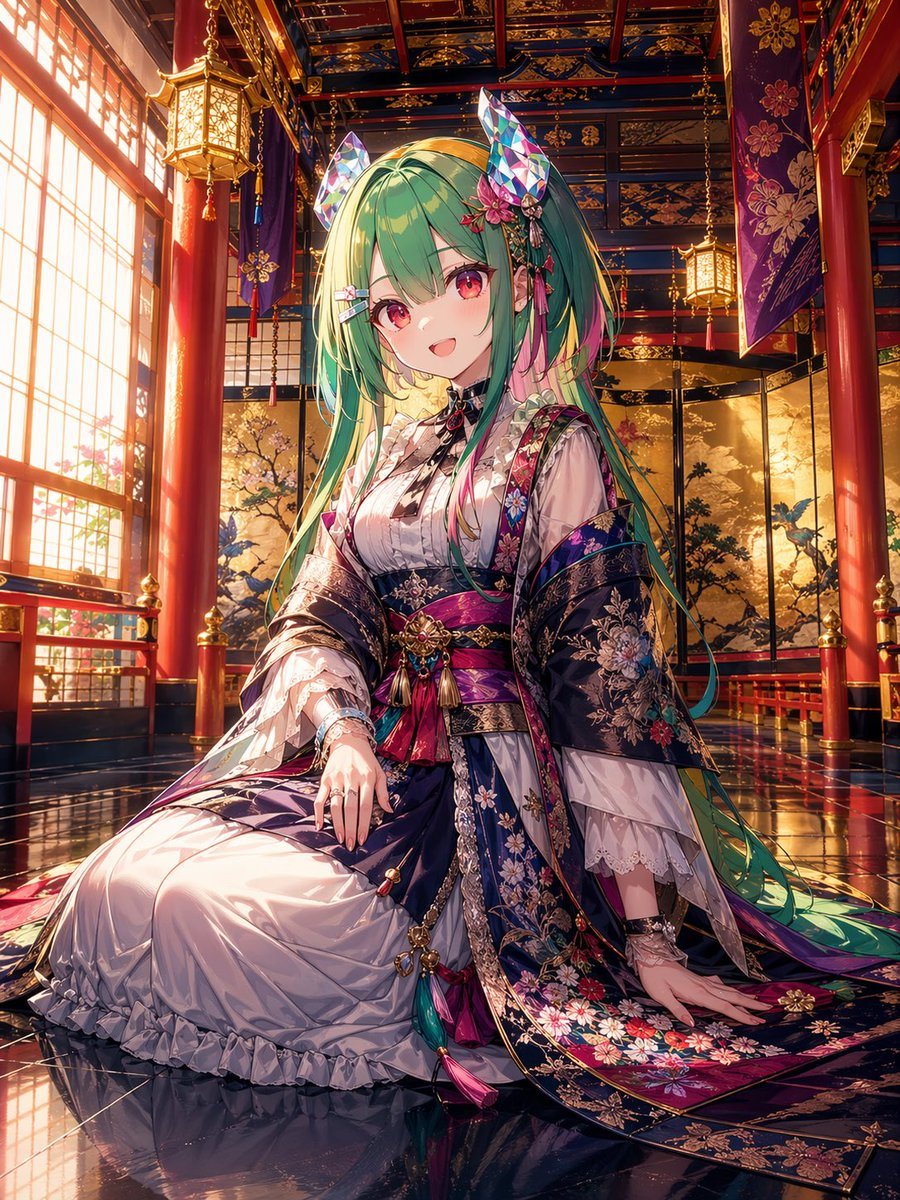
Highly Detailed Anime-style Portrait Of A Seated Shrine Maiden Princess

A highly detailed anime-style portrait of a seated shrine maiden princess in an opulent traditional Japanese palace interior, centered in a vertical composition. She is a young woman with...

A highly detailed anime-style portrait of a seated shrine maiden princess in an opulent traditional Japanese palace interior, centered in a vertical composition. She is a young woman with...
Prompt

A highly detailed anime-style portrait of a seated shrine maiden princess in an opulent traditional Japanese palace interior, centered in a vertical composition. She is a young woman with very long flowing {argument name="hair color" default="mint green"} hair fading into yellow-green at the tips, soft pink accent strands, straight bangs, and ornate hair ornaments including 2 tall faceted crystal fox ears, 1 pink flower cluster, and 2 small ribbon clips. Her face is intentionally obscured with a soft square blur. She wears an elaborate layered kimono and dress ensemble in deep indigo, violet, magenta, white, and gold, with rich brocade, floral embroidery, lace sleeves, tassels, cords, and jeweled obi ornaments. The outer robe is dark navy with intricate multicolor floral patterns and metallic trim; the inner dress is glossy white with ruffles and delicate translucent fabric. She is posed kneeling formally on a reflective lacquered floor, one hand resting on her lap and the other on the floor beside her, with long sleeves and trailing fabric spread elegantly around her. The setting is a grand ceremonial hall with 4 visible red lacquer columns, 3 hanging lanterns, tall shoji windows on the left casting warm golden sunset light, purple hanging banners with floral crests, a richly patterned coffered ceiling in blue, gold, and red, and folding screens in the background painted with trees and birds. Ultra-detailed, luminous cinematic lighting, polished reflections, intricate textiles, regal atmosphere, fantasy shrine aesthetic, high-end anime illustration, sharp focus on costume and environment, vibrant jewel tones, masterpiece quality.

Prompt structure
  • Modelgpt-image-2
  • Use casesocial-media-post
  • Styleluxury, anime, watercolor, cinematic
  • Aspect ratioFlexible
Best used for
  • Use casesocial-media-post
  • Styleluxury, anime, watercolor, cinematic
  • Recommended specs1:1, 4:5, 16:9, or 9:16
  • ModelGPT Image 2
How to customize

Use this Highly Detailed Anime-style Portrait Of A Seated Shrine Maiden Princess prompt as a base. Replace the subject, product details, environment, lighting, brand colors, and output ratio while keeping the social-media-post intent and luxury, anime, watercolor, cinematic direction stable.

Editable variables
  • SubjectReplace the product, person, scene, interface, or object being generated.
  • Use caseKeep or rewrite the destination as social media post, ad creative, cover image, poster, or ecommerce hero.
  • FrameChoose 1:1, 4:5, 16:9, or 9:16 based on the final placement.
  • Brand cuesAdd colors, materials, props, text-safe space, and the platform where the image will be used.
Recommended specs

Choose the frame for the destination first, then use 1K, 2K, or 4K based on output quality needs. Product images and posters usually benefit from higher resolution.

Pre-generation checklist
  • CheckSubject, lighting, composition, and frame are specific enough to review.
  • CheckText-safe space is included when the image will carry a headline or ad copy.
  • CheckResolution, credit cost, and final destination are checked before generation.
Why this prompt works

Highly Detailed Anime-style Portrait Of A Seated Shrine Maiden Princess works because it starts from the image job, then controls subject, composition, lighting, style, and frame. It is best for social media post while keeping the luxury, anime, watercolor, cinematic direction stable.

Common questions
  • Can I use it directly?Yes. Replace the subject, brand cues, and frame, then generate in Image2Studio.
  • Which ratio should I use?Choose 1:1, 4:5, 16:9, or 9:16 based on the destination.




