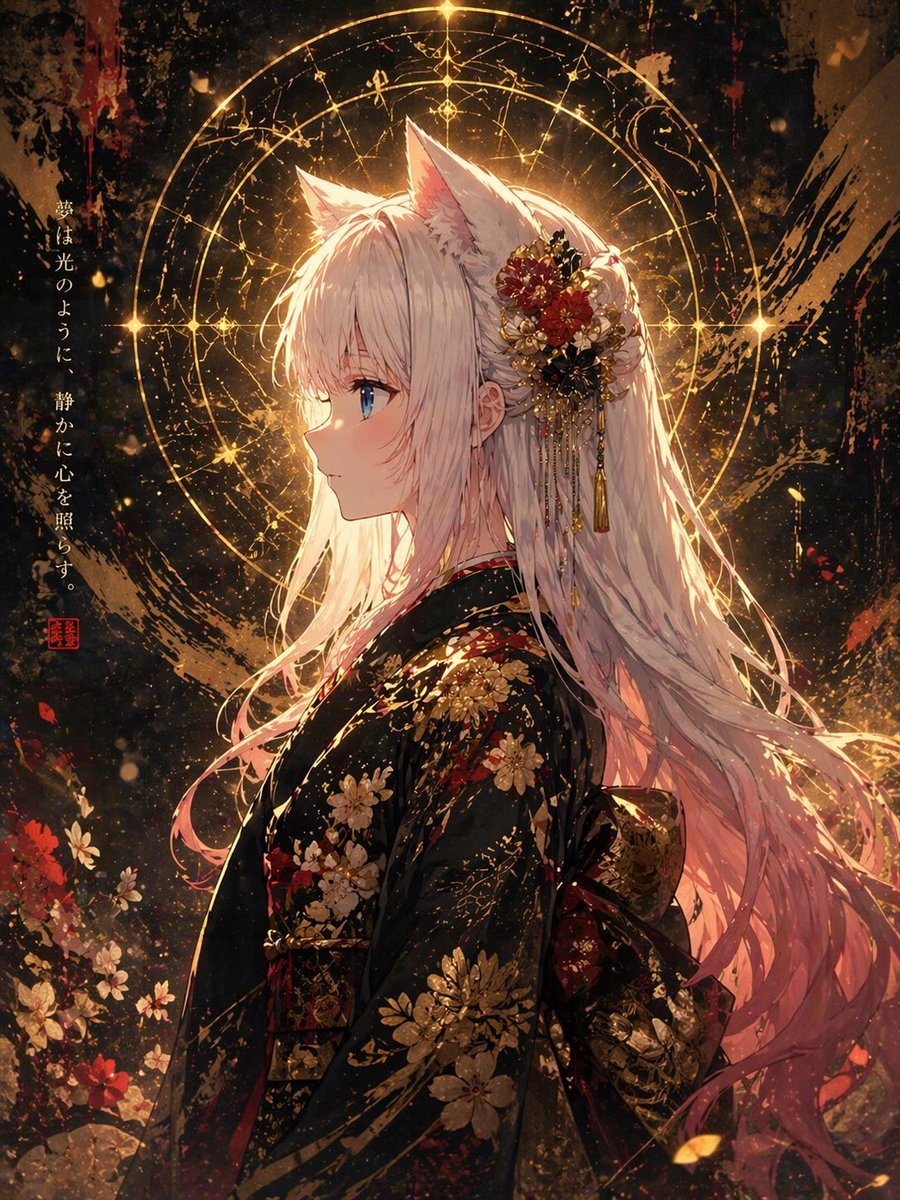
PromptA highly detailed anime fantasy portrait of a serene fox-eared young woman in left-facing side profile, shown from about thigh-up, centered slightly right of frame. She has long flowing {argument name="hair color" default="silver-white with a soft pink tint at the ends"} hair, large white fox ears, pale skin, and one visible vivid {argument name="eye color" default="blue"} eye. Her expression is calm, introspective, and luminous. She wears an elegant {argument name="kimono color" default="black"} kimono richly decorated with intricate gold and red floral patterns, with a traditional obi visible at the back. In her hair is an ornate kanzashi-style floral ornament made of red, gold, and black flowers with dangling gold chains and tassels. Behind her head is a large glowing circular celestial magic halo, formed by 3 concentric rings with fine arcane symbols, star-like points, and radiant golden lines, creating a sacred, mystical backlight. The background is a dark textured painterly space with dramatic black, bronze, and crimson brush textures, glowing embers, gold splashes, and scattered flowers near the lower left. Add 1 vertical line of Japanese calligraphy along the left side reading {argument name="vertical text" default="夢は光のように、静かに心を照らす。"}, plus 1 small red seal stamp beneath it. Use cinematic rim lighting, intense golden glow, ultra-detailed fabric, delicate hair strands, sparkling particles, elegant Japanese fantasy atmosphere, premium illustration quality, masterpiece anime key visual, refined composition, dramatic contrast, and a polished painterly finish.
Prompt structure- Modelgpt-image-2
- Use casesocial-media-post
- Styleluxury, cinematic, anime, watercolor
- Aspect ratioFlexible
Best used for- Use casesocial-media-post
- Styleluxury, cinematic, anime, watercolor
- Recommended specs1:1, 4:5, 16:9, or 9:16
- ModelGPT Image 2
How to customizeUse this Highly Detailed Anime Fantasy Portrait Of A Serene Fox-eared Young Woman prompt as a base. Replace the subject, product details, environment, lighting, brand colors, and output ratio while keeping the social-media-post intent and luxury, cinematic, anime, watercolor direction stable.
Editable variables- SubjectReplace the product, person, scene, interface, or object being generated.
- Use caseKeep or rewrite the destination as social media post, ad creative, cover image, poster, or ecommerce hero.
- FrameChoose 1:1, 4:5, 16:9, or 9:16 based on the final placement.
- Brand cuesAdd colors, materials, props, text-safe space, and the platform where the image will be used.
Recommended specsChoose the frame for the destination first, then use 1K, 2K, or 4K based on output quality needs. Product images and posters usually benefit from higher resolution.
Pre-generation checklist- CheckSubject, lighting, composition, and frame are specific enough to review.
- CheckText-safe space is included when the image will carry a headline or ad copy.
- CheckResolution, credit cost, and final destination are checked before generation.
Why this prompt worksHighly Detailed Anime Fantasy Portrait Of A Serene Fox-eared Young Woman works because it starts from the image job, then controls subject, composition, lighting, style, and frame. It is best for social media post while keeping the luxury, cinematic, anime, watercolor direction stable.
Common questions- Can I use it directly?Yes. Replace the subject, brand cues, and frame, then generate in Image2Studio.
- Which ratio should I use?Choose 1:1, 4:5, 16:9, or 9:16 based on the destination.