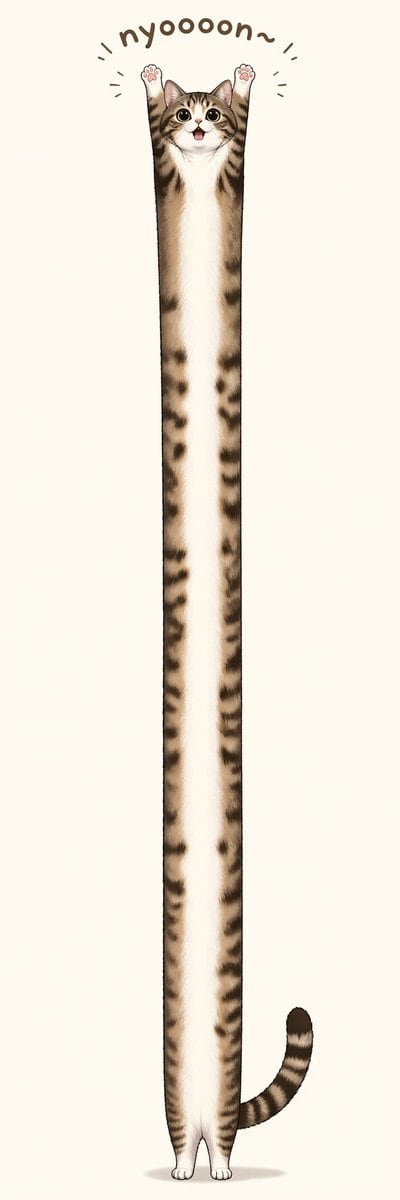
PromptA whimsical minimalist illustration of a {argument name="cat breed" default="brown tabby kitten"} standing upright in the exact center of a very tall vertical canvas, with an absurdly elongated, noodle-like body stretched from near the top to near the bottom of the image. The cat has a small round face with large glossy eyes, a tiny open smiling mouth, upright ears, and both front paws raised straight overhead in a cheering pose, showing 2 visible pink paw pads. Its fur is soft and detailed, with a white muzzle, chest, belly, and inner legs, and brown-and-black tabby stripes along the sides, head, arms, and tail. The body is extremely thin and vertically extended, creating a comical exaggerated proportion, while the hind paws remain tiny and close together at the bottom. Add 1 curved striped tail extending to the lower right side. Above the head, place the playful hand-drawn text "{argument name="caption text" default="nyoooon~"}" in a rounded dark brown font, arched like a semicircle, with 6 short motion lines around the raised paws and text to emphasize stretching. Use a clean off-white or warm light beige background with no scenery, only a faint soft oval shadow beneath the feet. Cute, polished digital illustration style, centered composition, high detail in fur, humorous Japanese sticker or social-media mascot vibe, lots of negative space, extra-tall aspect ratio.
Prompt structure- Modelgpt-image-2
- Use casesocial-media-post
- Styleminimal, watercolor
- Aspect ratioFlexible
Best used for- Use casesocial-media-post
- Styleminimal, watercolor
- Recommended specs1:1, 4:5, 16:9, or 9:16
- ModelGPT Image 2
How to customizeUse this Whimsical Minimalist Illustration Of A Brown Tabby Kitten Standing Uprig prompt as a base. Replace the subject, product details, environment, lighting, brand colors, and output ratio while keeping the social-media-post intent and minimal, watercolor direction stable.
Editable variables- SubjectReplace the product, person, scene, interface, or object being generated.
- Use caseKeep or rewrite the destination as social media post, ad creative, cover image, poster, or ecommerce hero.
- FrameChoose 1:1, 4:5, 16:9, or 9:16 based on the final placement.
- Brand cuesAdd colors, materials, props, text-safe space, and the platform where the image will be used.
Recommended specsChoose the frame for the destination first, then use 1K, 2K, or 4K based on output quality needs. Product images and posters usually benefit from higher resolution.
Pre-generation checklist- CheckSubject, lighting, composition, and frame are specific enough to review.
- CheckText-safe space is included when the image will carry a headline or ad copy.
- CheckResolution, credit cost, and final destination are checked before generation.
Why this prompt worksWhimsical Minimalist Illustration Of A Brown Tabby Kitten Standing Uprig works because it starts from the image job, then controls subject, composition, lighting, style, and frame. It is best for social media post while keeping the minimal, watercolor direction stable.
Common questions- Can I use it directly?Yes. Replace the subject, brand cues, and frame, then generate in Image2Studio.
- Which ratio should I use?Choose 1:1, 4:5, 16:9, or 9:16 based on the destination.