
Image2Studio
Examples

gpt-image-2

Photorealistic Close-up Tabletop Scene

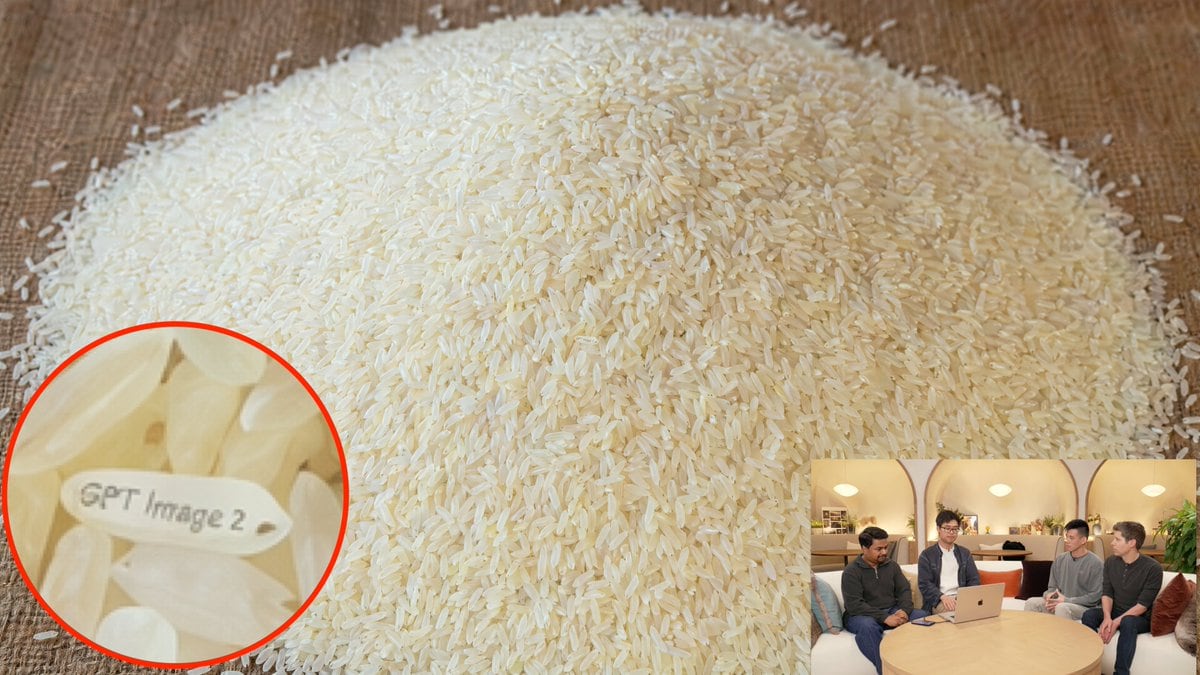
A photorealistic close-up tabletop scene showing a large mound of uncooked long-grain white rice poured onto a warm brown wooden surface, filling almost the entire frame. The camera is sl...

A photorealistic close-up tabletop scene showing a large mound of uncooked long-grain white rice poured onto a warm brown wooden surface, filling almost the entire frame. The camera is sl...
Prompt

A photorealistic close-up tabletop scene showing a large mound of uncooked long-grain white rice poured onto a warm brown wooden surface, filling almost the entire frame. The camera is slightly elevated and angled toward the pile so the rice forms a broad dome centered in the image, with thousands of individual grains sharply visible and softly lit by warm indoor lighting. Hide a tiny easter egg in the rice: exactly 1 unusual rice grain near the lower-left area is rotated horizontally and has the text "{argument name="engraved text" default="GPT Image 2"}" neatly engraved on its surface in small legible letters. Add a circular magnified callout in the bottom-left corner with a bright red outline, zooming in on that single engraved grain among surrounding rice grains so the text becomes readable. Also add exactly 1 small picture-in-picture inset in the bottom-right corner showing a casual indoor livestream or interview setting with 4 seated people around a round wooden table and an open laptop, warm ambient lighting, and faces slightly indistinct; the inset should feel like a secondary contextual thumbnail, much smaller than the main rice image. Prioritize realistic texture, convincing macro detail, natural shadows, subtle ivory color variation in the rice, and clear but believable engraved text on the highlighted grain.

Prompt structure
  • Modelgpt-image-2
  • Use caseyoutube-thumbnail
  • Stylephotorealistic
  • Aspect ratioFlexible
Best used for
  • Use caseyoutube-thumbnail
  • Stylephotorealistic
  • Recommended specs1:1, 4:5, 16:9, or 9:16
  • ModelGPT Image 2
How to customize

Use this Photorealistic Close-up Tabletop Scene prompt as a base. Replace the subject, product details, environment, lighting, brand colors, and output ratio while keeping the youtube-thumbnail intent and photorealistic direction stable.

Editable variables
  • SubjectReplace the product, person, scene, interface, or object being generated.
  • Use caseKeep or rewrite the destination as youtube thumbnail, ad creative, cover image, poster, or ecommerce hero.
  • FrameChoose 1:1, 4:5, 16:9, or 9:16 based on the final placement.
  • Brand cuesAdd colors, materials, props, text-safe space, and the platform where the image will be used.
Recommended specs

Choose the frame for the destination first, then use 1K, 2K, or 4K based on output quality needs. Product images and posters usually benefit from higher resolution.

Pre-generation checklist
  • CheckSubject, lighting, composition, and frame are specific enough to review.
  • CheckText-safe space is included when the image will carry a headline or ad copy.
  • CheckResolution, credit cost, and final destination are checked before generation.
Why this prompt works

Photorealistic Close-up Tabletop Scene works because it starts from the image job, then controls subject, composition, lighting, style, and frame. It is best for youtube thumbnail while keeping the photorealistic direction stable.

Common questions
  • Can I use it directly?Yes. Replace the subject, brand cues, and frame, then generate in Image2Studio.
  • Which ratio should I use?Choose 1:1, 4:5, 16:9, or 9:16 based on the destination.




