Image2Studio
Examples

gpt-image-2

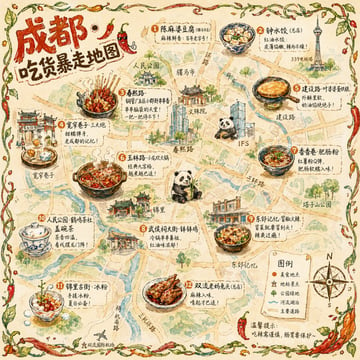
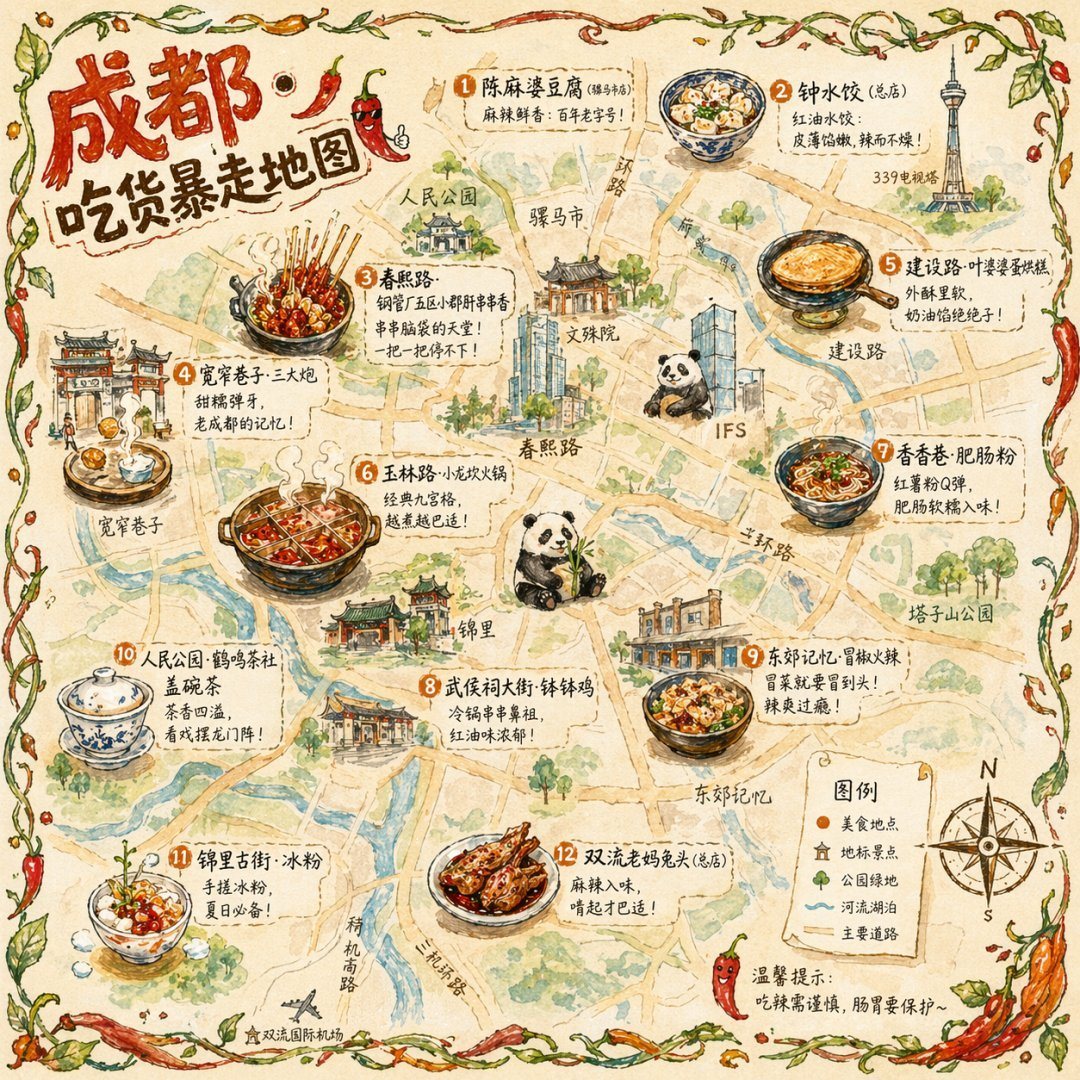
Illustrated City Food Map

Social Media Post prompt for infographics, ready to edit and generate in Image2Studio.

Social Media Post prompt for infographics, ready to edit and generate in Image2Studio.
Prompt

{ "type": "illustrated map infographic", "style": "{argument name=\"art style\" default=\"watercolor and ink hand-drawn illustration on vintage parchment\"}", "title_section": { "text": "{argument name=\"city name\" default=\"成都\"} {argument name=\"map title\" default=\"吃货暴走地图\"}", "mascot": "cartoon red chili pepper wearing sunglasses and giving a thumbs up" }, "border": "{argument name=\"border decoration\" default=\"vine of green leaves and red chili peppers\"}", "layout": { "background": "textured beige parchment paper with yellow roads, blue rivers, and green park areas", "sections": [ { "title": "landmarks", "count": 6, "illustrations": ["traditional pavilion", "traditional monastery", "modern skyscraper with climbing panda", "tall TV tower", "traditional gate", "industrial buildings"], "labels": ["人民公园", "文殊院", "IFS", "339电视塔", "宽窄巷子", "东郊记忆"] }, { "title": "food_spots", "count": 12, "illustrations": ["mapo tofu", "dumplings in chili oil", "skewers in pot", "sticky rice balls", "egg baking cake", "nine-grid hotpot", "sweet potato noodles", "cold skewers", "spicy mixed dish", "covered tea bowl", "ice jelly dessert", "spicy rabbit heads"], "labels": ["1 陈麻婆豆腐", "2 钟水饺", "3 春熙路", "4 宽窄巷子·三大炮", "5 建设路·叶婆婆蛋烘糕", "6 玉林路·小龙坎火锅", "7 香香巷·肥肠粉", "8 武侯祠大街·钵钵鸡", "9 东郊记忆·冒椒火辣", "10 人民公园·鹤鸣茶社", "11 锦里古街·冰粉", "12 双流老妈兔头"] }, { "title": "图例", "position": "bottom-right", "count": 5, "items": ["red dot", "green house", "green tree", "blue line", "yellow double line"], "labels": ["美食地点", "地标景点", "公园绿地", "河流湖泊", "主要道路"] } ], "centerpiece": "giant panda sitting and eating bamboo", "bottom_right_extras": ["vintage compass rose with N, S, E, W", "disclaimer text '温馨提示:吃辣需谨慎,肠胃要保护~' with a red chili pepper icon"] } }

Prompt structure
  • Modelgpt-image-2
  • Use casesocial-media-post
  • Stylewatercolor, editorial
  • Aspect ratioFlexible
Best used for
  • Use casesocial-media-post
  • Stylewatercolor, editorial
  • Recommended specs1:1, 4:5, 16:9, or 9:16
  • ModelGPT Image 2
How to customize

Use this Illustrated City Food Map prompt as a base. Replace the subject, product details, environment, lighting, brand colors, and output ratio while keeping the social-media-post intent and watercolor, editorial direction stable.

Editable variables
  • SubjectReplace the product, person, scene, interface, or object being generated.
  • Use caseKeep or rewrite the destination as social media post, ad creative, cover image, poster, or ecommerce hero.
  • FrameChoose 1:1, 4:5, 16:9, or 9:16 based on the final placement.
  • Brand cuesAdd colors, materials, props, text-safe space, and the platform where the image will be used.
Recommended specs

Choose the frame for the destination first, then use 1K, 2K, or 4K based on output quality needs. Product images and posters usually benefit from higher resolution.

Pre-generation checklist
  • CheckSubject, lighting, composition, and frame are specific enough to review.
  • CheckText-safe space is included when the image will carry a headline or ad copy.
  • CheckResolution, credit cost, and final destination are checked before generation.
Why this prompt works

Illustrated City Food Map works because it starts from the image job, then controls subject, composition, lighting, style, and frame. It is best for social media post while keeping the watercolor, editorial direction stable.

Common questions
  • Can I use it directly?Yes. Replace the subject, brand cues, and frame, then generate in Image2Studio.
  • Which ratio should I use?Choose 1:1, 4:5, 16:9, or 9:16 based on the destination.