
Image2Studio
Prompts

gpt-image-2

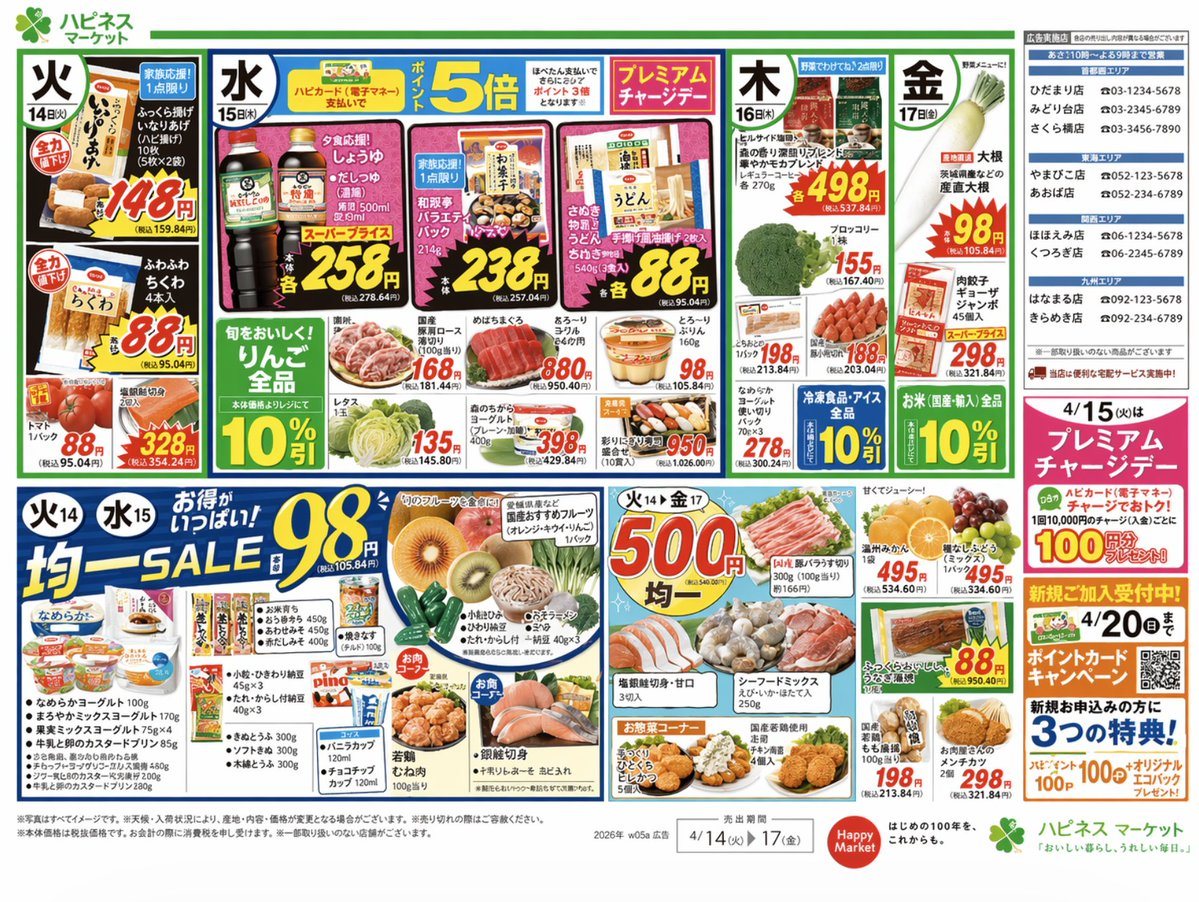
Japanese Supermarket Promotional Flyer

A highly detailed, dense Japanese grocery store circular featuring daily specials, uniform price sales, and realistic food photography.

A highly detailed, dense Japanese grocery store circular featuring daily specials, uniform price sales, and realistic food photography.
Prompt

{ "type": "Japanese supermarket promotional flyer", "header": { "store_name": "{argument name=\"store name\" default=\"ハピネス マーケット\"}", "store_directory": "List of 12 store locations and phone numbers grouped by region" }, "style": "Highly dense, colorful, bold red and yellow price tags, realistic food photography, traditional Japanese retail aesthetic", "layout": { "sections": [ { "title": "Tuesday Specials", "position": "top-left", "count": 3, "labels": ["Inari sushi pack", "Chikuwa", "Tomatoes"] }, { "title": "Wednesday Specials", "position": "top-middle", "promotion": "{argument name=\"point multiplier\" default=\"5倍\"}", "count": 6, "labels": ["Soy sauce bottles", "Japanese sweets variety pack", "Udon noodles", "Sliced pork", "Tuna sashimi block", "Pudding"] }, { "title": "Thursday & Friday Specials", "position": "top-right", "count": 5, "labels": ["Coffee bags", "Broccoli", "Daikon radish", "Pork slices", "Jumbo Gyoza"] }, { "title": "Middle Row Discounts", "position": "center-horizontal", "count": 7, "labels": ["Apples 10% off", "Lettuce", "Yogurt", "Sushi platter", "Yogurt multi-pack", "Frozen foods 10% off", "Rice 10% off"] }, { "title": "Uniform Sale Low Price", "position": "bottom-left", "price": "{argument name=\"low uniform price\" default=\"98\"}", "count": 6, "labels": ["Assorted fruits", "Yogurt and dairy", "Natto and Tofu", "Ice cream", "Fried chicken", "Salmon fillets"] }, { "title": "Uniform Sale High Price", "position": "bottom-middle", "price": "{argument name=\"high uniform price\" default=\"500\"}", "count": 4, "labels": ["Pork belly slices", "Mikan and grapes", "Seafood mix", "Grilled eel"] }, { "title": "Right Sidebar Promotions", "position": "bottom-right", "count": 3, "labels": ["Premium Charge Day", "Point Card Campaign", "Fried deli foods"] } ] }, "footer": { "sale_period": "{argument name=\"sale period\" default=\"4/14(火) ▶ 17(金)\"}", "disclaimers": "Standard fine print text and secondary logo" } }

Prompt structure
  • Modelgpt-image-2
  • Use casefood-menu-visual
  • Stylephotorealistic, editorial, luxury
  • Aspect ratioFlexible
Best used for
  • Use casefood-menu-visual
  • Stylephotorealistic, editorial, luxury
  • Recommended specs1:1, 4:5, 16:9, or 9:16
  • ModelGPT Image 2
How to customize

Use this Japanese Supermarket Promotional Flyer prompt as a base. Replace the subject, product details, environment, lighting, brand colors, and output ratio while keeping the food-menu-visual intent and photorealistic, editorial, luxury direction stable.

Editable variables
  • SubjectReplace the product, person, scene, interface, or object being generated.
  • Use caseKeep or rewrite the destination as food menu visual, ad creative, cover image, poster, or ecommerce hero.
  • FrameChoose 1:1, 4:5, 16:9, or 9:16 based on the final placement.
  • Brand cuesAdd colors, materials, props, text-safe space, and the platform where the image will be used.
Recommended specs

Choose the frame for the destination first, then use 1K, 2K, or 4K based on output quality needs. Product images and posters usually benefit from higher resolution.

Pre-generation checklist
  • CheckSubject, lighting, composition, and frame are specific enough to review.
  • CheckText-safe space is included when the image will carry a headline or ad copy.
  • CheckResolution, credit cost, and final destination are checked before generation.
Why this prompt works

Japanese Supermarket Promotional Flyer works because it starts from the image job, then controls subject, composition, lighting, style, and frame. It is best for food menu visual while keeping the photorealistic, editorial, luxury direction stable.

Common questions
  • Can I use it directly?Yes. Replace the subject, brand cues, and frame, then generate in Image2Studio.
  • Which ratio should I use?Choose 1:1, 4:5, 16:9, or 9:16 based on the destination.




