
Image2Studio
Prompts

gpt-image-2

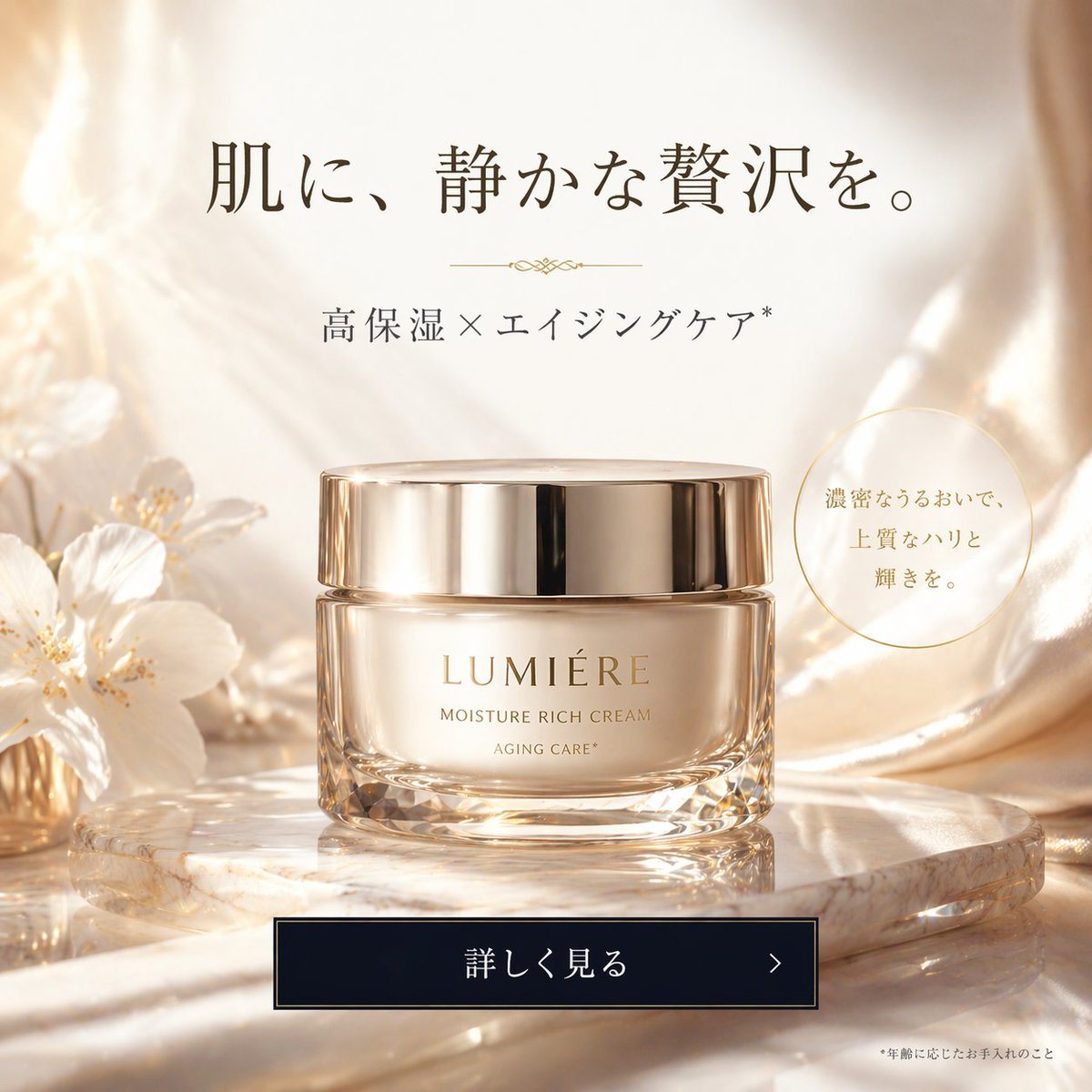
Luxury Cosmetic Web Advertisement

Generates a high-end cosmetic product advertisement with elegant typography, a glowing background, and a call-to-action button.

Generates a high-end cosmetic product advertisement with elegant typography, a glowing background, and a call-to-action button.
Prompt

A luxurious cosmetic product advertisement featuring a single elegant glass jar with a shiny gold lid resting on a round, light-colored marble slab. The jar has gold text reading {argument name="brand name" default="LUMIÉRE"} and {argument name="product type" default="MOISTURE RICH CREAM"} with "AGING CARE*" below it. The background consists of soft, draped, shimmering champagne-colored silk fabric with delicate white flowers on the left. The lighting is warm, ethereal, and sun-drenched with soft bokeh. At the top center, elegant dark brown Japanese typography reads {argument name="main headline" default="肌に、静かな贅沢を。"} above a small decorative gold divider and the text {argument name="subheadline" default="高保湿×エイジングケア*"}. To the right of the jar, a thin gold circle contains Japanese text meaning 'With dense moisture, high-quality firmness and radiance'. At the bottom center is a dark rectangular call-to-action button with a thin gold border containing the text {argument name="button text" default="詳しく見る"} and a right-pointing chevron. In the bottom right corner, tiny fine print contains Japanese text meaning '*Care according to age'.

Prompt structure
  • Modelgpt-image-2
  • Use caseecommerce-product-image
  • Styleluxury, photorealistic, editorial
  • Aspect ratioFlexible
Best used for
  • Use caseecommerce-product-image
  • Styleluxury, photorealistic, editorial
  • Recommended specs1:1, 4:5, 16:9, or 9:16
  • ModelGPT Image 2
How to customize

Use this Luxury Cosmetic Web Advertisement prompt as a base. Replace the subject, product details, environment, lighting, brand colors, and output ratio while keeping the ecommerce-product-image intent and luxury, photorealistic, editorial direction stable.

Editable variables
  • SubjectReplace the product, person, scene, interface, or object being generated.
  • Use caseKeep or rewrite the destination as ecommerce product image, ad creative, cover image, poster, or ecommerce hero.
  • FrameChoose 1:1, 4:5, 16:9, or 9:16 based on the final placement.
  • Brand cuesAdd colors, materials, props, text-safe space, and the platform where the image will be used.
Recommended specs

Choose the frame for the destination first, then use 1K, 2K, or 4K based on output quality needs. Product images and posters usually benefit from higher resolution.

Pre-generation checklist
  • CheckSubject, lighting, composition, and frame are specific enough to review.
  • CheckText-safe space is included when the image will carry a headline or ad copy.
  • CheckResolution, credit cost, and final destination are checked before generation.
Why this prompt works

Luxury Cosmetic Web Advertisement works because it starts from the image job, then controls subject, composition, lighting, style, and frame. It is best for ecommerce product image while keeping the luxury, photorealistic, editorial direction stable.

Common questions
  • Can I use it directly?Yes. Replace the subject, brand cues, and frame, then generate in Image2Studio.
  • Which ratio should I use?Choose 1:1, 4:5, 16:9, or 9:16 based on the destination.




