
Image2Studio
Examples

gpt-image-2

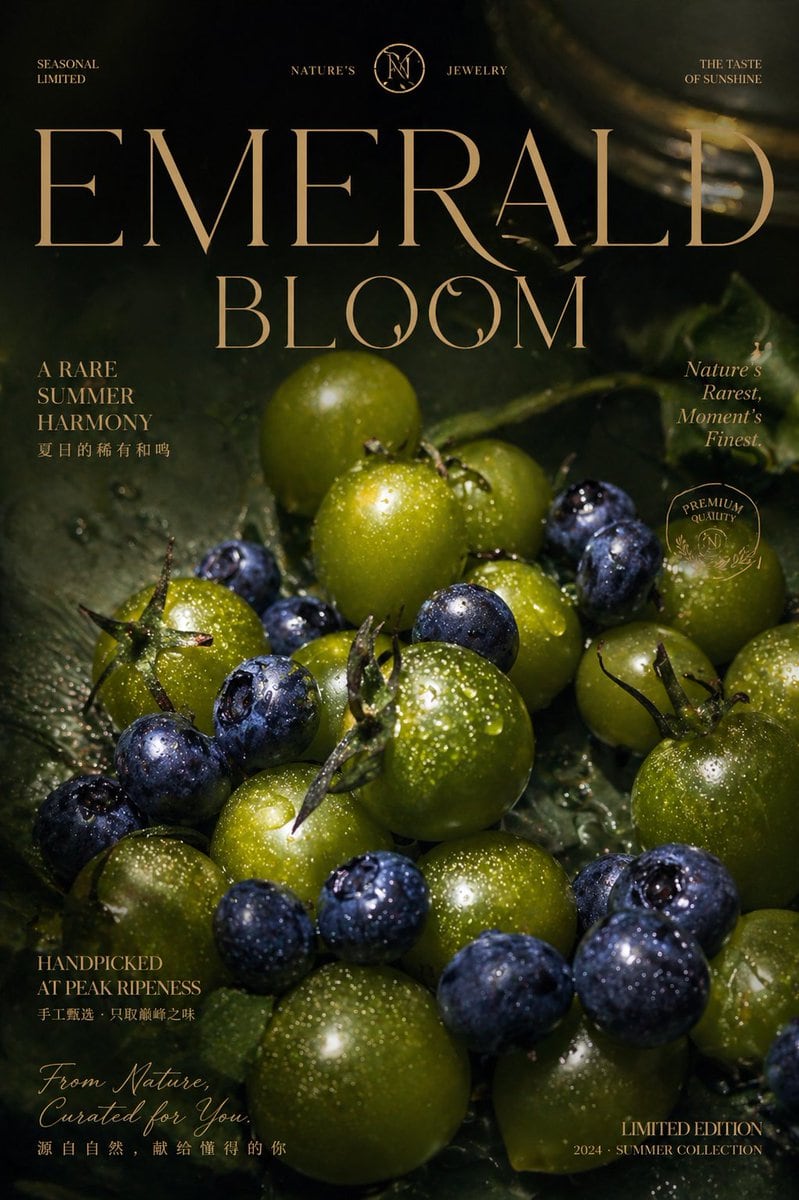
Luxury Emerald Fruit Poster

This prompt generates a dark, premium editorial advertisement poster featuring dewy green tomatoes and blueberries with elegant typography, ideal for luxury food branding or high-end seasonal campaign visuals.

This prompt generates a dark, premium editorial advertisement poster featuring dewy green tomatoes and blueberries with elegant typography, ideal for luxury food branding or high-end seasonal campaign visuals.
Prompt

A luxurious editorial-style fruit advertisement poster on a dark moody background, featuring a close-up arrangement of fresh green cherry tomatoes and deep indigo blueberries covered in sparkling water droplets, resting on glossy wet green leaves. Use dramatic low-key lighting with rich shadows, golden highlights, and a premium cinematic macro-photography look. The composition should feel lush, expensive, and sensorial, with the fruit clustered densely across the lower two-thirds of the image and softly fading into darkness around the edges. Add elegant high-fashion serif typography in warm champagne-gold across the poster, with the giant central headline {argument name="headline text" default="EMERALD BLOOM"} dominating the upper half. Include 9 additional text blocks: top left "SEASONAL LIMITED", top center split branding text "NATURE'S" and "JEWELRY" with a circular monogram emblem between them, top right "THE TASTE OF SUNSHINE", left upper-mid text "A RARE SUMMER HARMONY" with a smaller Chinese subtitle beneath, right upper-mid italic text "Nature's Rarest, Moment's Finest.", left lower-mid text "HANDPICKED AT PEAK RIPENESS" with a smaller Chinese subtitle beneath, bottom left handwritten script "From Nature, Curated for You." with a smaller Chinese subtitle beneath, bottom right "LIMITED EDITION", and beneath it "2024 · SUMMER COLLECTION". Add 1 vertical rounded capsule element on the right side containing a soft olive-green gradient, like a minimalist product swatch or bottle silhouette. Keep the overall design polished, upscale, fashion-magazine-inspired, and reminiscent of a premium seasonal jewelry or fragrance campaign, but centered on fruit as the hero subject.

Prompt structure
  • Modelgpt-image-2
  • Use casebrand-identity
  • Styleluxury, editorial, cinematic, photorealistic
  • Aspect ratioFlexible
Best used for
  • Use casebrand-identity
  • Styleluxury, editorial, cinematic, photorealistic
  • Recommended specs1:1, 4:5, 16:9, or 9:16
  • ModelGPT Image 2
How to customize

Use this Luxury Emerald Fruit Poster prompt as a base. Replace the subject, product details, environment, lighting, brand colors, and output ratio while keeping the brand-identity intent and luxury, editorial, cinematic, photorealistic direction stable.

Editable variables
  • SubjectReplace the product, person, scene, interface, or object being generated.
  • Use caseKeep or rewrite the destination as brand identity, ad creative, cover image, poster, or ecommerce hero.
  • FrameChoose 1:1, 4:5, 16:9, or 9:16 based on the final placement.
  • Brand cuesAdd colors, materials, props, text-safe space, and the platform where the image will be used.
Recommended specs

Choose the frame for the destination first, then use 1K, 2K, or 4K based on output quality needs. Product images and posters usually benefit from higher resolution.

Pre-generation checklist
  • CheckSubject, lighting, composition, and frame are specific enough to review.
  • CheckText-safe space is included when the image will carry a headline or ad copy.
  • CheckResolution, credit cost, and final destination are checked before generation.
Why this prompt works

Luxury Emerald Fruit Poster works because it starts from the image job, then controls subject, composition, lighting, style, and frame. It is best for brand identity while keeping the luxury, editorial, cinematic, photorealistic direction stable.

Common questions
  • Can I use it directly?Yes. Replace the subject, brand cues, and frame, then generate in Image2Studio.
  • Which ratio should I use?Choose 1:1, 4:5, 16:9, or 9:16 based on the destination.




