Image2Studio
Examples

gpt-image-2

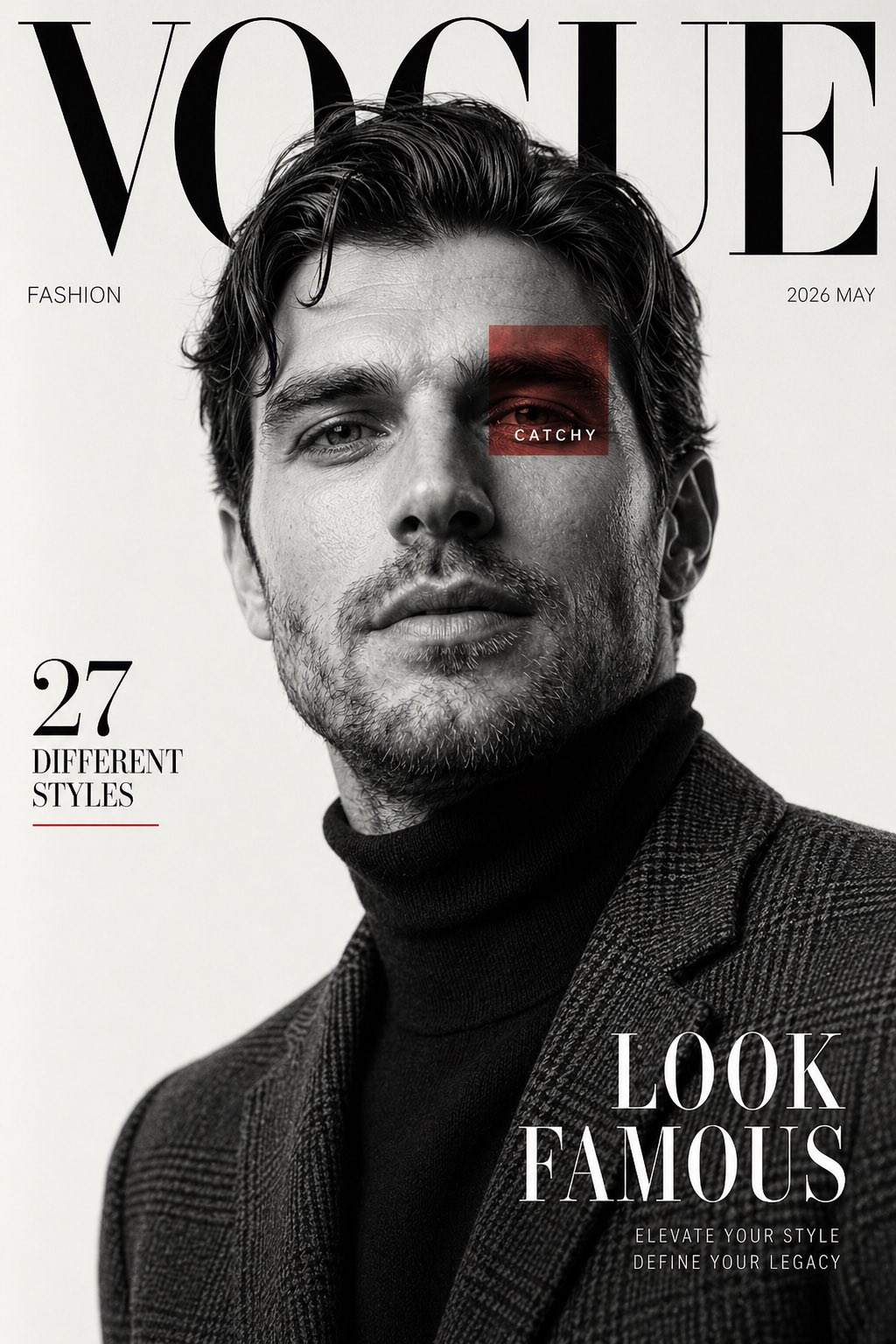
Luxury Fashion Magazine Cover Black and White

Social Media Post prompt for fashion editorial, ready to edit and generate in Image2Studio.

Social Media Post prompt for fashion editorial, ready to edit and generate in Image2Studio.
Prompt

Create a high fashion editorial magazine cover inspired by luxury fashion publications. Use the reference image of the male subject. Black and white portrait photography with a clean off white studio background. Subject is posed confidently from a low angle, looking slightly upward, sharp jawline, soft parted lips, tousled wavy hair with natural volume. Outfit includes a dark turtleneck layered under a textured tailored plaid blazer. Lighting is soft yet dramatic, creating sculpted facial shadows and elegant contrast. Magazine layout design with oversized serif masthead text at the top reading “VOGUE”, partially hidden behind the subject’s head. Minimal premium typography across the page. Add side text “FASHION”, issue date “2026 MAY”, left side headline “27 DIFFERENT STYLES”, and bold bottom right cover line “LOOK FAMOUS”. Include a small red translucent square overlay on one eye area with the word “CATCHY”. Style should feel premium, modern, cinematic, clean composition, sharp focus, ultra realistic skin texture, editorial luxury aesthetic, balanced negative space, timeless fashion cover design. Vertical magazine ratio, high resolution.

Prompt structure
  • Modelgpt-image-2
  • Use casesocial-media-post
  • Styleeditorial, minimal, luxury, cinematic
  • Aspect ratioFlexible
Best used for
  • Use casesocial-media-post
  • Styleeditorial, minimal, luxury, cinematic
  • Recommended specs1:1, 4:5, 16:9, or 9:16
  • ModelGPT Image 2
How to customize

Use this Luxury Fashion Magazine Cover Black and White prompt as a base. Replace the subject, product details, environment, lighting, brand colors, and output ratio while keeping the social-media-post intent and editorial, minimal, luxury, cinematic direction stable.

Editable variables
  • SubjectReplace the product, person, scene, interface, or object being generated.
  • Use caseKeep or rewrite the destination as social media post, ad creative, cover image, poster, or ecommerce hero.
  • FrameChoose 1:1, 4:5, 16:9, or 9:16 based on the final placement.
  • Brand cuesAdd colors, materials, props, text-safe space, and the platform where the image will be used.
Recommended specs

Choose the frame for the destination first, then use 1K, 2K, or 4K based on output quality needs. Product images and posters usually benefit from higher resolution.

Pre-generation checklist
  • CheckSubject, lighting, composition, and frame are specific enough to review.
  • CheckText-safe space is included when the image will carry a headline or ad copy.
  • CheckResolution, credit cost, and final destination are checked before generation.
Why this prompt works

Luxury Fashion Magazine Cover Black and White works because it starts from the image job, then controls subject, composition, lighting, style, and frame. It is best for social media post while keeping the editorial, minimal, luxury, cinematic direction stable.

Common questions
  • Can I use it directly?Yes. Replace the subject, brand cues, and frame, then generate in Image2Studio.
  • Which ratio should I use?Choose 1:1, 4:5, 16:9, or 9:16 based on the destination.