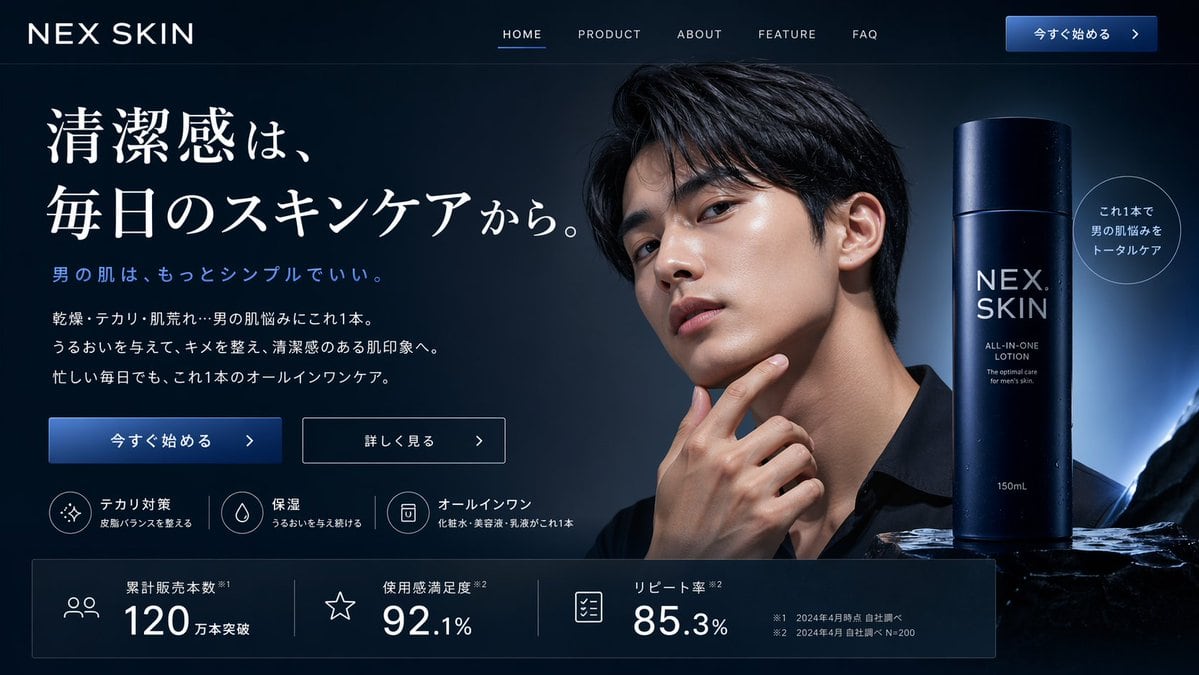
Prompt{
"type": "website landing page mockup",
"theme": "men's skincare, sleek, professional, dark mode",
"color_palette": "{argument name=\"color scheme\" default=\"dark navy blue\"}, white text, subtle blue gradients",
"header": {
"logo": "{argument name=\"brand name\" default=\"NEX SKIN\"}",
"navigation": ["HOME", "PRODUCT", "ABOUT", "FEATURE", "FAQ"],
"cta_button": "今すぐ始める >"
},
"hero_section": {
"left_column": {
"headline": "{argument name=\"main headline\" default=\"清潔感は、毎日のスキンケアから。\"}",
"sub_headline": "男の肌は、もっとシンプルでいい。",
"body_text": "3 lines of descriptive text about skincare benefits",
"buttons": [
{"style": "solid blue", "text": "今すぐ始める >"},
{"style": "outlined", "text": "詳しく見る >"}
],
"feature_highlights": {
"count": 3,
"items": [
{"icon": "sparkle", "title": "テカリ対策", "subtitle": "皮脂バランスを整える"},
{"icon": "water drop", "title": "保湿", "subtitle": "うるおいを与え続ける"},
{"icon": "shield/bottle", "title": "オールインワン", "subtitle": "化粧水・美容液・乳液がこれ1本"}
]
}
},
"center_image": {
"subject": "handsome {argument name=\"target demographic\" default=\"young Asian man\"}",
"appearance": "clean-cut, dark hair, flawless glowing skin, wearing a black shirt",
"pose": "hand touching chin thoughtfully",
"lighting": "dramatic studio lighting highlighting facial structure"
},
"right_column": {
"product_shot": {
"bottle": "tall cylindrical dark blue bottle with water droplets",
"labels": ["{argument name=\"brand name\" default=\"NEX SKIN\"}", "{argument name=\"product type\" default=\"ALL-IN-ONE LOTION\"}", "150mL"],
"base": "textured dark rock surface",
"badge": "circular outlined badge reading 'これ1本で男の肌悩みをトータルケア'"
}
}
},
"bottom_stats_bar": {
"count": 3,
"items": [
{"icon": "users", "label": "累計販売本数", "value": "120万本突破"},
{"icon": "star", "label": "使用感満足度", "value": "92.1%"},
{"icon": "checklist", "label": "リピート率", "value": "85.3%"}
],
"footnotes": "small legal text on the right"
}
}
Prompt structure- Modelgpt-image-2
- Use caseproduct-hero-shot
- Stylecinematic, photorealistic, minimal
- Aspect ratioFlexible
Best used for- Use caseproduct-hero-shot
- Stylecinematic, photorealistic, minimal
- Recommended specs1:1, 4:5, 16:9, or 9:16
- ModelGPT Image 2
How to customizeUse this Men's Skincare Website Landing Page Mockup prompt as a base. Replace the subject, product details, environment, lighting, brand colors, and output ratio while keeping the product-hero-shot intent and cinematic, photorealistic, minimal direction stable.
Editable variables- SubjectReplace the product, person, scene, interface, or object being generated.
- Use caseKeep or rewrite the destination as product hero shot, ad creative, cover image, poster, or ecommerce hero.
- FrameChoose 1:1, 4:5, 16:9, or 9:16 based on the final placement.
- Brand cuesAdd colors, materials, props, text-safe space, and the platform where the image will be used.
Recommended specsChoose the frame for the destination first, then use 1K, 2K, or 4K based on output quality needs. Product images and posters usually benefit from higher resolution.
Pre-generation checklist- CheckSubject, lighting, composition, and frame are specific enough to review.
- CheckText-safe space is included when the image will carry a headline or ad copy.
- CheckResolution, credit cost, and final destination are checked before generation.
Why this prompt worksMen's Skincare Website Landing Page Mockup works because it starts from the image job, then controls subject, composition, lighting, style, and frame. It is best for product hero shot while keeping the cinematic, photorealistic, minimal direction stable.
Common questions- Can I use it directly?Yes. Replace the subject, brand cues, and frame, then generate in Image2Studio.
- Which ratio should I use?Choose 1:1, 4:5, 16:9, or 9:16 based on the destination.