
Image2Studio
Examples

gpt-image-2

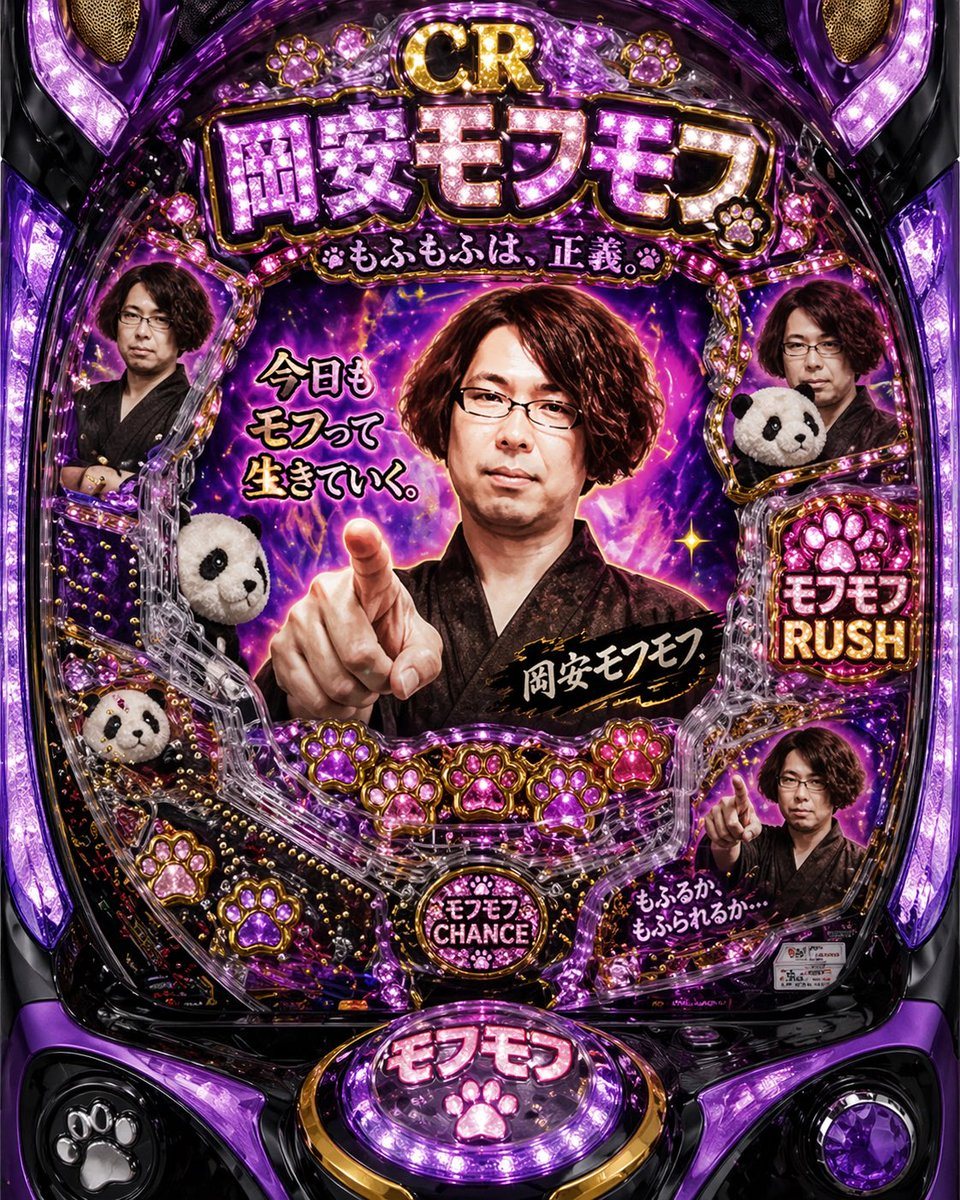
Hyper-detailed Japanese Pachinko Machine Front View Designed As A Surrea

A hyper-detailed Japanese pachinko machine front view designed as a surreal contemporary-art parody, glossy black and metallic purple body with intense magenta-violet LED illumination, sp...

A hyper-detailed Japanese pachinko machine front view designed as a surreal contemporary-art parody, glossy black and metallic purple body with intense magenta-violet LED illumination, sp...
Prompt

A hyper-detailed Japanese pachinko machine front view designed as a surreal contemporary-art parody, glossy black and metallic purple body with intense magenta-violet LED illumination, sparkling chrome trim, jewel-like plastic molding, and multiple pink paw-print emblems embedded throughout the frame. The central display features a dramatic middle-aged Japanese woman with short curly auburn-brown hair, wearing a dark kimono, pointing directly toward the viewer in a confrontational heroic pose against a cosmic purple lightning-and-nebula background. Her face is intentionally obscured by a soft rectangular blur, and 3 additional smaller portraits of the same woman also appear around the machine with the same blurred-face treatment, for a total of 4 blurred human portraits. Include 3 plush panda heads tucked into the machine layout along the left and right sides. At the very top, large glittering title text reads "CR 岡安モフモフ" with a smaller subtitle beneath it reading "もふもふは、正義。" On the left of the center screen, add the phrase "今日もモフって生きていく。" Across the woman’s chest area, place a black brushstroke label with gold lettering reading "岡安モフセフ". On the right side, create a bright bonus panel with a paw icon and the words "モフモフ RUSH". Near the lower center, add a circular button-like emblem reading "モフモフ CHANCE". At the bottom center, create a large glowing control button labeled "モフモフ" with a pink paw icon. In the lower right display area, add a smaller inset image of the same pointing woman and handwritten-style text reading "もふるか もふられるか…" The overall mood should feel absurd, gaudy, overdesigned, kitschy, and funny, like a fake pachinko machine celebrating fluffy animals and melodramatic spectacle, rendered as a high-resolution product-style front-facing photograph with sharp reflections, saturated purple highlights, and dense decorative detail.

Prompt structure
  • Modelgpt-image-2
  • Use casesocial-media-post
  • Styleeditorial, cinematic, luxury
  • Aspect ratioFlexible
Best used for
  • Use casesocial-media-post
  • Styleeditorial, cinematic, luxury
  • Recommended specs1:1, 4:5, 16:9, or 9:16
  • ModelGPT Image 2
How to customize

Use this Hyper-detailed Japanese Pachinko Machine Front View Designed As A Surrea prompt as a base. Replace the subject, product details, environment, lighting, brand colors, and output ratio while keeping the social-media-post intent and editorial, cinematic, luxury direction stable.

Editable variables
  • SubjectReplace the product, person, scene, interface, or object being generated.
  • Use caseKeep or rewrite the destination as social media post, ad creative, cover image, poster, or ecommerce hero.
  • FrameChoose 1:1, 4:5, 16:9, or 9:16 based on the final placement.
  • Brand cuesAdd colors, materials, props, text-safe space, and the platform where the image will be used.
Recommended specs

Choose the frame for the destination first, then use 1K, 2K, or 4K based on output quality needs. Product images and posters usually benefit from higher resolution.

Pre-generation checklist
  • CheckSubject, lighting, composition, and frame are specific enough to review.
  • CheckText-safe space is included when the image will carry a headline or ad copy.
  • CheckResolution, credit cost, and final destination are checked before generation.
Why this prompt works

Hyper-detailed Japanese Pachinko Machine Front View Designed As A Surrea works because it starts from the image job, then controls subject, composition, lighting, style, and frame. It is best for social media post while keeping the editorial, cinematic, luxury direction stable.

Common questions
  • Can I use it directly?Yes. Replace the subject, brand cues, and frame, then generate in Image2Studio.
  • Which ratio should I use?Choose 1:1, 4:5, 16:9, or 9:16 based on the destination.




