
Image2Studio
Examples

gpt-image-2

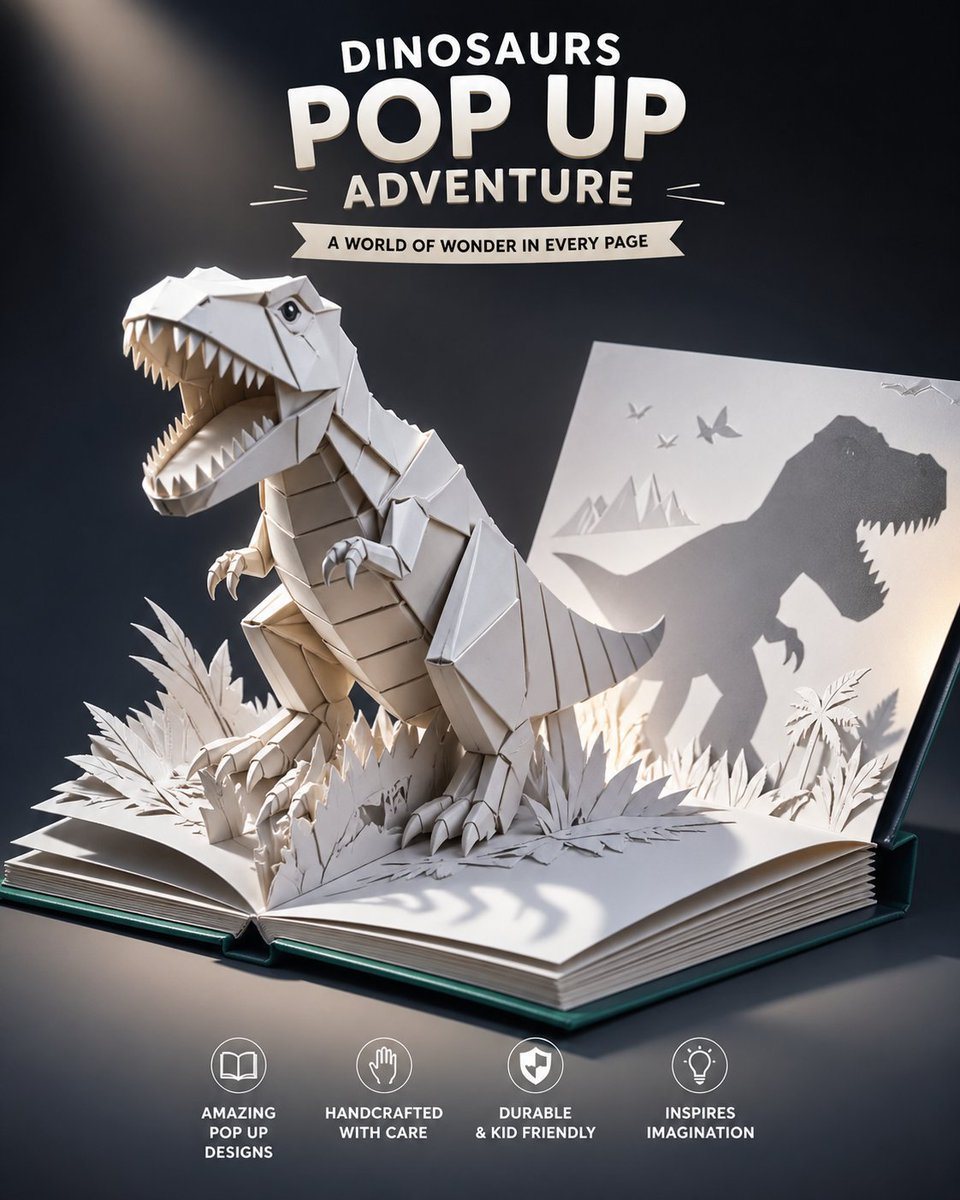
Origami Dinosaur Pop-Up Book Ad

This prompt generates a cinematic children's advertisement image of a paper T-rex bursting from a pop-up book, ideal for toy, book, or educational product marketing.

This prompt generates a cinematic children's advertisement image of a paper T-rex bursting from a pop-up book, ideal for toy, book, or educational product marketing.
Prompt

A polished children's pop-up book advertisement on a dark studio background, featuring an open hardcover book with thick white pages and a teal-green cover lying on a tabletop. From the center fold, a highly detailed white paper origami T-rex bursts upward in a dynamic roaring pose, mouth wide open with sharp triangular teeth, tiny clawed arms raised, thick folded legs planted in layered paper jungle foliage, and a segmented tail extending backward. The dinosaur should look handcrafted from crisp folded cardstock, with visible geometric paper panels and clean origami seams. Behind it, the right-hand page stands partially upright and catches a dramatic shadow projection of the T-rex profile, creating a large silhouette with open jaws; also include small paper-cut scenery on that page: 3 flying pterosaurs and a simple mountain landscape. Surround the dinosaur base with dense cut-paper plants and grass emerging from both pages. Light the scene with a cinematic warm spotlight from the upper left, leaving the background in deep navy to black, with soft realistic shadows cast across the book and onto the raised page. At the top center, include bold white ad typography in stacked lines reading {argument name="headline text" default="DINOSAURS POP UP ADVENTURE"}, with a white ribbon banner below that reads {argument name="tagline" default="A WORLD OF WONDER IN EVERY PAGE"}. At the bottom center, place 4 evenly spaced circular feature icons with captions in white: an open book icon labeled "AMAZING POP UP DESIGNS", a hand icon labeled "HANDCRAFTED WITH CARE", a shield icon labeled "DURABLE & KID FRIENDLY", and a light bulb icon labeled "INSPIRES IMAGINATION". Premium toy catalog style, cinematic product photography mixed with paper craft illustration, centered composition, high contrast, ultra-clean, whimsical, family-friendly, realistic paper texture.

Prompt structure
  • Modelgpt-image-2
  • Use caseproduct-hero-shot
  • Stylecinematic, photorealistic, minimal, watercolor
  • Aspect ratioFlexible
Best used for
  • Use caseproduct-hero-shot
  • Stylecinematic, photorealistic, minimal, watercolor
  • Recommended specs1:1, 4:5, 16:9, or 9:16
  • ModelGPT Image 2
How to customize

Use this Origami Dinosaur Pop-Up Book Ad prompt as a base. Replace the subject, product details, environment, lighting, brand colors, and output ratio while keeping the product-hero-shot intent and cinematic, photorealistic, minimal, watercolor direction stable.

Editable variables
  • SubjectReplace the product, person, scene, interface, or object being generated.
  • Use caseKeep or rewrite the destination as product hero shot, ad creative, cover image, poster, or ecommerce hero.
  • FrameChoose 1:1, 4:5, 16:9, or 9:16 based on the final placement.
  • Brand cuesAdd colors, materials, props, text-safe space, and the platform where the image will be used.
Recommended specs

Choose the frame for the destination first, then use 1K, 2K, or 4K based on output quality needs. Product images and posters usually benefit from higher resolution.

Pre-generation checklist
  • CheckSubject, lighting, composition, and frame are specific enough to review.
  • CheckText-safe space is included when the image will carry a headline or ad copy.
  • CheckResolution, credit cost, and final destination are checked before generation.
Why this prompt works

Origami Dinosaur Pop-Up Book Ad works because it starts from the image job, then controls subject, composition, lighting, style, and frame. It is best for product hero shot while keeping the cinematic, photorealistic, minimal, watercolor direction stable.

Common questions
  • Can I use it directly?Yes. Replace the subject, brand cues, and frame, then generate in Image2Studio.
  • Which ratio should I use?Choose 1:1, 4:5, 16:9, or 9:16 based on the destination.




