
Image2Studio
Examples

gpt-image-2

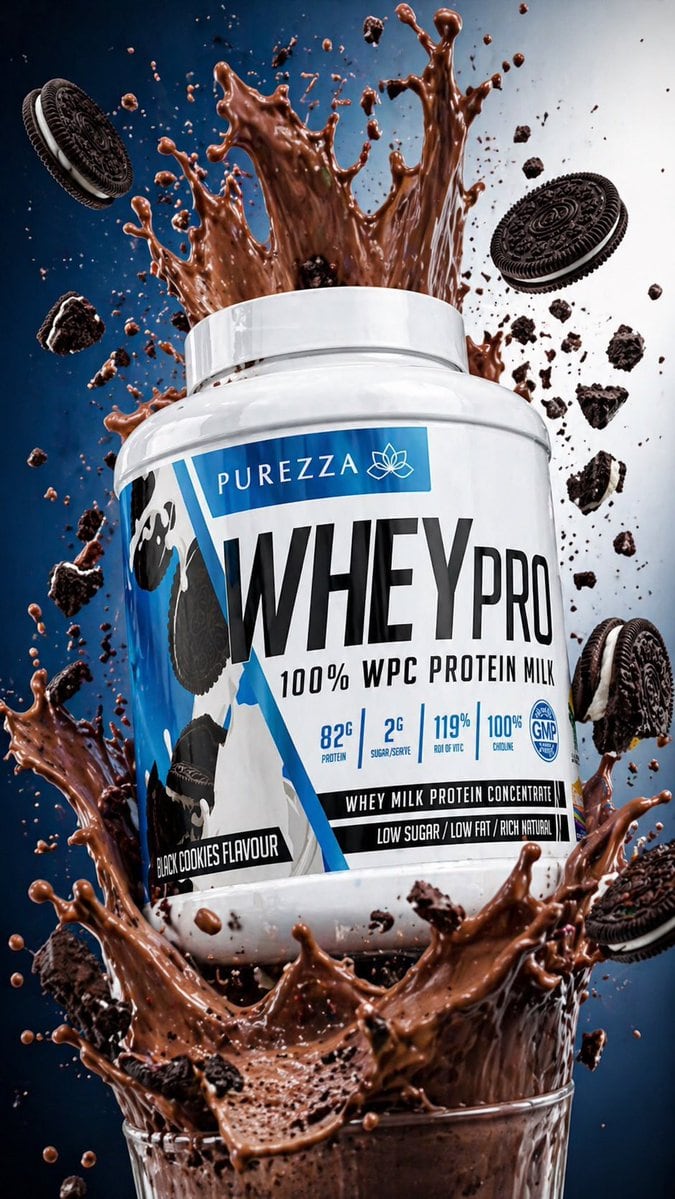
Protein Powder Splash Hero Shot

This prompt generates a dramatic premium supplement product advertisement with a floating whey tub, chocolate splash, and flying cookies for ecommerce or fitness brand web assets.

This prompt generates a dramatic premium supplement product advertisement with a floating whey tub, chocolate splash, and flying cookies for ecommerce or fitness brand web assets.
Prompt

Create a hyper-realistic commercial product splash shot of a large white plastic whey protein tub labeled {argument name="brand name" default="PUREZZA"} and {argument name="product name" default="WHEYPRO"}, floating slightly above a glass filled with thick chocolate protein shake. The tub is centered, angled slightly to the right, with a clean glossy surface and a bold blue, white, and black label design. The label should prominently read “100% WPC PROTEIN MILK” and include small nutrition callouts such as “82G PROTEIN,” “2G SUGAR/SERVING,” “119% RDI OF VC,” “100% CHOLINE,” a circular “GMP” badge, a black strip reading “WHEY MILK PROTEIN CONCENTRATE,” another strip reading “LOW SUGAR / LOW FAT / RICH NATURAL,” and a flavor tag reading {argument name="flavor text" default="BLACK COOKIES FLAVOUR"}. Surround the tub with an explosive upward and outward splash of glossy chocolate liquid, with dramatic arcs, droplets, and suspended motion frozen in midair. Include exactly 5 whole chocolate sandwich cookies flying around the product and multiple broken cookie chunks and crumbs scattered throughout the scene, with one partially visible cookie near the lower right and another near the upper left. The glass at the bottom should be only partially visible, transparent, and overflowing from the impact of the splash. Use a high-contrast studio background with a dark deep blue gradient on the left fading to bright white on the right, cinematic rim lighting, crisp reflections, ultra-sharp focus on the tub, and detailed texture in the liquid and cookie crumbs. The overall look should be premium sports nutrition advertising, dynamic, energetic, and suitable for a hero image on a modern ecommerce fitness website.

Prompt structure
  • Modelgpt-image-2
  • Use caseproduct-hero-shot
  • Stylecinematic, photorealistic, luxury, minimal
  • Aspect ratioFlexible
Best used for
  • Use caseproduct-hero-shot
  • Stylecinematic, photorealistic, luxury, minimal
  • Recommended specs1:1, 4:5, 16:9, or 9:16
  • ModelGPT Image 2
How to customize

Use this Protein Powder Splash Hero Shot prompt as a base. Replace the subject, product details, environment, lighting, brand colors, and output ratio while keeping the product-hero-shot intent and cinematic, photorealistic, luxury, minimal direction stable.

Editable variables
  • SubjectReplace the product, person, scene, interface, or object being generated.
  • Use caseKeep or rewrite the destination as product hero shot, ad creative, cover image, poster, or ecommerce hero.
  • FrameChoose 1:1, 4:5, 16:9, or 9:16 based on the final placement.
  • Brand cuesAdd colors, materials, props, text-safe space, and the platform where the image will be used.
Recommended specs

Choose the frame for the destination first, then use 1K, 2K, or 4K based on output quality needs. Product images and posters usually benefit from higher resolution.

Pre-generation checklist
  • CheckSubject, lighting, composition, and frame are specific enough to review.
  • CheckText-safe space is included when the image will carry a headline or ad copy.
  • CheckResolution, credit cost, and final destination are checked before generation.
Why this prompt works

Protein Powder Splash Hero Shot works because it starts from the image job, then controls subject, composition, lighting, style, and frame. It is best for product hero shot while keeping the cinematic, photorealistic, luxury, minimal direction stable.

Common questions
  • Can I use it directly?Yes. Replace the subject, brand cues, and frame, then generate in Image2Studio.
  • Which ratio should I use?Choose 1:1, 4:5, 16:9, or 9:16 based on the destination.




