Image2Studio
Examples

gpt-image-2

ReAct reasoning trace

Social Media Post prompt for social ads, ready to edit and generate in Image2Studio.

Social Media Post prompt for social ads, ready to edit and generate in Image2Studio.
Prompt

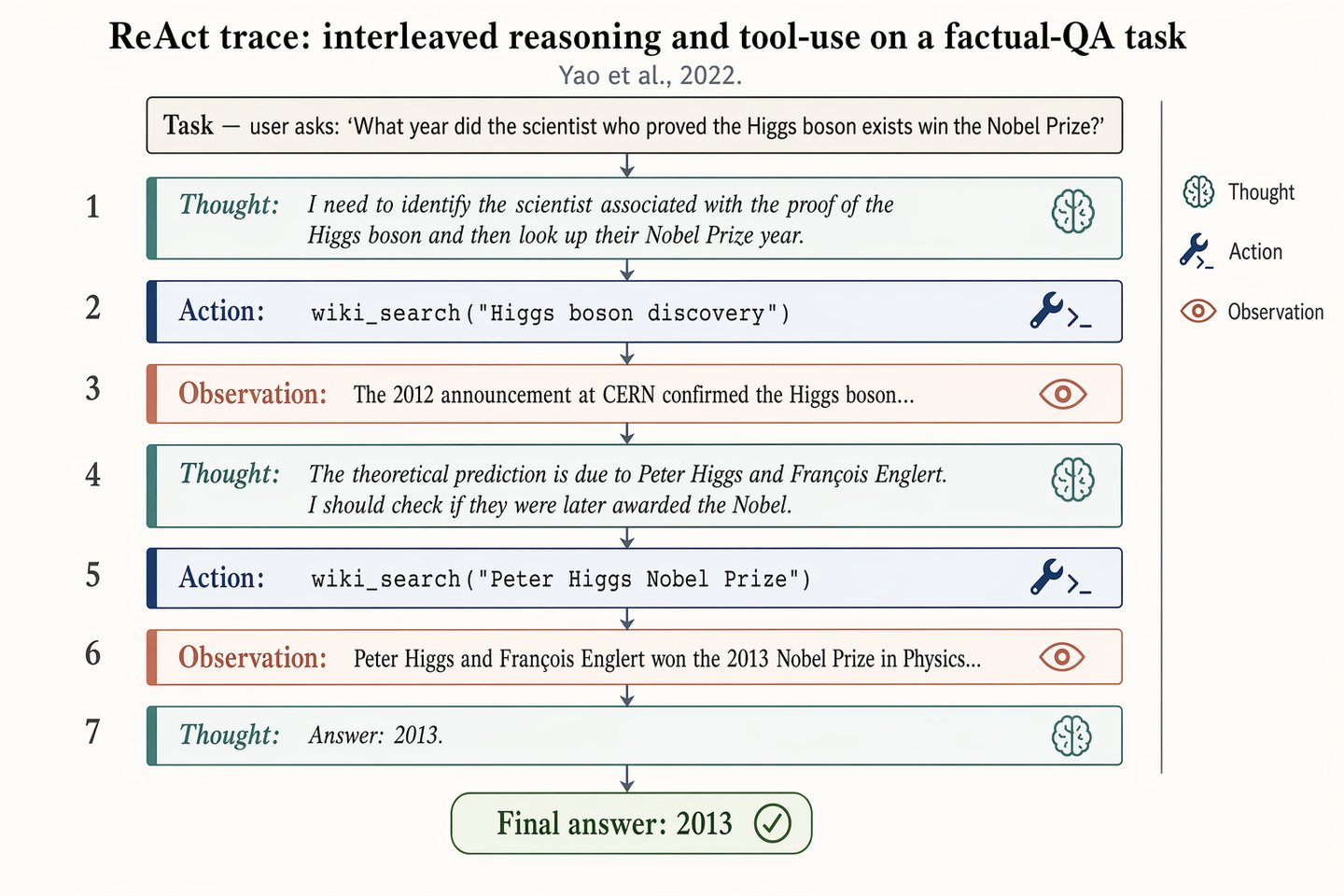
Landscape 16:9 figure of a ReAct trace on a factual-QA task, vertical sequence of 7 alternating blocks. Top header: "Task — user asks: 'What year did the scientist who proved the Higgs boson exists win the Nobel Prize?'" Seven blocks, top-to-bottom, each numbered 1–7 on the left: 1. Thought: "I need to identify the scientist associated with the proof of the Higgs boson and then look up their Nobel Prize year." 2. Action: wiki_search("Higgs boson discovery") 3. Observation: "The 2012 announcement at CERN confirmed the Higgs boson..." 4. Thought: "The theoretical prediction is due to Peter Higgs and François Englert. I should check if they were later awarded the Nobel." 5. Action: wiki_search("Peter Higgs Nobel Prize") 6. Observation: "Peter Higgs and François Englert won the 2013 Nobel Prize in Physics..." 7. Thought: "Answer: 2013." Thought blocks: dusty-teal left border, italic, brain glyph. Action blocks: muted-navy left border, monospace, wrench glyph. Observation blocks: soft-terracotta left border, lighter fill, eye glyph. Thin slate-gray arrows between blocks. Bottom: pill-shaped "Final answer: 2013" with a check glyph. Title: "ReAct trace: interleaved reasoning and tool-use on a factual-QA task". Subtitle: "Yao et al., 2022."

Prompt structure
  • Modelgpt-image-2
  • Use casesocial-media-post
  • Styleprompt-defined style
  • Aspect ratiolandscape
Best used for
  • Use casesocial-media-post
  • Styleprompt-defined style
  • Recommended specslandscape
  • ModelGPT Image 2
How to customize

Use this ReAct reasoning trace prompt as a base. Replace the subject, product details, environment, lighting, brand colors, and output ratio while keeping the social-media-post intent and the visual style direction stable.

Editable variables
  • SubjectReplace the product, person, scene, interface, or object being generated.
  • Use caseKeep or rewrite the destination as social media post, ad creative, cover image, poster, or ecommerce hero.
  • Framelandscape
  • Brand cuesAdd colors, materials, props, text-safe space, and the platform where the image will be used.
Recommended specs

Choose the frame for the destination first, then use 1K, 2K, or 4K based on output quality needs. Product images and posters usually benefit from higher resolution.

Pre-generation checklist
  • CheckSubject, lighting, composition, and frame are specific enough to review.
  • CheckText-safe space is included when the image will carry a headline or ad copy.
  • CheckResolution, credit cost, and final destination are checked before generation.
Why this prompt works

ReAct reasoning trace works because it starts from the image job, then controls subject, composition, lighting, style, and frame. It is best for social media post while keeping the prompt-defined style direction stable.

Common questions
  • Can I use it directly?Yes. Replace the subject, brand cues, and frame, then generate in Image2Studio.
  • Which ratio should I use?landscape