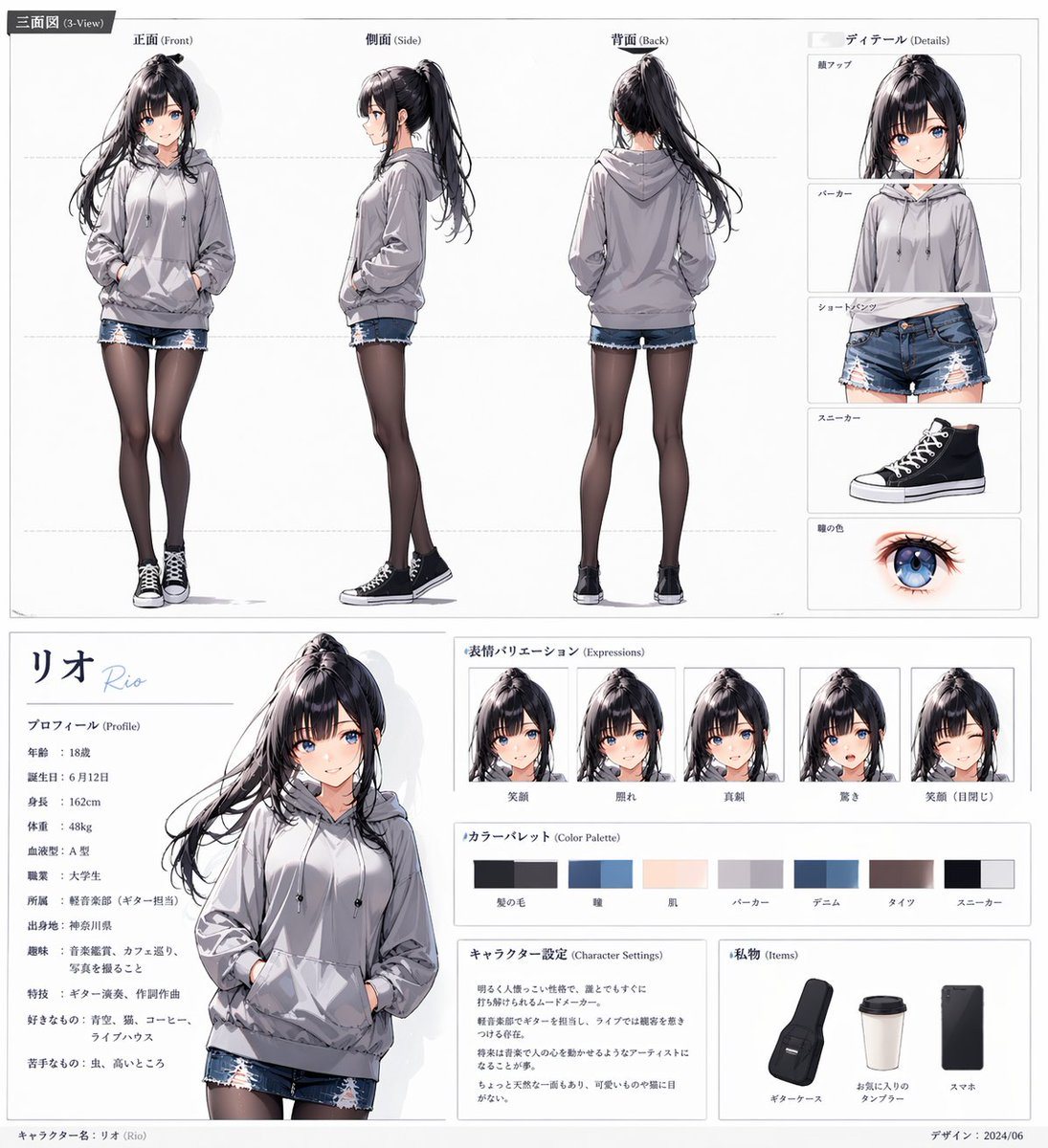
Prompt{"type":"anime character reference sheet","style":"clean polished Japanese character design board, white background, thin gray panel lines, modern editorial layout, soft neutral lighting, highly detailed semi-realistic anime rendering","character":{"name":"{argument name=\"character name\" default=\"リオ\"}","romanization":"Rio","gender_presentation":"teenage girl","age":"18","appearance":{"build":"slim","height":"162 cm","hair":{"color":"{argument name=\"hair color\" default=\"black with cool violet sheen\"}","style":"long high ponytail with loose strands, straight bangs parted slightly, flowing hair with light motion"},"eyes":{"color":"{argument name=\"eye color\" default=\"bright blue\"}","shape":"large anime eyes"},"expression":"calm and slightly reserved"},"outfit":{"top":"oversized light gray hoodie with drawstrings and front pocket","bottom":"distressed blue denim shorts with frayed hems","legwear":"sheer black tights","shoes":"black high-top canvas sneakers with white toe caps and white laces"}},"layout":{"format":"single-page character sheet","sections":[{"title":"三面図 (3-View)","position":"top wide panel","count":4,"labels":["正面 (Front)","側面 (Side)","背面 (Back)","ディテール (Details)"]},{"title":"ディテール (Details)","position":"top-right stacked column","count":5,"labels":["顔アップ","パーカー","ショートパンツ","スニーカー","瞳の色"]},{"title":"プロフィール (Profile)","position":"bottom-left text panel","count":10,"labels":["年齢","誕生日","身長","体重","血液型","職業","所属","出身地","趣味","好きなもの"]},{"title":"表情バリエーション (Expressions)","position":"bottom-center upper row","count":5,"labels":["笑顔","照れ","真顔","驚き","笑顔(日閉じ)"]},{"title":"カラーパレット (Color Palette)","position":"bottom-center middle row","count":7,"labels":["髪の色","瞳","肌","パーカー","デニム","タイツ","スニーカー"]},{"title":"キャラクター設定 (Character Settings)","position":"bottom-center lower left","count":1,"labels":["character notes block"]},{"title":"私物 (Items)","position":"bottom-right lower panel","count":3,"labels":["ギターケース","お気に入りのタンブラー","スマホ"]}],"centerpiece":"large three-quarter portrait of the character from thighs up, one hand in hoodie pocket, relaxed pose","footer":"small credit text and date in the lower margin"},"text":{"profile_name_large":"{argument name=\"character name\" default=\"リオ\"}","profile_name_roman":"Rio","profile_values":{"年齢":"18歳","誕生日":"6月12日","身長":"162cm","体重":"48kg","血液型":"A型","職業":"大学生"},"setting_summary":"a quiet, somewhat shy music-loving girl with an artistic side and everyday urban casual fashion"},"composition":"top half dedicated to full-body front, side, and back views plus detail callouts; bottom half split into profile text on the left, large portrait near left-center, expression row in the upper middle, color palette beneath it, character settings text block lower middle, and personal items panel on the lower right","quality":"crisp linework, delicate fabric folds, realistic hoodie shading, detailed glossy hair strands, subtle skin tones, accurate fashion reference sheet presentation"}