
Image2Studio
Examples

gpt-image-2

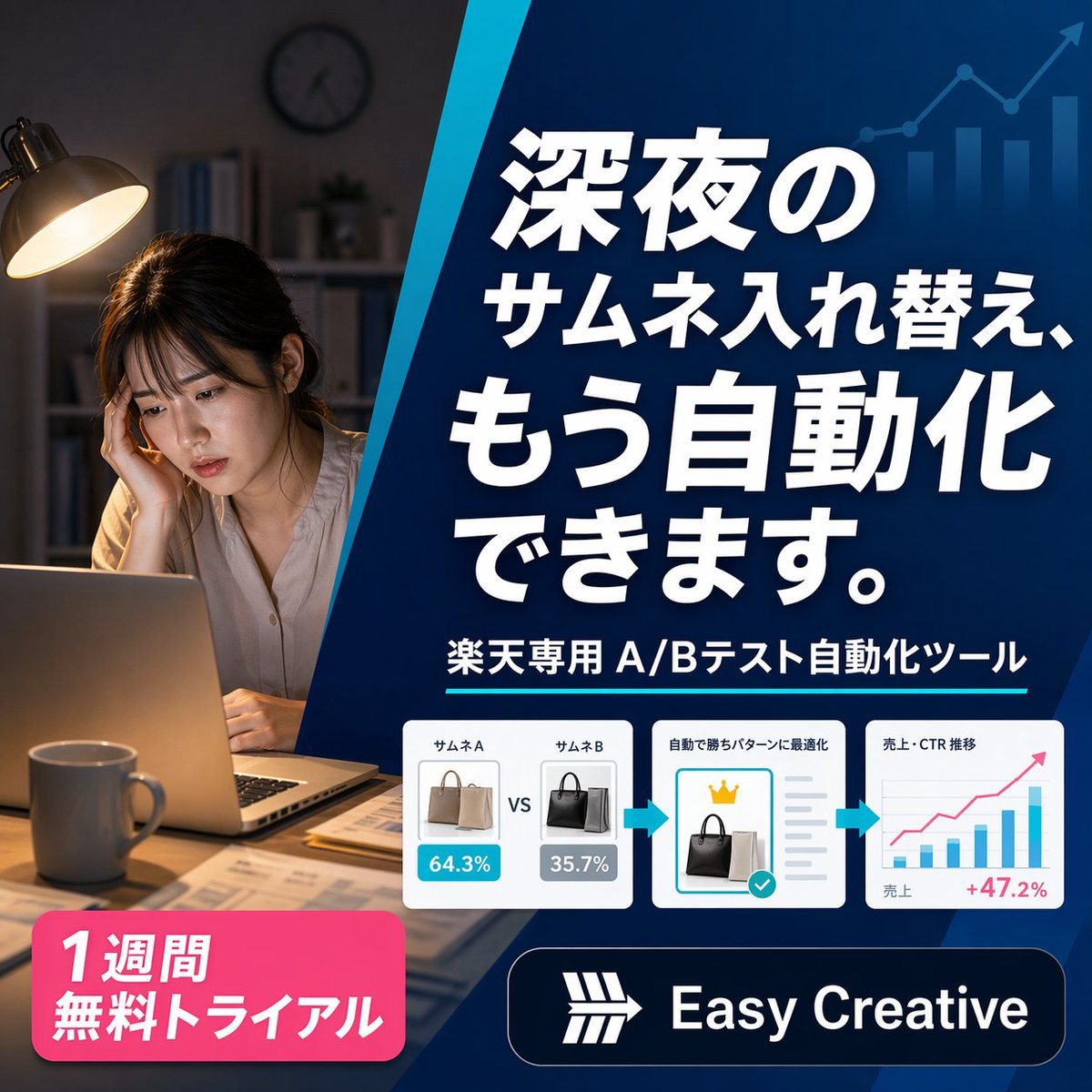
Polished Square Japanese Digital Advertising Banner

A polished square Japanese digital advertising banner for an AI e-commerce optimization tool, split into 2 main visual zones by a bold diagonal blue divider running from upper center to l...

A polished square Japanese digital advertising banner for an AI e-commerce optimization tool, split into 2 main visual zones by a bold diagonal blue divider running from upper center to l...
Prompt

A polished square Japanese digital advertising banner for an AI e-commerce optimization tool, split into 2 main visual zones by a bold diagonal blue divider running from upper center to lower center-left. On the left third, show a realistic nighttime home-office scene with 1 tired young woman sitting at a desk, her face intentionally blurred, resting her head on one hand while looking at an open laptop. Warm desk-lamp lighting illuminates her and the desk, with a mug in the foreground, scattered papers, shelves and a wall clock softly out of focus in the dark background, creating a late-night overwork mood. On the right two-thirds, place a deep blue gradient promotional panel with subtle financial-growth graphics in the background: 1 ascending line chart with arrow and 4 vertical bar-chart columns in a lighter transparent blue near the top right. Fill this panel with bold oversized Japanese headline text in white with strong drop shadow, stacked across 4 lines: {argument name="headline text" default="深夜の\nサムネ入れ替え、\nもう自動化\nできます。"}. Beneath it, add 1 subheadline line in white reading {argument name="subheadline text" default="楽天専用 A/Bテスト自動化ツール"}, accented by a thin cyan underline. Below that, place a horizontal process strip containing 3 white rounded-corner cards connected by 2 cyan right-pointing arrows. Card 1 shows 2 handbag thumbnails side by side labeled exactly 2 items: "サムネA" and "サムネB", with blue and gray percentage badges reading "64.3%" and "35.7%", and a centered "VS" between them. Card 2 shows 1 selected black handbag thumbnail, a small gold crown icon above it, gray checklist lines to the right, and a turquoise confirmation checkmark badge, with a small Japanese heading indicating automatic optimization. Card 3 shows 1 simple analytics chart with axes, several blue bars, 1 pink upward trend line, small Japanese labels for sales and CTR trend, and a pink result figure "+47.2%" at the lower right. At the bottom left, add 1 bright pink rounded promotional badge with bold white Japanese text on 2 lines: {argument name="offer text" default="1週間\n無料トライアル"}. At the bottom right, add 1 dark navy rounded logo bar containing a simple white geometric emblem and the brand name {argument name="brand name" default="Easy Creative"} in bold white sans-serif. Use a clean modern SaaS-ad aesthetic, high contrast, crisp typography, glossy UI cards, subtle shadows, and a professional conversion-focused layout sized 1:1.

Prompt structure
  • Modelgpt-image-2
  • Use casebrand-identity
  • Styleminimal, photorealistic, editorial, luxury
  • Aspect ratioFlexible
Best used for
  • Use casebrand-identity
  • Styleminimal, photorealistic, editorial, luxury
  • Recommended specs1:1, 4:5, 16:9, or 9:16
  • ModelGPT Image 2
How to customize

Use this Polished Square Japanese Digital Advertising Banner prompt as a base. Replace the subject, product details, environment, lighting, brand colors, and output ratio while keeping the brand-identity intent and minimal, photorealistic, editorial, luxury direction stable.

Editable variables
  • SubjectReplace the product, person, scene, interface, or object being generated.
  • Use caseKeep or rewrite the destination as brand identity, ad creative, cover image, poster, or ecommerce hero.
  • FrameChoose 1:1, 4:5, 16:9, or 9:16 based on the final placement.
  • Brand cuesAdd colors, materials, props, text-safe space, and the platform where the image will be used.
Recommended specs

Choose the frame for the destination first, then use 1K, 2K, or 4K based on output quality needs. Product images and posters usually benefit from higher resolution.

Pre-generation checklist
  • CheckSubject, lighting, composition, and frame are specific enough to review.
  • CheckText-safe space is included when the image will carry a headline or ad copy.
  • CheckResolution, credit cost, and final destination are checked before generation.
Why this prompt works

Polished Square Japanese Digital Advertising Banner works because it starts from the image job, then controls subject, composition, lighting, style, and frame. It is best for brand identity while keeping the minimal, photorealistic, editorial, luxury direction stable.

Common questions
  • Can I use it directly?Yes. Replace the subject, brand cues, and frame, then generate in Image2Studio.
  • Which ratio should I use?Choose 1:1, 4:5, 16:9, or 9:16 based on the destination.




