
Image2Studio
Examples

gpt-image-2

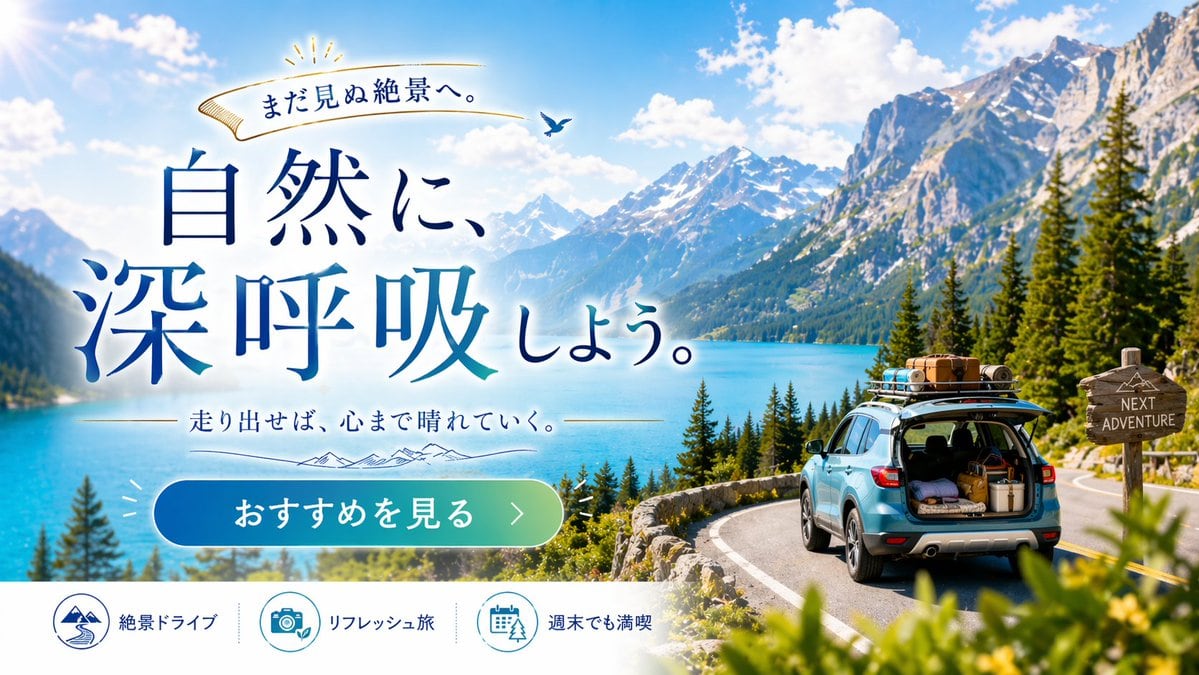
Scenic Travel Ad Banner Generator

Generates a promotional web banner for road trips, featuring customizable typography, a scenic background, and a bottom feature bar.

Generates a promotional web banner for road trips, featuring customizable typography, a scenic background, and a bottom feature bar.
Prompt

{ "type": "travel advertisement web banner", "layout": { "background": "{argument name=\"scenery type\" default=\"majestic snow-capped mountains and turquoise lake\"}, pine trees, winding paved road, bright blue sky with fluffy clouds", "foreground_right": "{argument name=\"car color\" default=\"light blue\"} SUV on road, open trunk with luggage, loaded roof rack, wooden signpost reading 'NEXT ADVENTURE'", "typography_left": { "top_ribbon": "Golden ribbon with text 'まだ見ぬ絶景へ。' and small bird", "main_headline": "Large serif text '{argument name=\"main headline\" default=\"自然に、深呼吸しよう。\"}' in deep blue gradient", "sub_headline": "Text '{argument name=\"sub headline\" default=\"走り出せば、心まで晴れていく。\"}' with thin lines and mountain graphic" }, "ui_elements": { "cta_button": "Pill-shaped blue-to-green gradient button with text '{argument name=\"cta button text\" default=\"おすすめを見る >\"}'", "bottom_bar": { "description": "White footer bar", "count": 3, "items": [ {"icon": "mountain and road", "text": "絶景ドライブ"}, {"icon": "camera and leaf", "text": "リフレッシュ旅"}, {"icon": "calendar and tree", "text": "週末でも満喫"} ] } } } }

Prompt structure
  • Modelgpt-image-2
  • Use casecampaign-poster
  • Stylephotorealistic, editorial
  • Aspect ratioFlexible
Best used for
  • Use casecampaign-poster
  • Stylephotorealistic, editorial
  • Recommended specs1:1, 4:5, 16:9, or 9:16
  • ModelGPT Image 2
How to customize

Use this Scenic Travel Ad Banner Generator prompt as a base. Replace the subject, product details, environment, lighting, brand colors, and output ratio while keeping the campaign-poster intent and photorealistic, editorial direction stable.

Editable variables
  • SubjectReplace the product, person, scene, interface, or object being generated.
  • Use caseKeep or rewrite the destination as campaign poster, ad creative, cover image, poster, or ecommerce hero.
  • FrameChoose 1:1, 4:5, 16:9, or 9:16 based on the final placement.
  • Brand cuesAdd colors, materials, props, text-safe space, and the platform where the image will be used.
Recommended specs

Choose the frame for the destination first, then use 1K, 2K, or 4K based on output quality needs. Product images and posters usually benefit from higher resolution.

Pre-generation checklist
  • CheckSubject, lighting, composition, and frame are specific enough to review.
  • CheckText-safe space is included when the image will carry a headline or ad copy.
  • CheckResolution, credit cost, and final destination are checked before generation.
Why this prompt works

Scenic Travel Ad Banner Generator works because it starts from the image job, then controls subject, composition, lighting, style, and frame. It is best for campaign poster while keeping the photorealistic, editorial direction stable.

Common questions
  • Can I use it directly?Yes. Replace the subject, brand cues, and frame, then generate in Image2Studio.
  • Which ratio should I use?Choose 1:1, 4:5, 16:9, or 9:16 based on the destination.




