
Image2Studio
Prompts

gpt-image-2

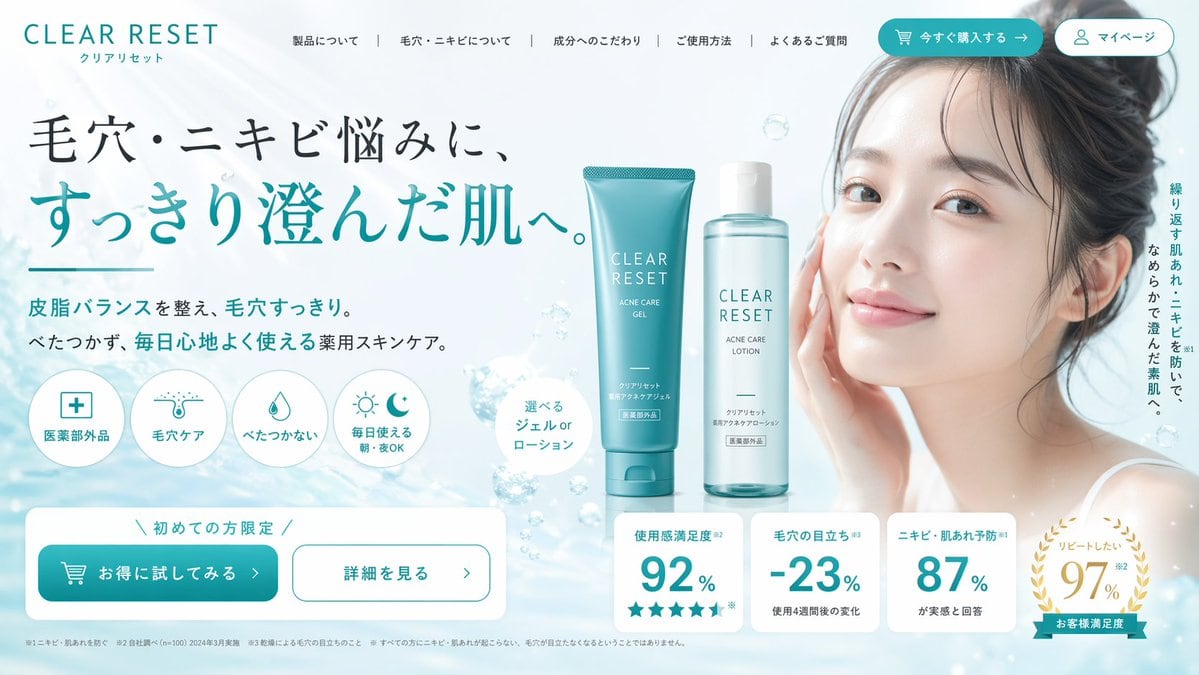
Skincare Landing Page Hero Section

Generates a highly structured e-commerce landing page first view for a skincare brand, featuring a model, product shots, feature icons, and statistics.

Generates a highly structured e-commerce landing page first view for a skincare brand, featuring a model, product shots, feature icons, and statistics.
Prompt

{ "type": "landing page hero section", "theme": "skincare and beauty", "color_palette": ["white", "{argument name=\"primary color\" default=\"teal\"}", "light blue"], "header": { "logo": "{argument name=\"brand name\" default=\"CLEAR RESET\"}", "navigation_links": 5, "buttons": 2 }, "hero_content": { "headline": "{argument name=\"main headline\" default=\"毛穴・ニキビ悩みに、すっきり澄んだ肌へ。\"}", "subheadline": "Balances sebum and clears pores. Non-sticky, medicated skincare for comfortable daily use.", "feature_icons": { "count": 4, "labels": ["医薬部外品", "毛穴ケア", "べたつかない", "毎日使える 朝・夜OK"] } }, "centerpiece": { "products": { "count": 2, "description": "{argument name=\"product type\" default=\"skincare gel and lotion\"}", "items": ["teal tube", "clear bottle"] }, "background": "water surface with floating bubbles" }, "model": { "description": "{argument name=\"model description\" default=\"young Asian woman with clear radiant skin, hair tied up, gentle smile\"}", "position": "right side" }, "bottom_section": { "cta_buttons": { "count": 2, "labels": ["お得に試してみる >", "詳細を見る >"] }, "statistics_cards": { "count": 4, "labels": ["使用感満足度 92%", "毛穴の目立ち -23%", "ニキビ・肌あれ予防 87%", "リピートしたい 97%"] } } }

Prompt structure
  • Modelgpt-image-2
  • Use caseproduct-hero-shot
  • Stylephotorealistic
  • Aspect ratioFlexible
Best used for
  • Use caseproduct-hero-shot
  • Stylephotorealistic
  • Recommended specs1:1, 4:5, 16:9, or 9:16
  • ModelGPT Image 2
How to customize

Use this Skincare Landing Page Hero Section prompt as a base. Replace the subject, product details, environment, lighting, brand colors, and output ratio while keeping the product-hero-shot intent and photorealistic direction stable.

Editable variables
  • SubjectReplace the product, person, scene, interface, or object being generated.
  • Use caseKeep or rewrite the destination as product hero shot, ad creative, cover image, poster, or ecommerce hero.
  • FrameChoose 1:1, 4:5, 16:9, or 9:16 based on the final placement.
  • Brand cuesAdd colors, materials, props, text-safe space, and the platform where the image will be used.
Recommended specs

Choose the frame for the destination first, then use 1K, 2K, or 4K based on output quality needs. Product images and posters usually benefit from higher resolution.

Pre-generation checklist
  • CheckSubject, lighting, composition, and frame are specific enough to review.
  • CheckText-safe space is included when the image will carry a headline or ad copy.
  • CheckResolution, credit cost, and final destination are checked before generation.
Why this prompt works

Skincare Landing Page Hero Section works because it starts from the image job, then controls subject, composition, lighting, style, and frame. It is best for product hero shot while keeping the photorealistic direction stable.

Common questions
  • Can I use it directly?Yes. Replace the subject, brand cues, and frame, then generate in Image2Studio.
  • Which ratio should I use?Choose 1:1, 4:5, 16:9, or 9:16 based on the destination.




