
Image2Studio
Examples

gpt-image-2

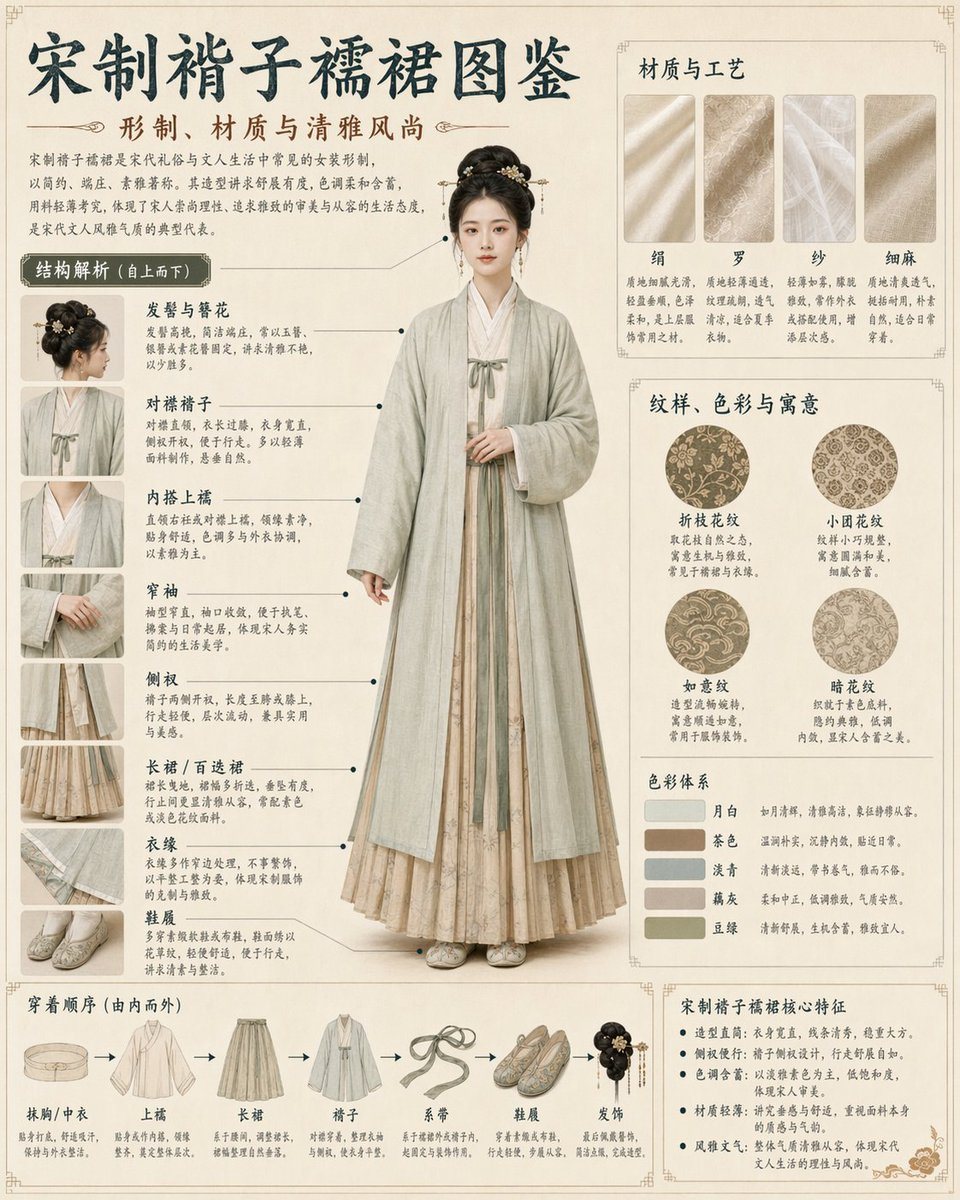
Song Dynasty Hanfu Infographic Guide

Generates a highly detailed, museum-style infographic poster analyzing traditional Chinese clothing components, materials, and wearing steps.

Generates a highly detailed, museum-style infographic poster analyzing traditional Chinese clothing components, materials, and wearing steps.
Prompt

{ "type": "traditional Chinese clothing infographic poster", "header": { "main_title": "{argument name=\"main title\" default=\"宋制褙子襦裙图鉴\"}", "subtitle": "形制、材质与清雅风尚", "intro_text": "Short paragraph describing the historical context and aesthetic." }, "centerpiece": { "description": "Full-body portrait of a young Asian woman standing elegantly with hands clasped.", "clothing": "{argument name=\"clothing style\" default=\"Song Dynasty Beizi and Ruqun, light green outer robe, beige inner dress\"}" }, "layout": { "style": "museum exhibition guide, highly structured, clean grid", "background": "{argument name=\"background texture\" default=\"vintage parchment, beige\"}", "sections": [ { "title": "结构解析 (自上而下)", "position": "left column", "count": 8, "labels": ["发髻与簪花", "对襟褙子", "内搭上襦", "窄袖", "侧衩", "长裙 / 百迭裙", "衣缘", "鞋履"], "details": "Thumbnail images with text and pointer lines to the central figure." }, { "title": "材质与工艺", "position": "top right", "count": 4, "labels": ["绢", "罗", "纱", "细麻"] }, { "title": "纹样、色彩与寓意", "position": "middle right", "count": 4, "labels": ["折枝花纹", "小团花纹", "如意纹", "暗花纹"], "details": "Circular pattern swatches." }, { "title": "色彩体系", "position": "middle right, below patterns", "count": 5, "labels": ["月白", "茶色", "淡青", "藕灰", "豆绿"], "details": "Rectangular color swatches." }, { "title": "穿着顺序 (由内而外)", "position": "bottom left", "count": 7, "labels": ["抹胸/中衣", "上襦", "长裙", "褙子", "系带", "鞋履", "发饰"], "details": "Sequential garment illustrations connected by arrows." }, { "title": "宋制褙子襦裙核心特征", "position": "bottom right", "count": 5, "details": "Bulleted text list of features." } ] } }

Prompt structure
  • Modelgpt-image-2
  • Use caseavatar
  • Styleeditorial, minimal
  • Aspect ratioFlexible
Best used for
  • Use caseavatar
  • Styleeditorial, minimal
  • Recommended specs1:1, 4:5, 16:9, or 9:16
  • ModelGPT Image 2
How to customize

Use this Song Dynasty Hanfu Infographic Guide prompt as a base. Replace the subject, product details, environment, lighting, brand colors, and output ratio while keeping the avatar intent and editorial, minimal direction stable.

Editable variables
  • SubjectReplace the product, person, scene, interface, or object being generated.
  • Use caseKeep or rewrite the destination as avatar, ad creative, cover image, poster, or ecommerce hero.
  • FrameChoose 1:1, 4:5, 16:9, or 9:16 based on the final placement.
  • Brand cuesAdd colors, materials, props, text-safe space, and the platform where the image will be used.
Recommended specs

Choose the frame for the destination first, then use 1K, 2K, or 4K based on output quality needs. Product images and posters usually benefit from higher resolution.

Pre-generation checklist
  • CheckSubject, lighting, composition, and frame are specific enough to review.
  • CheckText-safe space is included when the image will carry a headline or ad copy.
  • CheckResolution, credit cost, and final destination are checked before generation.
Why this prompt works

Song Dynasty Hanfu Infographic Guide works because it starts from the image job, then controls subject, composition, lighting, style, and frame. It is best for avatar while keeping the editorial, minimal direction stable.

Common questions
  • Can I use it directly?Yes. Replace the subject, brand cues, and frame, then generate in Image2Studio.
  • Which ratio should I use?Choose 1:1, 4:5, 16:9, or 9:16 based on the destination.




