
Image2Studio
Examples

gpt-image-2

Create A Premium Minimalist Fashion Advertisement Poster In A Tall Verti

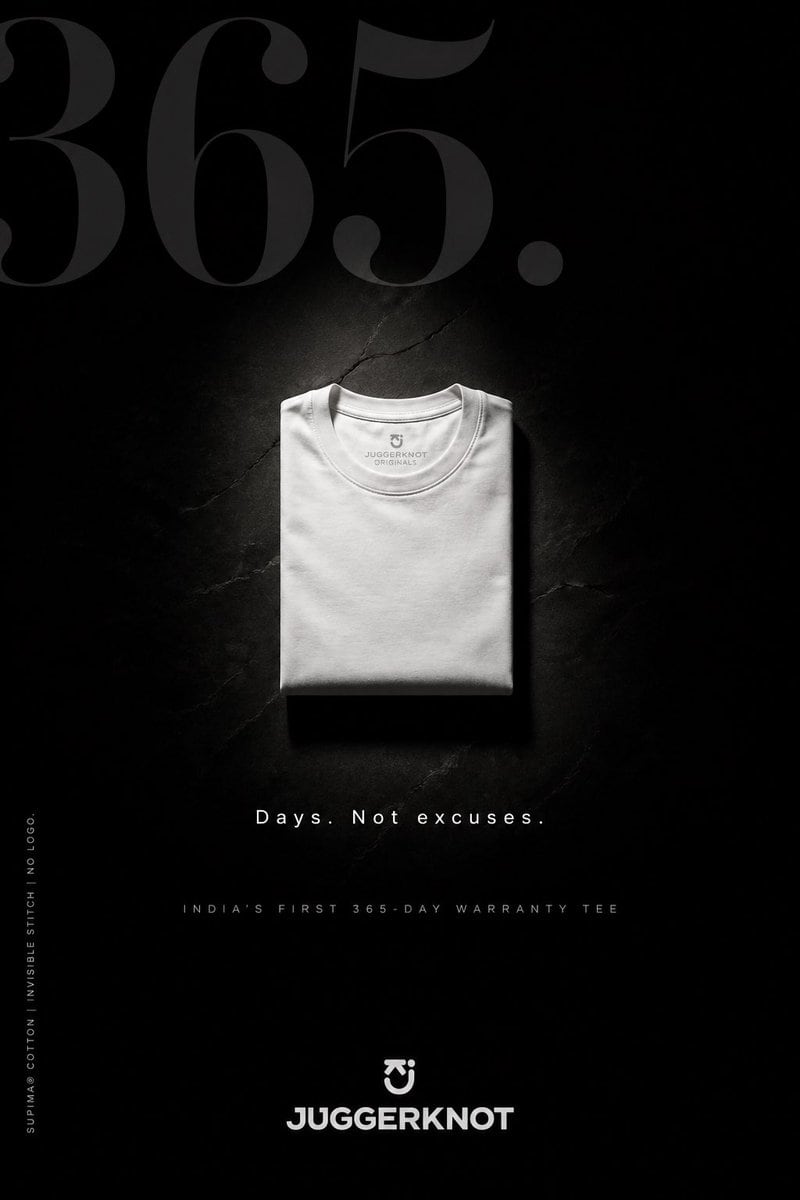
Create a premium minimalist fashion advertisement poster in a tall vertical format for a folded crew-neck t-shirt brand. Use a deep matte black background with a subtle cracked stone or c...

Create a premium minimalist fashion advertisement poster in a tall vertical format for a folded crew-neck t-shirt brand. Use a deep matte black background with a subtle cracked stone or c...
Prompt

Create a premium minimalist fashion advertisement poster in a tall vertical format for a folded crew-neck t-shirt brand. Use a deep matte black background with a subtle cracked stone or concrete texture, almost disappearing into shadow. Place 1 neatly folded {argument name="t-shirt color" default="white"} t-shirt at the exact center, viewed from above, with soft sculptural lighting from above that creates a faint halo glow around the shirt and a clean shadow beneath it. The t-shirt should look luxurious, thick, smooth, and wrinkle-controlled, with a visible inner collar print reading {argument name="brand text inside collar" default="JUGGERKNOT ORIGINALS"}. At the very top, place oversized elegant serif numerals reading {argument name="hero number" default="365."} in a very dark charcoal gray, spanning nearly the full width and partially fading into the background. Beneath the shirt, add the centered tagline {argument name="tagline" default="Days. Not excuses."} in spaced white sans-serif text. Below that, add a smaller all-caps line in muted gray reading {argument name="subheadline" default="INDIA'S FIRST 365-DAY WARRANTY TEE"}. Along the lower left edge, place 1 vertical line of tiny white text reading "SUPIMA® COTTON | INVISIBLE STITCH | NO LOGO." At the bottom center, place 1 small emblem above the bold brand name "JUGGERKNOT" in white geometric sans-serif lettering. Overall style: luxury streetwear campaign, brutalist minimalism, high contrast, editorial product poster, clean typography, premium monochrome palette, dramatic negative space, photorealistic fabric detail.

Prompt structure
  • Modelgpt-image-2
  • Use casebrand-identity
  • Styleminimal, luxury, photorealistic, editorial
  • Aspect ratioFlexible
Best used for
  • Use casebrand-identity
  • Styleminimal, luxury, photorealistic, editorial
  • Recommended specs1:1, 4:5, 16:9, or 9:16
  • ModelGPT Image 2
How to customize

Use this Create A Premium Minimalist Fashion Advertisement Poster In A Tall Verti prompt as a base. Replace the subject, product details, environment, lighting, brand colors, and output ratio while keeping the brand-identity intent and minimal, luxury, photorealistic, editorial direction stable.

Editable variables
  • SubjectReplace the product, person, scene, interface, or object being generated.
  • Use caseKeep or rewrite the destination as brand identity, ad creative, cover image, poster, or ecommerce hero.
  • FrameChoose 1:1, 4:5, 16:9, or 9:16 based on the final placement.
  • Brand cuesAdd colors, materials, props, text-safe space, and the platform where the image will be used.
Recommended specs

Choose the frame for the destination first, then use 1K, 2K, or 4K based on output quality needs. Product images and posters usually benefit from higher resolution.

Pre-generation checklist
  • CheckSubject, lighting, composition, and frame are specific enough to review.
  • CheckText-safe space is included when the image will carry a headline or ad copy.
  • CheckResolution, credit cost, and final destination are checked before generation.
Why this prompt works

Create A Premium Minimalist Fashion Advertisement Poster In A Tall Verti works because it starts from the image job, then controls subject, composition, lighting, style, and frame. It is best for brand identity while keeping the minimal, luxury, photorealistic, editorial direction stable.

Common questions
  • Can I use it directly?Yes. Replace the subject, brand cues, and frame, then generate in Image2Studio.
  • Which ratio should I use?Choose 1:1, 4:5, 16:9, or 9:16 based on the destination.




