
Image2Studio
Examples

gpt-image-2

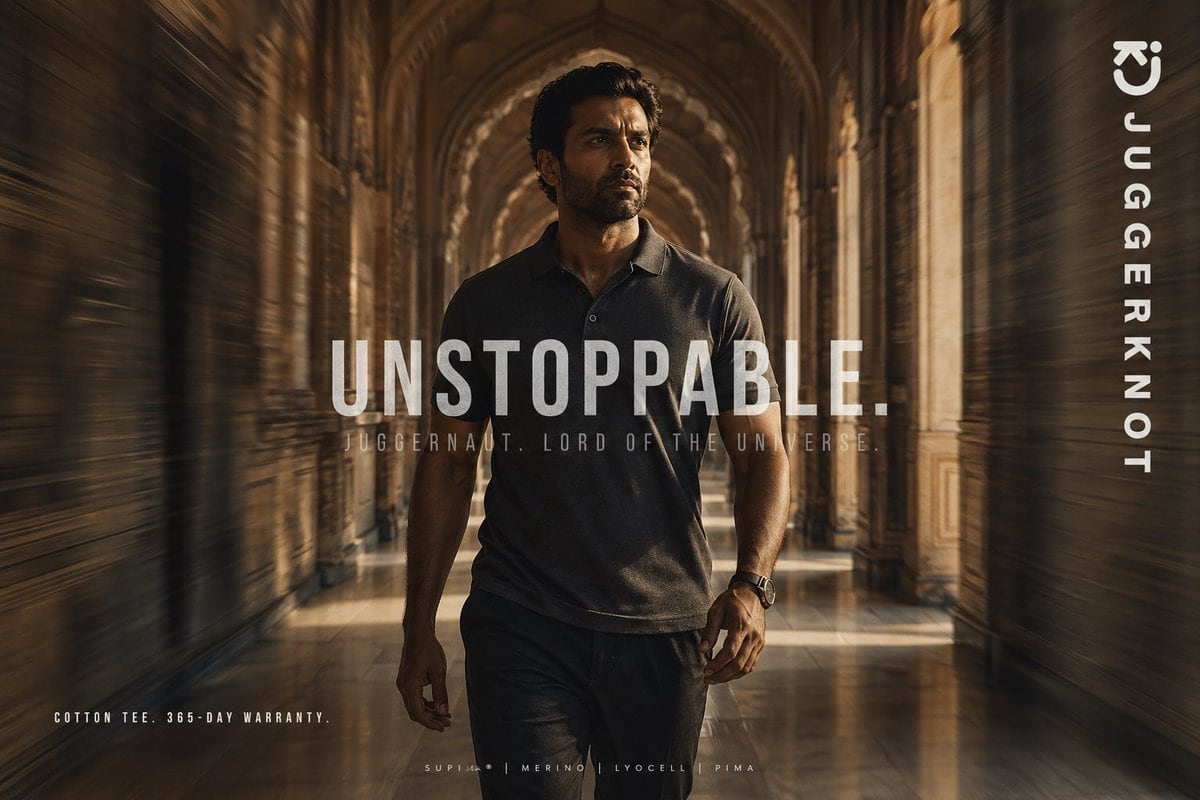
Cinematic Fashion Advertisement Poster

A cinematic fashion advertisement poster featuring a confident athletic man walking directly toward the camera through a grand historic palace corridor with repeating stone arches, carved...

A cinematic fashion advertisement poster featuring a confident athletic man walking directly toward the camera through a grand historic palace corridor with repeating stone arches, carved...
Prompt

A cinematic fashion advertisement poster featuring a confident athletic man walking directly toward the camera through a grand historic palace corridor with repeating stone arches, carved pillars, and a glossy reflective floor. He is centered in the frame in a powerful full-body stride, wearing a premium dark charcoal short-sleeve polo-style cotton tee and dark trousers, with a watch on one wrist. Use warm golden-brown lighting, dramatic shadows, and a luxurious editorial mood. Add strong radial motion blur along both side walls to create speed and momentum while keeping the man mostly sharp. His face is obscured by a rectangular blur block, giving the image a mysterious branded-campaign look. Overlay large bold condensed white uppercase text across the center reading {argument name="headline text" default="UNSTOPPABLE."}. Beneath it, add smaller spaced uppercase text reading {argument name="tagline text" default="JUGGERNAUT. LORD OF THE UNIVERSE."}. Place vertical white brand text along the right edge reading {argument name="brand name" default="JUGGERKNOT"}, with a minimal curved logo mark near the top right. In the bottom left, add small uppercase copy reading {argument name="product copy" default="COTTON TEE. 365-DAY WARRANTY."}. In the bottom center, add a tiny premium-fabric line with 4 materials separated by vertical bars: {argument name="fabric line" default="SUPIMA | MERINO | LYOCELL | PIMA"}. High-end streetwear campaign aesthetic, symmetrical composition, shallow depth of field, rich sepia grading, poster-ready typography, ultra-detailed, photorealistic.

Prompt structure
  • Modelgpt-image-2
  • Use casebrand-identity
  • Stylephotorealistic, luxury, cinematic, editorial
  • Aspect ratioFlexible
Best used for
  • Use casebrand-identity
  • Stylephotorealistic, luxury, cinematic, editorial
  • Recommended specs1:1, 4:5, 16:9, or 9:16
  • ModelGPT Image 2
How to customize

Use this Cinematic Fashion Advertisement Poster prompt as a base. Replace the subject, product details, environment, lighting, brand colors, and output ratio while keeping the brand-identity intent and photorealistic, luxury, cinematic, editorial direction stable.

Editable variables
  • SubjectReplace the product, person, scene, interface, or object being generated.
  • Use caseKeep or rewrite the destination as brand identity, ad creative, cover image, poster, or ecommerce hero.
  • FrameChoose 1:1, 4:5, 16:9, or 9:16 based on the final placement.
  • Brand cuesAdd colors, materials, props, text-safe space, and the platform where the image will be used.
Recommended specs

Choose the frame for the destination first, then use 1K, 2K, or 4K based on output quality needs. Product images and posters usually benefit from higher resolution.

Pre-generation checklist
  • CheckSubject, lighting, composition, and frame are specific enough to review.
  • CheckText-safe space is included when the image will carry a headline or ad copy.
  • CheckResolution, credit cost, and final destination are checked before generation.
Why this prompt works

Cinematic Fashion Advertisement Poster works because it starts from the image job, then controls subject, composition, lighting, style, and frame. It is best for brand identity while keeping the photorealistic, luxury, cinematic, editorial direction stable.

Common questions
  • Can I use it directly?Yes. Replace the subject, brand cues, and frame, then generate in Image2Studio.
  • Which ratio should I use?Choose 1:1, 4:5, 16:9, or 9:16 based on the destination.




