
Image2Studio
Examples

gpt-image-2

Clean Premium Fashion Campaign Banner Shot Against A Warm Beige Textured

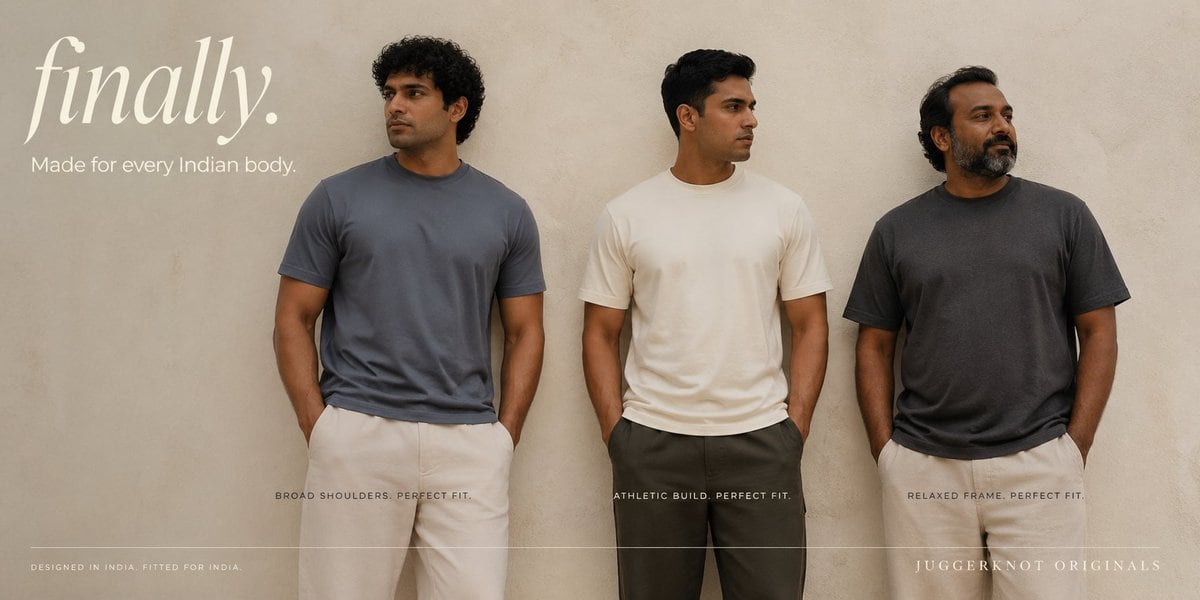
A clean premium fashion campaign banner shot against a warm beige textured plaster wall, featuring 3 Indian men standing side by side full torso to upper thigh, evenly spaced across the f...

A clean premium fashion campaign banner shot against a warm beige textured plaster wall, featuring 3 Indian men standing side by side full torso to upper thigh, evenly spaced across the f...
Prompt

A clean premium fashion campaign banner shot against a warm beige textured plaster wall, featuring 3 Indian men standing side by side full torso to upper thigh, evenly spaced across the frame, all with their hands in their pockets and looking slightly away from the camera. The styling is minimalist, editorial, and aspirational, with soft natural studio lighting and muted earthy tones. On the left, a lean man with short curly dark hair wears a slate blue crew-neck t-shirt and off-white trousers; in the center, an athletic man with short black hair wears an ivory cream crew-neck t-shirt and dark charcoal trousers; on the right, a heavier relaxed-build man with medium-length wavy dark hair wears a faded charcoal crew-neck t-shirt and light beige trousers. The t-shirts should look well-fitted on different body types, with realistic cotton texture, subtle folds, and clean hems. Add large elegant serif text in the upper left reading {argument name="headline text" default="finally."} in off-white, with smaller sans-serif subheading below reading {argument name="tagline" default="Made for every Indian body."}. Place 3 small uppercase captions near the bottom beneath each model: left caption {argument name="left caption" default="BROAD SHOULDERS. PERFECT FIT."}, center caption "ATHLETIC BUILD. PERFECT FIT.", right caption "RELAXED FRAME. PERFECT FIT.". Add tiny uppercase footer text at the bottom left reading "DESIGNED IN INDIA. FITTED FOR INDIA." and brand text at the bottom right reading {argument name="brand name" default="JUGGERKNOT ORIGINALS"}. Include a thin horizontal divider line running near the bottom across most of the image. Wide aspect ratio, luxury apparel ad aesthetic, realistic photography, neutral color grading, uncluttered composition, high-end Indian menswear branding.

Prompt structure
  • Modelgpt-image-2
  • Use casebrand-identity
  • Stylephotorealistic, luxury, minimal, editorial
  • Aspect ratioFlexible
Best used for
  • Use casebrand-identity
  • Stylephotorealistic, luxury, minimal, editorial
  • Recommended specs1:1, 4:5, 16:9, or 9:16
  • ModelGPT Image 2
How to customize

Use this Clean Premium Fashion Campaign Banner Shot Against A Warm Beige Textured prompt as a base. Replace the subject, product details, environment, lighting, brand colors, and output ratio while keeping the brand-identity intent and photorealistic, luxury, minimal, editorial direction stable.

Editable variables
  • SubjectReplace the product, person, scene, interface, or object being generated.
  • Use caseKeep or rewrite the destination as brand identity, ad creative, cover image, poster, or ecommerce hero.
  • FrameChoose 1:1, 4:5, 16:9, or 9:16 based on the final placement.
  • Brand cuesAdd colors, materials, props, text-safe space, and the platform where the image will be used.
Recommended specs

Choose the frame for the destination first, then use 1K, 2K, or 4K based on output quality needs. Product images and posters usually benefit from higher resolution.

Pre-generation checklist
  • CheckSubject, lighting, composition, and frame are specific enough to review.
  • CheckText-safe space is included when the image will carry a headline or ad copy.
  • CheckResolution, credit cost, and final destination are checked before generation.
Why this prompt works

Clean Premium Fashion Campaign Banner Shot Against A Warm Beige Textured works because it starts from the image job, then controls subject, composition, lighting, style, and frame. It is best for brand identity while keeping the photorealistic, luxury, minimal, editorial direction stable.

Common questions
  • Can I use it directly?Yes. Replace the subject, brand cues, and frame, then generate in Image2Studio.
  • Which ratio should I use?Choose 1:1, 4:5, 16:9, or 9:16 based on the destination.




