
Image2Studio
Examples

gpt-image-2

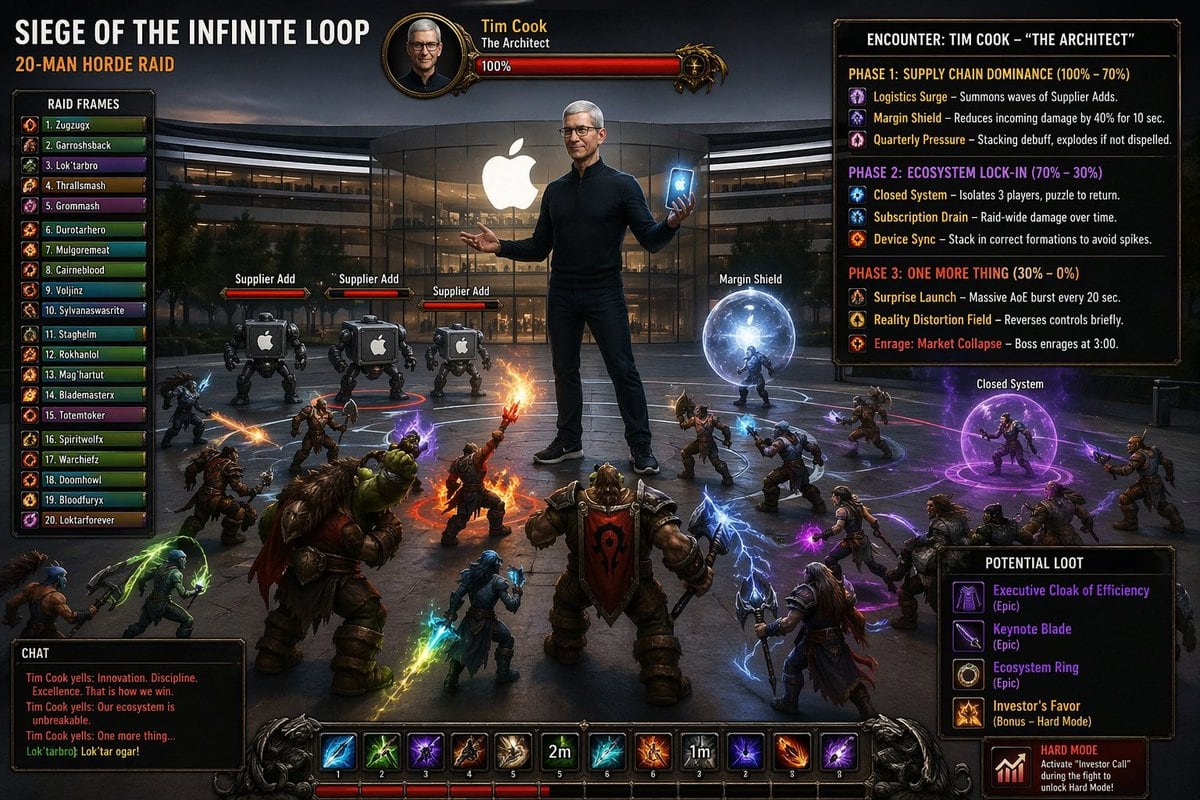
Create A Cinematic Fantasy MMO Raid Boss Loading-screen-style Illustrati

Create a cinematic fantasy MMO raid boss loading-screen-style illustration with a full custom game UI overlay. The scene is set at dusk in front of the glass cube Apple Store, with the gl...

Create a cinematic fantasy MMO raid boss loading-screen-style illustration with a full custom game UI overlay. The scene is set at dusk in front of the glass cube Apple Store, with the gl...
Prompt

Create a cinematic fantasy MMO raid boss loading-screen-style illustration with a full custom game UI overlay. The scene is set at dusk in front of the glass cube Apple Store, with the glowing white Apple logo centered on the building facade. In the middle of the plaza stands a giant raid boss version of {argument name="boss name" default="Tim Cook"}, labeled as "The Architect," wearing a fitted black turtleneck, dark pants, and sneakers, holding a glowing smartphone in one hand and posing calmly with the other hand open. His face is intentionally blurred or anonymized. The overall tone is epic, satirical, and high-production, like a World of Warcraft raid encounter screen mixed with corporate tech parody. Around him, exactly 20 fantasy raiders in a semicircle battle formation face inward toward the boss, with varied races and silhouettes including armored warriors, rogues, mages, shamans, hunters, and orc-like and human-like characters. Several are casting bright spells in orange fire, blue lightning, green energy, and purple void magic. Include exactly 3 small robotic adds near the boss, each labeled "Supplier Add," with squat industrial bodies and Apple logos on their fronts. Also include 2 active encounter mechanic bubbles: one blue spherical shield labeled "Margin Shield" on the right side of the boss, and one purple circular dome labeled "Closed System" farther right with a humanoid enemy trapped inside. Build the image as a complete raid UI composition. Top left: a large expansion-style title reading "SIEGE OF THE INFINITE LOOP" with subtitle "20-MAN HORDE RAID." Far left: a vertical "RAID FRAMES" panel listing exactly 20 player names in numbered rows from 1 to 20 with colored health bars. Top center: a boss portrait frame with the boss name {argument name="boss name" default="Tim Cook"}, subtitle "The Architect," and a red health bar at 100%. Top right: a large encounter guide panel titled "ENCOUNTER: {argument name="boss name" default="TIM COOK"} – \"THE ARCHITECT\"" containing exactly 3 phases. Phase 1 title: "SUPPLY CHAIN DOMINANCE (100% – 70%)" with 3 abilities: "Logistics Surge – Summons waves of Supplier Adds.", "Margin Shield – Reduces incoming damage by 40% for 10 sec.", and "Quarterly Pressure – Stacking debuff, explodes if not dispelled." Phase 2 title: "ECOSYSTEM LOCK-IN (70% – 30%)" with 3 abilities: "Closed System – Isolates 3 players, puzzle to return.", "Subscription Drain – Raid-wide damage over time.", and "Device Sync – Stack in correct formations to avoid spikes." Phase 3 title: "ONE MORE THING (30% – 0%)" with 3 abilities: "Surprise Launch – Massive AoE burst every 20 sec.", "Reality Distortion Field – Reverses controls briefly.", and "Enrage: Market Collapse – Boss enrages at 3:00." Bottom right: a "POTENTIAL LOOT" panel listing exactly 4 items with rarity-colored text: "Executive Cloak of Efficiency (Epic)", "Keynote Blade (Epic)", "Ecosystem Ring (Epic)", and "Investor's Favor (Bonus – Hard Mode)." Below that, add a small red-black badge reading "HARD MODE" and the line "Activate \"Investor Call\" during the fight to" with the remaining text cut off or obscured. Bottom left: a "CHAT" box with 4 lines, including taunting boss dialogue and a player response, such as "{argument name="boss quote" default="Tim Cook yells: Innovation. Discipline. Excellence. That is how we win."}", "Tim Cook yells: Our ecosystem is unbreakable.", "Tim Cook yells: One more thing...", and "Lok'tarbrok: Lok'tar ogar!" Along the bottom center: a fantasy action bar with exactly 12 ability icons in ornate slots, some numbered, some showing cooldown text including "2m" and "1m". Use dramatic volumetric lighting, glossy reflections on the wet plaza, realistic environment rendering, highly detailed fantasy characters, exaggerated spell effects, dark vignette, sharp UI typography, and polished AAA game key art composition.

Prompt structure
  • Modelgpt-image-2
  • Use caseecommerce-product-image
  • Stylecinematic, photorealistic, watercolor
  • Aspect ratioFlexible
Best used for
  • Use caseecommerce-product-image
  • Stylecinematic, photorealistic, watercolor
  • Recommended specs1:1, 4:5, 16:9, or 9:16
  • ModelGPT Image 2
How to customize

Use this Create A Cinematic Fantasy MMO Raid Boss Loading-screen-style Illustrati prompt as a base. Replace the subject, product details, environment, lighting, brand colors, and output ratio while keeping the ecommerce-product-image intent and cinematic, photorealistic, watercolor direction stable.

Editable variables
  • SubjectReplace the product, person, scene, interface, or object being generated.
  • Use caseKeep or rewrite the destination as ecommerce product image, ad creative, cover image, poster, or ecommerce hero.
  • FrameChoose 1:1, 4:5, 16:9, or 9:16 based on the final placement.
  • Brand cuesAdd colors, materials, props, text-safe space, and the platform where the image will be used.
Recommended specs

Choose the frame for the destination first, then use 1K, 2K, or 4K based on output quality needs. Product images and posters usually benefit from higher resolution.

Pre-generation checklist
  • CheckSubject, lighting, composition, and frame are specific enough to review.
  • CheckText-safe space is included when the image will carry a headline or ad copy.
  • CheckResolution, credit cost, and final destination are checked before generation.
Why this prompt works

Create A Cinematic Fantasy MMO Raid Boss Loading-screen-style Illustrati works because it starts from the image job, then controls subject, composition, lighting, style, and frame. It is best for ecommerce product image while keeping the cinematic, photorealistic, watercolor direction stable.

Common questions
  • Can I use it directly?Yes. Replace the subject, brand cues, and frame, then generate in Image2Studio.
  • Which ratio should I use?Choose 1:1, 4:5, 16:9, or 9:16 based on the destination.




