
Image2Studio
Examples

gpt-image-2

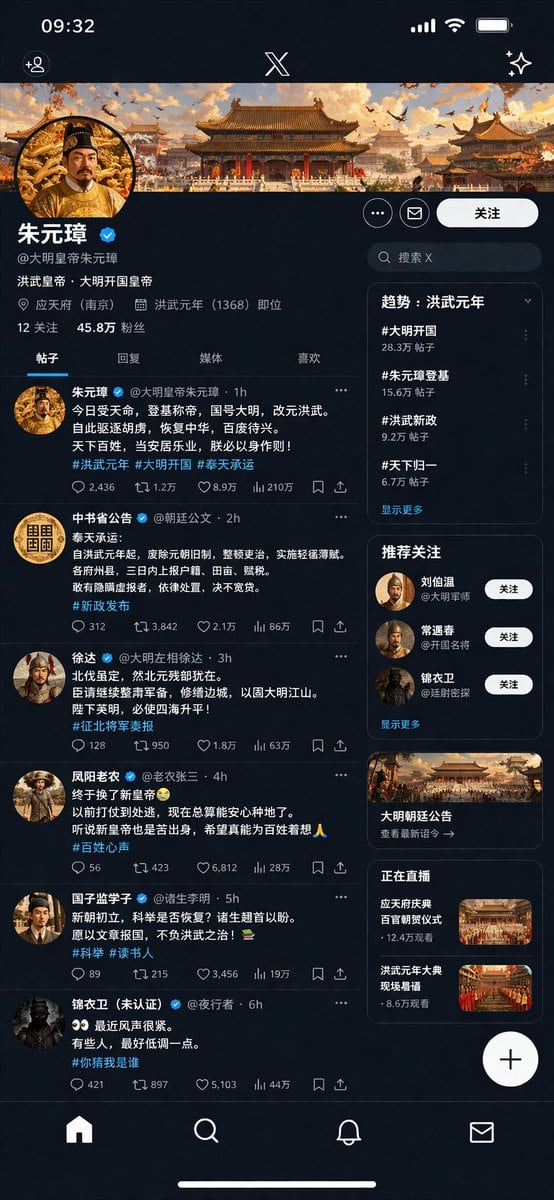
Social Media Profile UI Mockup

Ready-to-edit social media profile UI mockup image prompt.

Ready-to-edit social media profile UI mockup image prompt.
Prompt

{ "type": "social media profile UI mockup", "theme": "{argument name=\"theme era\" default=\"Ming Dynasty\"}", "app_style": "{argument name=\"app style\" default=\"X/Twitter dark mode\"}", "header": { "banner_image": "traditional Chinese palace complex at sunset", "avatar": "portrait of emperor in yellow robes", "name": "{argument name=\"profile name\" default=\"朱元璋\"}", "handle": "{argument name=\"profile handle\" default=\"@大明皇帝朱元璋\"}", "bio": "{argument name=\"bio text\" default=\"洪武皇帝,大明开国皇帝\"}", "location": "应天府 (南京)", "joined": "洪武元年 (1368) 即位", "stats": "12 关注, 45.8万 粉丝" }, "navigation_tabs": ["帖子", "回复", "媒体", "喜欢"], "layout": { "left_column_feed": { "count": 6, "items": [ { "author": "朱元璋", "handle": "@大明皇帝朱元璋", "content_summary": "proclamation of new dynasty", "tags": ["#洪武元年", "#大明开国", "#奉天承运"] }, { "author": "中书省公告", "handle": "@朝廷公文", "content_summary": "official edict on taxes", "tags": ["#新政发布"] }, { "author": "徐达", "handle": "@大明左相徐达", "content_summary": "military report", "tags": ["#征北将军奏报"] }, { "author": "凤阳老农", "handle": "@老农张三", "content_summary": "peasant expressing relief", "tags": ["#百姓心声"] }, { "author": "国子监学子", "handle": "@诸生李明", "content_summary": "scholar asking about exams", "tags": ["#科举", "#读书人"] }, { "author": "锦衣卫 (未认证)", "handle": "@夜行者", "content_summary": "secret police warning", "tags": ["#你猜我是谁"] } ] }, "right_column_sidebar": { "sections": [ { "title": "趋势: 洪武元年", "count": 4, "labels": ["#大明开国", "#朱元璋登基", "#洪武新政", "#天下归一"] }, { "title": "推荐关注", "count": 3, "labels": ["刘伯温", "常遇春", "锦衣卫"] }, { "title": "promo_card", "count": 1, "label": "大明朝廷公告", "image": "palace building" }, { "title": "正在直播", "count": 2, "labels": ["应天府庆典", "洪武元年大典"], "thumbnails": "grand ceremonies" } ] }, "system_ui": { "top_bar": "time 09:32, signal, wifi, battery, X logo", "bottom_bar": "home, search, notifications, messages icons", "floating_button": "+" } } }

Prompt structure
  • Modelgpt-image-2
  • Use casesocial-media-post
  • Styleeditorial
  • Aspect ratioFlexible
Best used for
  • Use casesocial-media-post
  • Styleeditorial
  • Recommended specs1:1, 4:5, 16:9, or 9:16
  • ModelGPT Image 2
How to customize

Use this Social Media Profile UI Mockup prompt as a base. Replace the subject, product details, environment, lighting, brand colors, and output ratio while keeping the social-media-post intent and editorial direction stable.

Editable variables
  • SubjectReplace the product, person, scene, interface, or object being generated.
  • Use caseKeep or rewrite the destination as social media post, ad creative, cover image, poster, or ecommerce hero.
  • FrameChoose 1:1, 4:5, 16:9, or 9:16 based on the final placement.
  • Brand cuesAdd colors, materials, props, text-safe space, and the platform where the image will be used.
Recommended specs

Choose the frame for the destination first, then use 1K, 2K, or 4K based on output quality needs. Product images and posters usually benefit from higher resolution.

Pre-generation checklist
  • CheckSubject, lighting, composition, and frame are specific enough to review.
  • CheckText-safe space is included when the image will carry a headline or ad copy.
  • CheckResolution, credit cost, and final destination are checked before generation.
Why this prompt works

Social Media Profile UI Mockup works because it starts from the image job, then controls subject, composition, lighting, style, and frame. It is best for social media post while keeping the editorial direction stable.

Common questions
  • Can I use it directly?Yes. Replace the subject, brand cues, and frame, then generate in Image2Studio.
  • Which ratio should I use?Choose 1:1, 4:5, 16:9, or 9:16 based on the destination.




