
Image2Studio
Examples

gpt-image-2

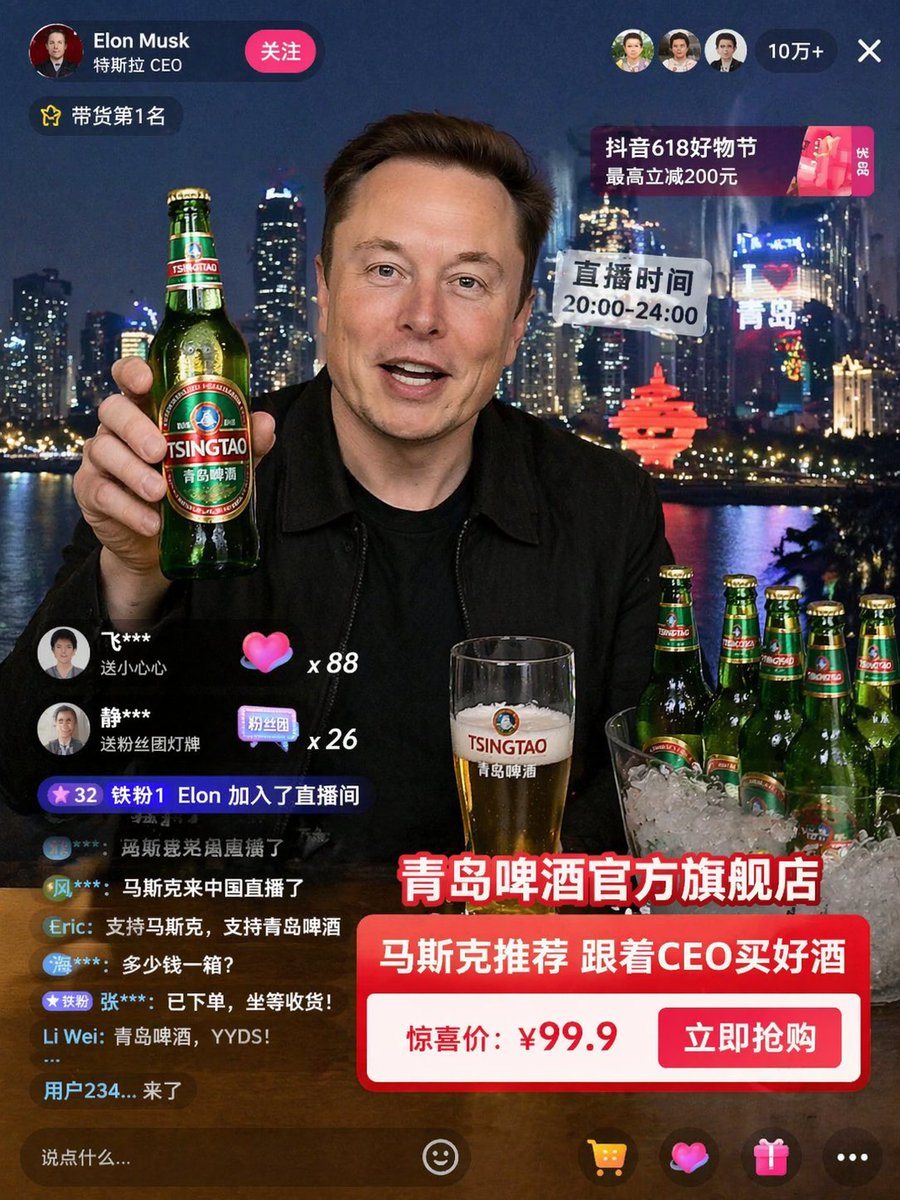
Livestream Interface Mockup

Ready-to-edit livestream interface mockup image prompt.

Ready-to-edit livestream interface mockup image prompt.
Prompt

{ "type": "livestream interface mockup", "broadcaster": { "name": "{argument name=\"broadcaster name\" default=\"Elon Musk\"}", "appearance": "smiling man in a black jacket", "action": "holding up a green glass beer bottle with a {argument name=\"product brand\" default=\"TSINGTAO\"} label" }, "environment": { "background": "{argument name=\"city background\" default=\"Qingdao skyline at night\"} with illuminated skyscrapers, a river, a glowing red sculptural monument, and a neon sign reading 'I ❤️ 青岛'", "foreground": "a wooden table with a glass of beer with foam, and a clear ice bucket containing 4 green beer bottles" }, "ui_elements": { "header": { "left": "Profile picture, name '{argument name=\"broadcaster name\" default=\"Elon Musk\"}', subtitle '特斯拉 CEO', and a pink '关注' button", "right": "3 viewer avatars, '10万+' viewer count, and an 'X' close button", "top_right_banner": "Pink promotional banner reading '抖音618好物节 最高立减200元'" }, "floating_badges": [ "Yellow star badge '带货第1名' on top left", "Translucent speech bubble '直播时间 20:00-24:00' on mid right" ], "interaction_panel": { "gifts": [ "User '飞***' sending a pink heart 'x 88'", "User '静***' sending a fan club badge 'x 26'" ], "system_message": "Purple badge '32 铁粉1 Elon 加入了直播间'", "chat_messages_count": 7, "chat_examples": ["马斯克来中国直播了", "支持马斯克,支持青岛啤酒", "多少钱一箱?"] }, "product_card": { "position": "bottom right", "main_title": "{argument name=\"banner headline\" default=\"青岛啤酒官方旗舰店\"}", "subtitle": "Red banner with white text '马斯克推荐 跟着CEO买好酒'", "purchase_button": "White box with red text '惊喜价: {argument name=\"price\" default=\"¥99.9\"}' and a red '立即抢购' button" }, "bottom_bar": { "input_field": "Text input reading '说点什么...'", "icons_count": 5, "icons_list": ["smiley face", "shopping cart", "heart", "gift box", "three dots"] } } }

Prompt structure
  • Modelgpt-image-2
  • Use caseavatar
  • Stylephotorealistic, cyberpunk
  • Aspect ratioFlexible
Best used for
  • Use caseavatar
  • Stylephotorealistic, cyberpunk
  • Recommended specs1:1, 4:5, 16:9, or 9:16
  • ModelGPT Image 2
How to customize

Use this Livestream Interface Mockup prompt as a base. Replace the subject, product details, environment, lighting, brand colors, and output ratio while keeping the avatar intent and photorealistic, cyberpunk direction stable.

Editable variables
  • SubjectReplace the product, person, scene, interface, or object being generated.
  • Use caseKeep or rewrite the destination as avatar, ad creative, cover image, poster, or ecommerce hero.
  • FrameChoose 1:1, 4:5, 16:9, or 9:16 based on the final placement.
  • Brand cuesAdd colors, materials, props, text-safe space, and the platform where the image will be used.
Recommended specs

Choose the frame for the destination first, then use 1K, 2K, or 4K based on output quality needs. Product images and posters usually benefit from higher resolution.

Pre-generation checklist
  • CheckSubject, lighting, composition, and frame are specific enough to review.
  • CheckText-safe space is included when the image will carry a headline or ad copy.
  • CheckResolution, credit cost, and final destination are checked before generation.
Why this prompt works

Livestream Interface Mockup works because it starts from the image job, then controls subject, composition, lighting, style, and frame. It is best for avatar while keeping the photorealistic, cyberpunk direction stable.

Common questions
  • Can I use it directly?Yes. Replace the subject, brand cues, and frame, then generate in Image2Studio.
  • Which ratio should I use?Choose 1:1, 4:5, 16:9, or 9:16 based on the destination.




