
Image2Studio
Examples

gpt-image-2

Using The Provided Reference Image As The Brand Style Guide

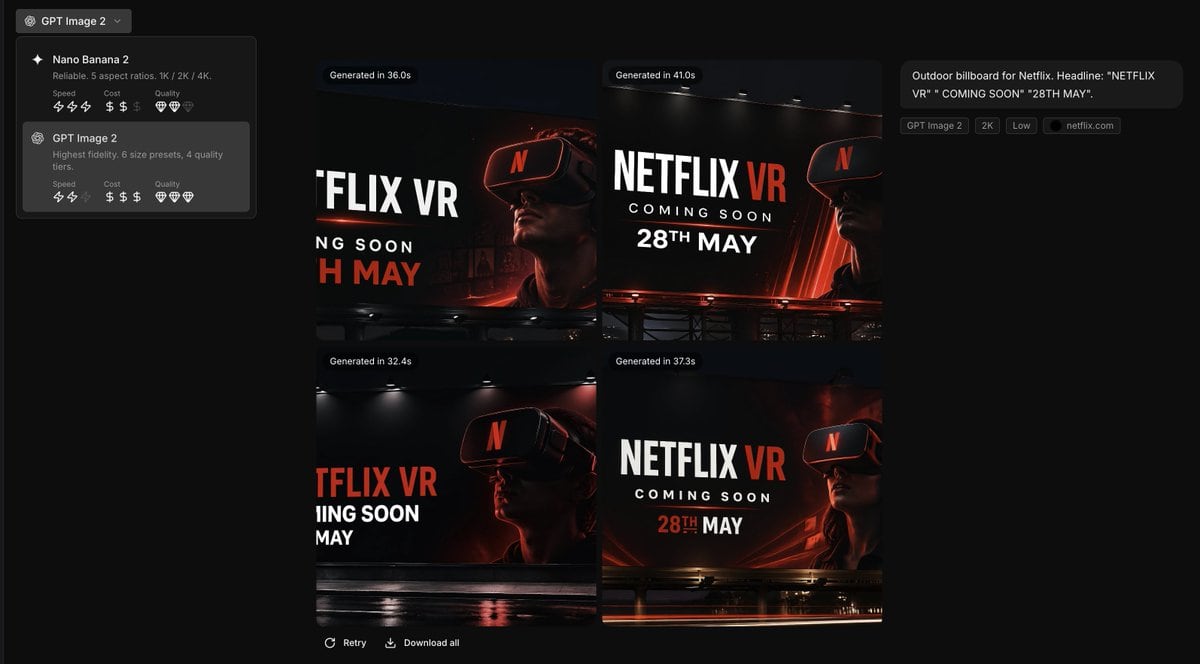
Using the provided reference image as the brand style guide, generate a dark creative-generation app interface showing 4 billboard ad concepts in a 2x2 grid for Netflix. Apply the exact b...

Using the provided reference image as the brand style guide, generate a dark creative-generation app interface showing 4 billboard ad concepts in a 2x2 grid for Netflix. Apply the exact b...
Prompt

Using the provided reference image as the brand style guide, generate a dark creative-generation app interface showing 4 billboard ad concepts in a 2x2 grid for {argument name="brand name" default="Netflix"}. Apply the exact brand palette and overall visual identity from the reference: deep black background, red accent, white typography, charcoal overlays, and clean modern sans-serif styling. Turn the reference from a static brand settings page into an image-generation results screen with a left sidebar model picker containing 2 model cards, and a main canvas displaying 4 generated concept thumbnails. Each thumbnail should be a cinematic nighttime outdoor billboard mockup with dramatic lighting, glossy reflections, and a person wearing a VR headset. Use bold billboard copy reading {argument name="headline text" default="NETFLIX VR"}, {argument name="subheadline text" default="COMING SOON"}, and {argument name="date text" default="28TH MAY"}. Add small UI chips and labels on the right summarizing the prompt, plus generation-time badges above each of the 4 images. Keep the result looking like a premium creative tool screenshot for branded ad ideation.

Prompt structure
  • Modelgpt-image-2
  • Use casebrand-identity
  • Stylecinematic, minimal, luxury
  • Aspect ratioFlexible
Best used for
  • Use casebrand-identity
  • Stylecinematic, minimal, luxury
  • Recommended specs1:1, 4:5, 16:9, or 9:16
  • ModelGPT Image 2
How to customize

Use this Using The Provided Reference Image As The Brand Style Guide prompt as a base. Replace the subject, product details, environment, lighting, brand colors, and output ratio while keeping the brand-identity intent and cinematic, minimal, luxury direction stable.

Editable variables
  • SubjectReplace the product, person, scene, interface, or object being generated.
  • Use caseKeep or rewrite the destination as brand identity, ad creative, cover image, poster, or ecommerce hero.
  • FrameChoose 1:1, 4:5, 16:9, or 9:16 based on the final placement.
  • Brand cuesAdd colors, materials, props, text-safe space, and the platform where the image will be used.
Recommended specs

Choose the frame for the destination first, then use 1K, 2K, or 4K based on output quality needs. Product images and posters usually benefit from higher resolution.

Pre-generation checklist
  • CheckSubject, lighting, composition, and frame are specific enough to review.
  • CheckText-safe space is included when the image will carry a headline or ad copy.
  • CheckResolution, credit cost, and final destination are checked before generation.
Why this prompt works

Using The Provided Reference Image As The Brand Style Guide works because it starts from the image job, then controls subject, composition, lighting, style, and frame. It is best for brand identity while keeping the cinematic, minimal, luxury direction stable.

Common questions
  • Can I use it directly?Yes. Replace the subject, brand cues, and frame, then generate in Image2Studio.
  • Which ratio should I use?Choose 1:1, 4:5, 16:9, or 9:16 based on the destination.




