Prompt{
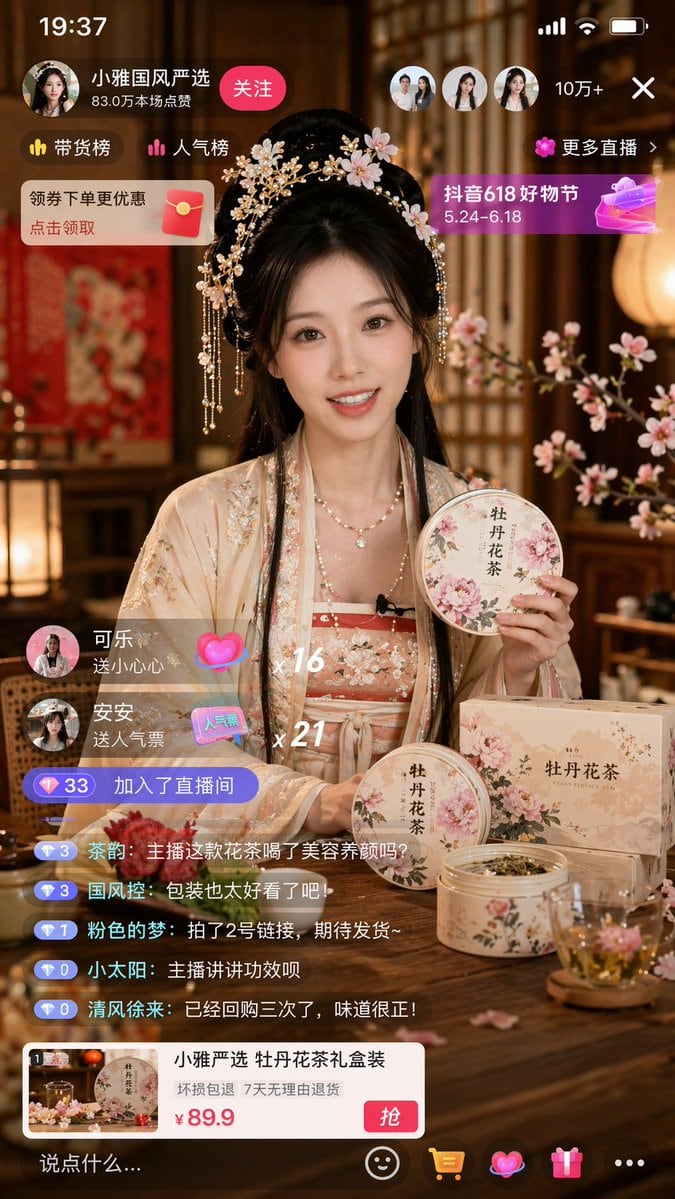
"type": "mobile live stream UI mockup",
"subject": {
"description": "young Asian woman in traditional light peach Hanfu with floral embroidery, ornate gold and pearl hairpins with pink flowers, smiling, looking at camera, holding a round tin of floral tea",
"foreground_objects": {
"count": 5,
"items": [
"round tin held by host",
"round tin on table",
"rectangular box on table",
"open tin with dried tea leaves",
"clear glass teacup with blooming pink flower"
],
"labels": ["牡丹花茶"]
},
"background": "traditional Chinese interior, warm lighting, wooden lattice screens, pink floral branches"
},
"ui_layout": {
"top_bar": {
"elements": ["19:37", "signal bars", "wifi", "battery"]
},
"top_left": {
"host_info": {
"name": "{argument name=\"host name\" default=\"小雅国风严选\"}",
"stats": "83.0万本场点赞",
"button": "关注"
},
"badges": ["带货榜", "人气榜"],
"promo_banner": "领券下单更优惠 点击领取"
},
"top_right": {
"viewers": {
"count": 3,
"text": "10万+",
"close_button": "X"
},
"links": ["更多直播 >"],
"event_banner": {
"title": "{argument name=\"event banner text\" default=\"抖音618好物节\"}",
"dates": "5.24-6.18"
}
},
"mid_left_events": {
"gift_count": 2,
"gifts": [
{"user": "可乐", "action": "送小心心", "combo": "x 16"},
{"user": "安安", "action": "送人气票", "combo": "x 21"}
],
"join_notification": "加入了直播间"
},
"bottom_left_chat": {
"message_count": 5,
"messages": [
"{argument name=\"chat message\" default=\"主播这款花茶喝了美容养颜吗?\"}",
"包装也太好看了吧!",
"拍了2号链接,期待发货~",
"主播讲讲功效呗",
"已经回购三次了,味道很正!"
]
},
"bottom_product_card": {
"title": "小雅严选 {argument name=\"product name\" default=\"牡丹花茶\"}礼盒装",
"guarantee": "坏损包退 7天无理由退货",
"price": "{argument name=\"product price\" default=\"¥ 89.9\"}",
"button": "抢"
},
"bottom_nav_bar": {
"input_placeholder": "说点什么...",
"icons_count": 5,
"icons": ["smiley", "shopping cart", "gift", "heart", "more options"]
}
}
}
Prompt structure- Modelgpt-image-2
- Use caseapp-ui-mockup
- Stylephotorealistic, luxury
- Aspect ratioFlexible
Best used for- Use caseapp-ui-mockup
- Stylephotorealistic, luxury
- Recommended specs1:1, 4:5, 16:9, or 9:16
- ModelGPT Image 2
How to customizeUse this Mobile Live Stream UI Mockup prompt as a base. Replace the subject, product details, environment, lighting, brand colors, and output ratio while keeping the app-ui-mockup intent and photorealistic, luxury direction stable.
Editable variables- SubjectReplace the product, person, scene, interface, or object being generated.
- Use caseKeep or rewrite the destination as app ui mockup, ad creative, cover image, poster, or ecommerce hero.
- FrameChoose 1:1, 4:5, 16:9, or 9:16 based on the final placement.
- Brand cuesAdd colors, materials, props, text-safe space, and the platform where the image will be used.
Recommended specsChoose the frame for the destination first, then use 1K, 2K, or 4K based on output quality needs. Product images and posters usually benefit from higher resolution.
Pre-generation checklist- CheckSubject, lighting, composition, and frame are specific enough to review.
- CheckText-safe space is included when the image will carry a headline or ad copy.
- CheckResolution, credit cost, and final destination are checked before generation.
Why this prompt worksMobile Live Stream UI Mockup works because it starts from the image job, then controls subject, composition, lighting, style, and frame. It is best for app ui mockup while keeping the photorealistic, luxury direction stable.
Common questions- Can I use it directly?Yes. Replace the subject, brand cues, and frame, then generate in Image2Studio.
- Which ratio should I use?Choose 1:1, 4:5, 16:9, or 9:16 based on the destination.