
Image2Studio
Examples

gpt-image-2

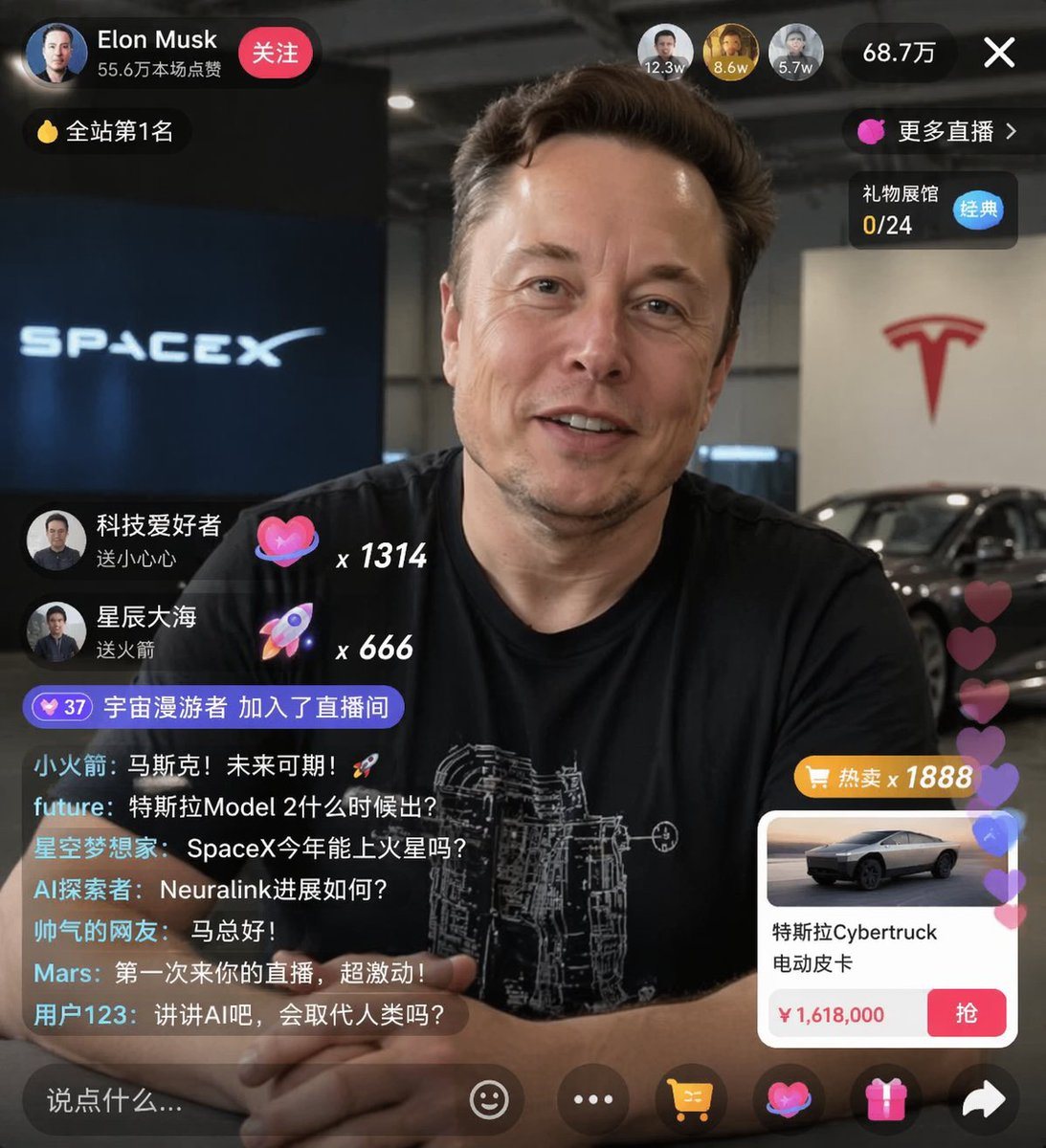
Live Stream UI Mockup

Ready-to-edit live stream UI mockup image prompt.

Ready-to-edit live stream UI mockup image prompt.
Prompt

{ "type": "live stream UI mockup", "subject": { "description": "portrait of {argument name=\"host name\" default=\"Elon Musk\"}, smiling, wearing a black t-shirt with a white technical schematic graphic", "background": "left side shows a screen with '{argument name=\"left background logo\" default=\"SPACEX\"}' text, right side shows a red '{argument name=\"right background logo\" default=\"Tesla T logo\"}' and a dark car" }, "ui_overlay": { "top_header": { "host_info": "avatar, name '{argument name=\"host name\" default=\"Elon Musk\"}', subtext '55.6万本场点赞', red '关注' button", "rank_badge": "gold coin icon with '全站第1名'", "viewer_stats": "3 top viewer avatars with '12.3w', '8.6w', '5.7w', total '68.7万', 'X' close button", "right_links": "'更多直播 >', '礼物展馆 0/24' with blue '经典' tag" }, "mid_left_gifts": { "count": 2, "items": [ "avatar '科技爱好者', '送小心心', heart icon x 1314", "avatar '星辰大海', '送火箭', rocket icon x 666" ] }, "bottom_left_chat": { "system_message": "level 37 badge '宇宙漫游者 加入了直播间'", "message_count": 7, "messages": [ "小火箭: 马斯克!未来可期!🚀", "future: 特斯拉Model 2什么时候出?", "星空梦想家: SpaceX今年能上火星吗?", "AI探索者: Neuralink进展如何?", "帅气的网友: 马总好!", "Mars: 第一次来你的直播,超激动!", "用户123: 讲讲AI吧,会取代人类吗?" ] }, "bottom_right_product_card": { "hot_tag": "orange '热卖 x 1888'", "image": "Tesla Cybertruck", "title": "{argument name=\"product name\" default=\"特斯拉Cybertruck 电动皮卡\"}", "price": "{argument name=\"product price\" default=\"¥ 1,618,000\"}", "button": "red '抢' button", "floating_animation": "translucent hearts floating up the right edge" }, "bottom_bar": { "input_field": "'说点什么...'", "icons": ["smiley face", "three dots", "shopping cart", "gift box", "share"] } } }

Prompt structure
  • Modelgpt-image-2
  • Use caseavatar
  • Stylephotorealistic, luxury
  • Aspect ratioFlexible
Best used for
  • Use caseavatar
  • Stylephotorealistic, luxury
  • Recommended specs1:1, 4:5, 16:9, or 9:16
  • ModelGPT Image 2
How to customize

Use this Live Stream UI Mockup prompt as a base. Replace the subject, product details, environment, lighting, brand colors, and output ratio while keeping the avatar intent and photorealistic, luxury direction stable.

Editable variables
  • SubjectReplace the product, person, scene, interface, or object being generated.
  • Use caseKeep or rewrite the destination as avatar, ad creative, cover image, poster, or ecommerce hero.
  • FrameChoose 1:1, 4:5, 16:9, or 9:16 based on the final placement.
  • Brand cuesAdd colors, materials, props, text-safe space, and the platform where the image will be used.
Recommended specs

Choose the frame for the destination first, then use 1K, 2K, or 4K based on output quality needs. Product images and posters usually benefit from higher resolution.

Pre-generation checklist
  • CheckSubject, lighting, composition, and frame are specific enough to review.
  • CheckText-safe space is included when the image will carry a headline or ad copy.
  • CheckResolution, credit cost, and final destination are checked before generation.
Why this prompt works

Live Stream UI Mockup works because it starts from the image job, then controls subject, composition, lighting, style, and frame. It is best for avatar while keeping the photorealistic, luxury direction stable.

Common questions
  • Can I use it directly?Yes. Replace the subject, brand cues, and frame, then generate in Image2Studio.
  • Which ratio should I use?Choose 1:1, 4:5, 16:9, or 9:16 based on the destination.




