
Image2Studio
Prompts

gpt-image-2

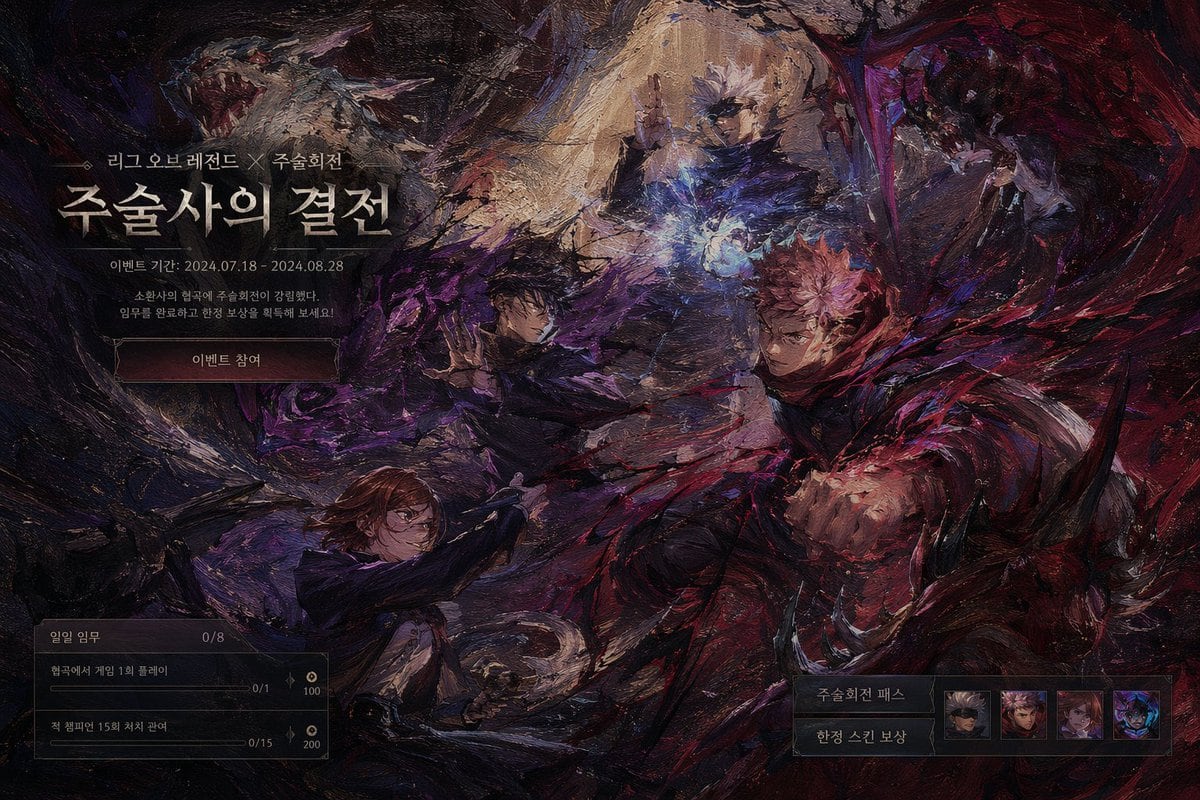
暗黑奇幻游戏活动 UI 设计稿

生成带有角色插画以及任务和奖励 UI 面板的油画风格暗黑奇幻游戏活动界面。

Copy this GPT Image 2 prompt for product hero shot and ui mockups. Use it in Image2Studio to generate, edit, and save production-ready images.
Prompt

{ "type": "game event landing page UI mockup", "art_style": "{argument name=\"art style\" default=\"heavy impasto oil painting, dark fantasy\"}", "background_artwork": { "description": "dynamic combat scene with swirling dark and red energy", "character_count": 4, "characters": [ "top: white-haired man casting blue spell", "middle-left: dark-haired man summoning shadow energy", "right: pink-haired man throwing red energy punch", "bottom-left: brown-haired woman wielding hammer" ] }, "ui_layout": { "top_left": { "type": "event header", "elements": [ {"small_text": "{argument name=\"subtitle\" default=\"리그 오브 레전드 X 주술회전\"}"}, {"large_title": "{argument name=\"main title\" default=\"주술사의 결전\"}"}, {"date_text": "{argument name=\"event date\" default=\"이벤트 기간: 2024.07.18 - 2024.08.28\"}"}, {"description": "소환사의 협곡에 주술회전이 강림했다. 임무를 완료하고 한정 보상을 획득해 보세요!"}, {"button": "{argument name=\"button text\" default=\"이벤트 참여\"}"} ] }, "bottom_left": { "type": "mission panel", "header": "일일 임무 0/8", "mission_count": 2, "missions": [ {"text": "협곡에서 게임 1회 플레이", "progress": "0/1", "reward": "100"}, {"text": "적 챔피언 15회 처치 관여", "progress": "0/15", "reward": "200"} ] }, "bottom_right": { "type": "rewards panel", "labels": ["주술회전 패스", "한정 스킨 보상"], "icon_count": 4, "icons": [ "blindfolded man", "pink-haired boy", "brown-haired girl", "dark monster" ] } } }

Prompt structure
  • Modelgpt-image-2
  • Use caseproduct-hero-shot
  • Styleprompt-defined style
  • Aspect ratioFlexible
Best used for
  • Use caseproduct-hero-shot
  • Styleprompt-defined style
  • Recommended specs1:1, 4:5, 16:9, or 9:16
  • ModelGPT Image 2
How to customize

Use this 暗黑奇幻游戏活动 UI 设计稿 prompt as a base. Replace the subject, product details, environment, lighting, brand colors, and output ratio while keeping the product-hero-shot intent and the visual style direction stable.

Editable variables
  • SubjectReplace the product, person, scene, interface, or object being generated.
  • Use caseKeep or rewrite the destination as product hero shot, ad creative, cover image, poster, or ecommerce hero.
  • FrameChoose 1:1, 4:5, 16:9, or 9:16 based on the final placement.
  • Brand cuesAdd colors, materials, props, text-safe space, and the platform where the image will be used.
Recommended specs

Choose the frame for the destination first, then use 1K, 2K, or 4K based on output quality needs. Product images and posters usually benefit from higher resolution.

Pre-generation checklist
  • CheckSubject, lighting, composition, and frame are specific enough to review.
  • CheckText-safe space is included when the image will carry a headline or ad copy.
  • CheckResolution, credit cost, and final destination are checked before generation.
Why this prompt works

暗黑奇幻游戏活动 UI 设计稿 works because it starts from the image job, then controls subject, composition, lighting, style, and frame. It is best for product hero shot while keeping the prompt-defined style direction stable.

Common questions
  • Can I use it directly?Yes. Replace the subject, brand cues, and frame, then generate in Image2Studio.
  • Which ratio should I use?Choose 1:1, 4:5, 16:9, or 9:16 based on the destination.




