
Image2Studio
Prompts

gpt-image-2

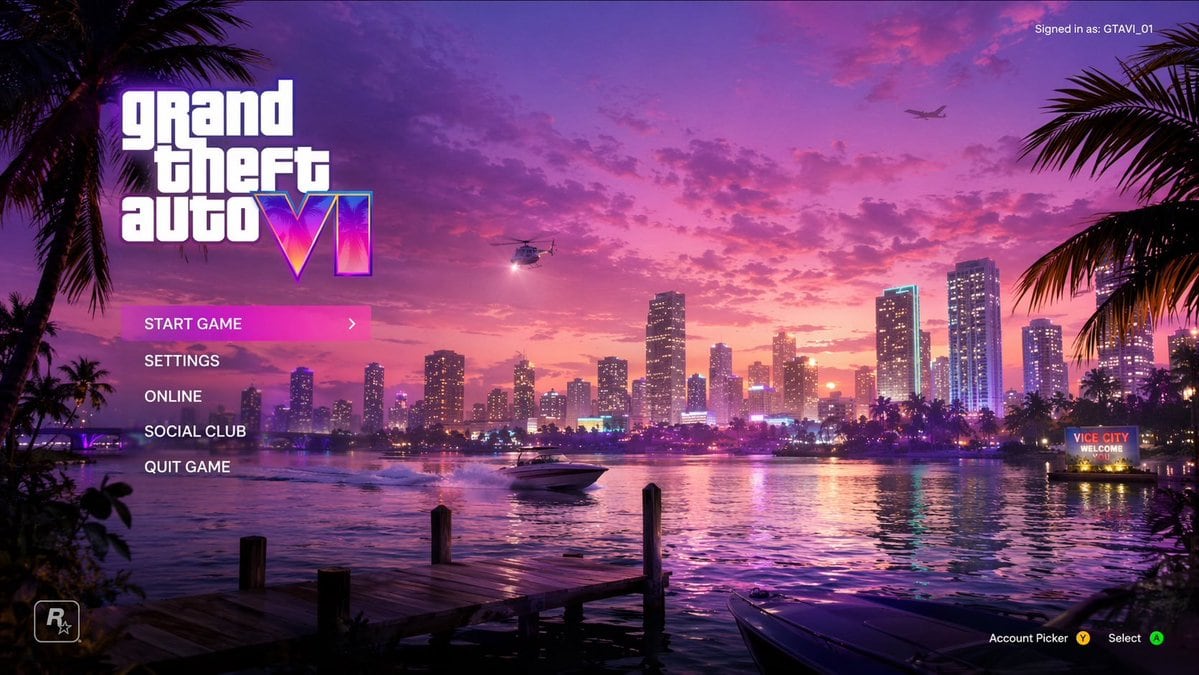
Video Game Main Menu UI Mockup

Structured video game main menu UI mockup prompt for GPT Image 2.

Structured video game main menu UI mockup prompt for GPT Image 2.
Prompt

{ "type": "video game main menu UI mockup", "background": { "setting": "Miami-style city skyline across water at sunset", "sky": "vibrant pink and purple with scattered clouds", "elements": [ "wooden dock in foreground left", "boat bow in foreground right", "palm trees framing left and right edges", "helicopter with spotlight", "airplane in distance", "speedboat on water", "neon sign on right shore reading '{argument name=\"city sign text\" default=\"VICE CITY WELCOME YOU\"}'" ] }, "ui_layout": { "top_left": { "logo": "{argument name=\"game title\" default=\"grand theft auto VI\"}", "style": "stacked white text, 'VI' is a neon pink/purple gradient with palm tree silhouettes" }, "top_right": { "text": "Signed in as: {argument name=\"username\" default=\"GTAVI_01\"}" }, "mid_left": { "menu_count": 5, "menu_items": [ "{argument name=\"highlighted menu item\" default=\"START GAME\"} (highlighted with pink gradient bar and '>' arrow)", "SETTINGS", "ONLINE", "SOCIAL CLUB", "QUIT GAME" ] }, "bottom_left": { "logo": "R* icon" }, "bottom_right": { "text": "Account Picker Y, Select A" } } }

Prompt structure
  • Modelgpt-image-2
  • Use caseapp-ui-mockup
  • Stylecyberpunk
  • Aspect ratioFlexible
Best used for
  • Use caseapp-ui-mockup
  • Stylecyberpunk
  • Recommended specs1:1, 4:5, 16:9, or 9:16
  • ModelGPT Image 2
How to customize

Use this Video Game Main Menu UI Mockup prompt as a base. Replace the subject, product details, environment, lighting, brand colors, and output ratio while keeping the app-ui-mockup intent and cyberpunk direction stable.

Editable variables
  • SubjectReplace the product, person, scene, interface, or object being generated.
  • Use caseKeep or rewrite the destination as app ui mockup, ad creative, cover image, poster, or ecommerce hero.
  • FrameChoose 1:1, 4:5, 16:9, or 9:16 based on the final placement.
  • Brand cuesAdd colors, materials, props, text-safe space, and the platform where the image will be used.
Recommended specs

Choose the frame for the destination first, then use 1K, 2K, or 4K based on output quality needs. Product images and posters usually benefit from higher resolution.

Pre-generation checklist
  • CheckSubject, lighting, composition, and frame are specific enough to review.
  • CheckText-safe space is included when the image will carry a headline or ad copy.
  • CheckResolution, credit cost, and final destination are checked before generation.
Why this prompt works

Video Game Main Menu UI Mockup works because it starts from the image job, then controls subject, composition, lighting, style, and frame. It is best for app ui mockup while keeping the cyberpunk direction stable.

Common questions
  • Can I use it directly?Yes. Replace the subject, brand cues, and frame, then generate in Image2Studio.
  • Which ratio should I use?Choose 1:1, 4:5, 16:9, or 9:16 based on the destination.