Prompt{
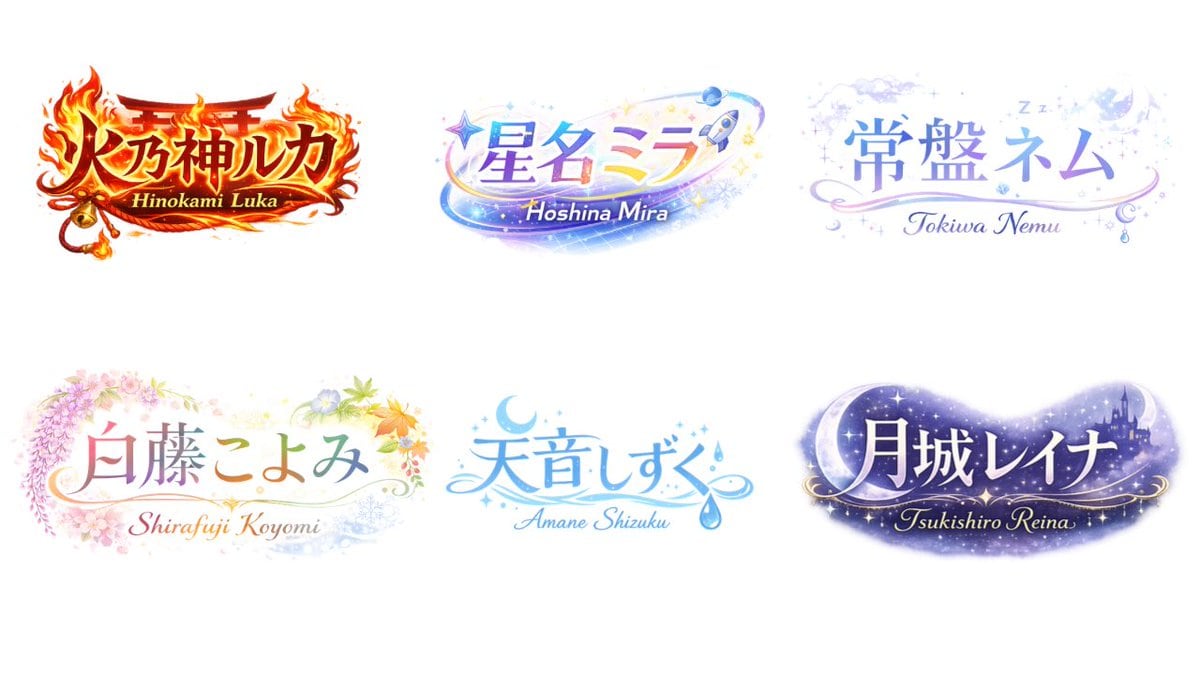
"type": "logo design concept sheet",
"style": "{argument name=\"overall style\" default=\"anime VTuber typography, highly decorative, gradient text\"}",
"background": "solid white",
"layout": {
"arrangement": "2 rows by 3 columns",
"count": 6
},
"logos": [
{
"main_text": "{argument name=\"logo 1 text\" default=\"火乃神ルカ\"}",
"sub_text": "Hinokami Luka",
"theme": "{argument name=\"logo 1 theme\" default=\"fire, shrine gate, bell, intense red and gold\"}"
},
{
"main_text": "{argument name=\"logo 2 text\" default=\"星名ミラ\"}",
"sub_text": "Hoshina Mira",
"theme": "{argument name=\"logo 2 theme\" default=\"space, stars, rocket, shooting star, blue and purple gradient\"}"
},
{
"main_text": "常盤ネム",
"sub_text": "Tokiwa Nemu",
"theme": "sleep, night sky, clouds, crescent moon, Zzz, soft pastel blue and purple"
},
{
"main_text": "白藤こよみ",
"sub_text": "Shirafuji Koyomi",
"theme": "four seasons, wisteria, cherry blossoms, autumn leaves, soft pastel colors"
},
{
"main_text": "天音しずく",
"sub_text": "Amane Shizuku",
"theme": "water, rain drops, crescent moon, clear blue colors"
},
{
"main_text": "月城レイナ",
"sub_text": "Tsukishiro Reina",
"theme": "night, castle silhouette, large crescent moon, stars, dark purple galaxy colors"
}
]
}
Prompt structure- Modelgpt-image-2
- Use casebrand-identity
- Styleanime, editorial, luxury
- Aspect ratioFlexible
Best used for- Use casebrand-identity
- Styleanime, editorial, luxury
- Recommended specs1:1, 4:5, 16:9, or 9:16
- ModelGPT Image 2
How to customizeUse this Logo Design Concept Sheet prompt as a base. Replace the subject, product details, environment, lighting, brand colors, and output ratio while keeping the brand-identity intent and anime, editorial, luxury direction stable.
Editable variables- SubjectReplace the product, person, scene, interface, or object being generated.
- Use caseKeep or rewrite the destination as brand identity, ad creative, cover image, poster, or ecommerce hero.
- FrameChoose 1:1, 4:5, 16:9, or 9:16 based on the final placement.
- Brand cuesAdd colors, materials, props, text-safe space, and the platform where the image will be used.
Recommended specsChoose the frame for the destination first, then use 1K, 2K, or 4K based on output quality needs. Product images and posters usually benefit from higher resolution.
Pre-generation checklist- CheckSubject, lighting, composition, and frame are specific enough to review.
- CheckText-safe space is included when the image will carry a headline or ad copy.
- CheckResolution, credit cost, and final destination are checked before generation.
Why this prompt worksLogo Design Concept Sheet works because it starts from the image job, then controls subject, composition, lighting, style, and frame. It is best for brand identity while keeping the anime, editorial, luxury direction stable.
Common questions- Can I use it directly?Yes. Replace the subject, brand cues, and frame, then generate in Image2Studio.
- Which ratio should I use?Choose 1:1, 4:5, 16:9, or 9:16 based on the destination.