
Image2Studio
Examples

gpt-image-2

VTuber Stream Thumbnail

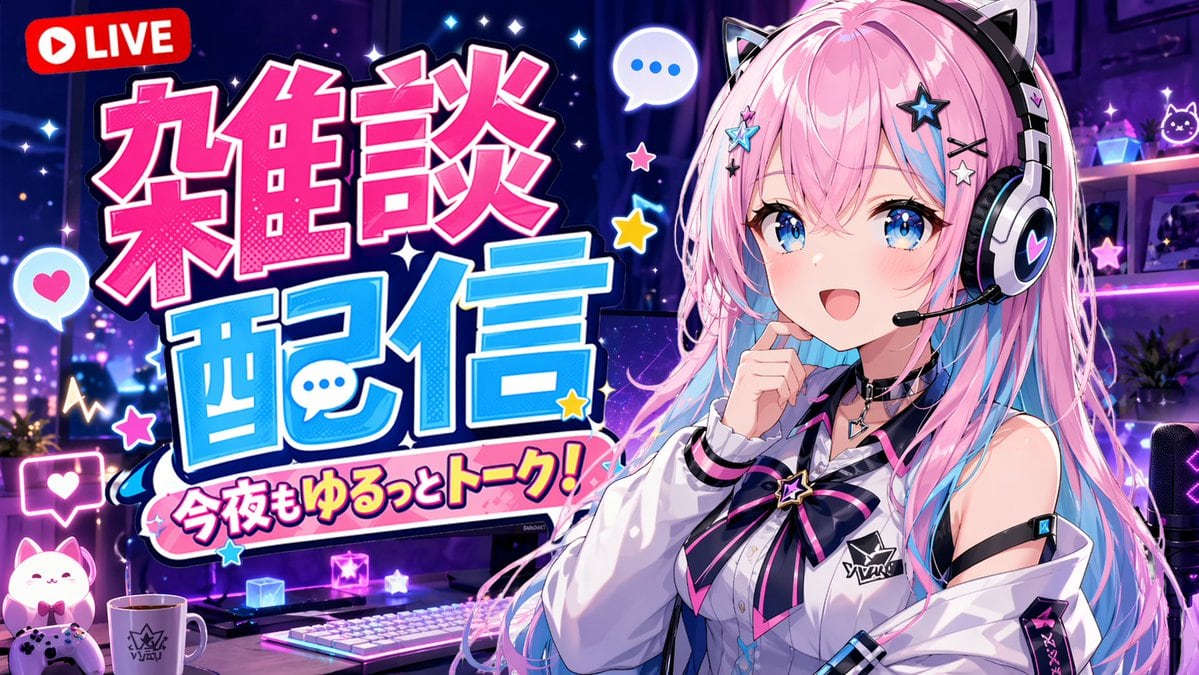
Generates an anime-style YouTube live stream thumbnail featuring a VTuber character, a gaming setup, and bold, customizable typography.

Generates an anime-style YouTube live stream thumbnail featuring a VTuber character, a gaming setup, and bold, customizable typography.
Prompt

An anime-style YouTube stream thumbnail featuring a cheerful female VTuber. She has long {argument name="hair color" default="pink with light blue inner highlights"} hair, blue eyes, and wears black and white cat-ear headphones with a boom mic. She wears a white collared shirt with a black and pink star ribbon and a black choker, smiling with one hand near her chin. The background is a gaming room with {argument name="room lighting" default="purple and blue neon"} lighting, showing a desk equipped with 1 white keyboard, 1 mug, 1 glowing cat figure, 1 game controller, and 1 streaming microphone. The left side features large, bold, pop-art Japanese typography: a bright pink top word "{argument name="main text line 1" default="雑談"}" and a bright blue bottom word "{argument name="main text line 2" default="配信"}". Below is a pink banner reading "{argument name="subtitle text" default="今夜もゆるっとトーク!"}". A red "LIVE" badge sits in the top left. Floating speech bubbles, stars, and hearts decorate the composition.

Prompt structure
  • Modelgpt-image-2
  • Use caseyoutube-thumbnail
  • Styleanime, cyberpunk
  • Aspect ratioFlexible
Best used for
  • Use caseyoutube-thumbnail
  • Styleanime, cyberpunk
  • Recommended specs1:1, 4:5, 16:9, or 9:16
  • ModelGPT Image 2
How to customize

Use this VTuber Stream Thumbnail prompt as a base. Replace the subject, product details, environment, lighting, brand colors, and output ratio while keeping the youtube-thumbnail intent and anime, cyberpunk direction stable.

Editable variables
  • SubjectReplace the product, person, scene, interface, or object being generated.
  • Use caseKeep or rewrite the destination as youtube thumbnail, ad creative, cover image, poster, or ecommerce hero.
  • FrameChoose 1:1, 4:5, 16:9, or 9:16 based on the final placement.
  • Brand cuesAdd colors, materials, props, text-safe space, and the platform where the image will be used.
Recommended specs

Choose the frame for the destination first, then use 1K, 2K, or 4K based on output quality needs. Product images and posters usually benefit from higher resolution.

Pre-generation checklist
  • CheckSubject, lighting, composition, and frame are specific enough to review.
  • CheckText-safe space is included when the image will carry a headline or ad copy.
  • CheckResolution, credit cost, and final destination are checked before generation.
Why this prompt works

VTuber Stream Thumbnail works because it starts from the image job, then controls subject, composition, lighting, style, and frame. It is best for youtube thumbnail while keeping the anime, cyberpunk direction stable.

Common questions
  • Can I use it directly?Yes. Replace the subject, brand cues, and frame, then generate in Image2Studio.
  • Which ratio should I use?Choose 1:1, 4:5, 16:9, or 9:16 based on the destination.




