
Image2Studio
Prompts

gpt-image-2

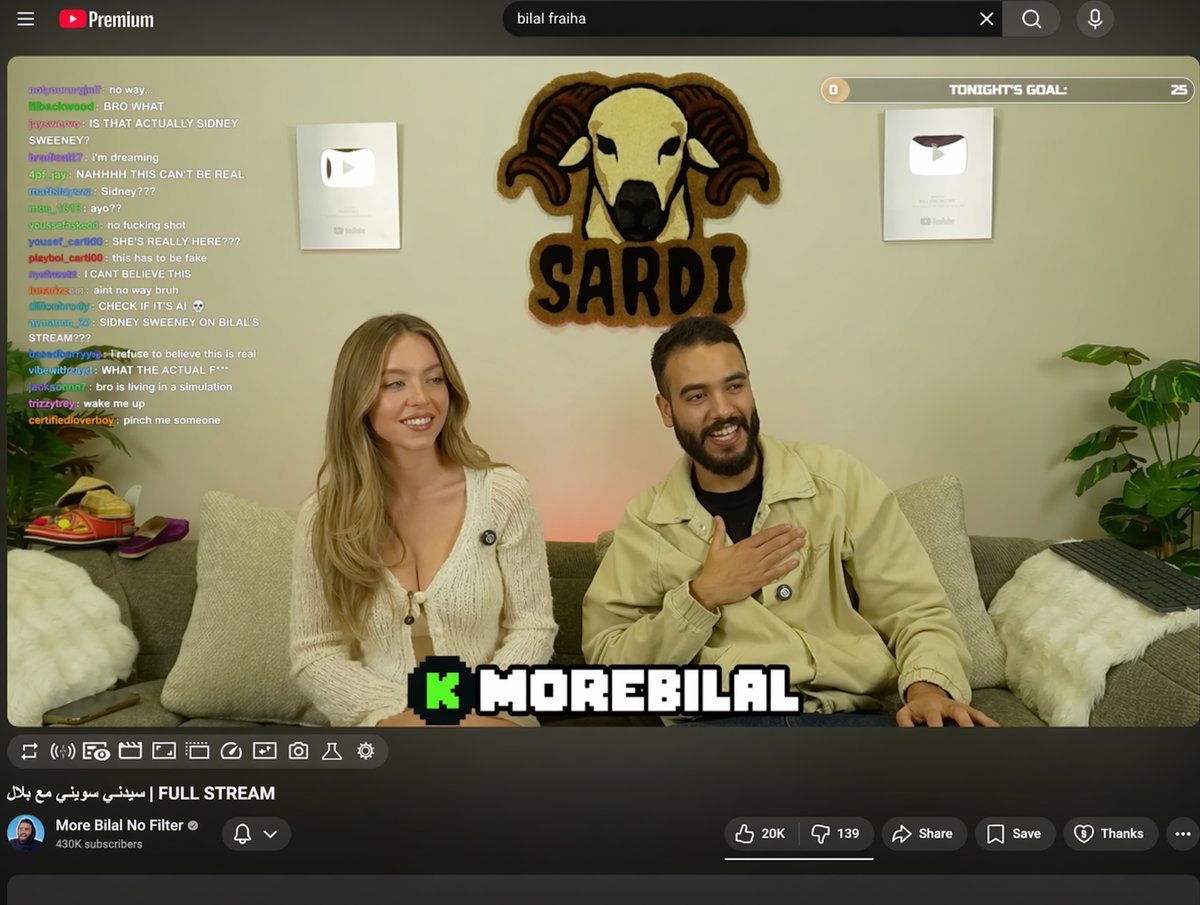
YouTube Livestream UI

Structured YouTube livestream UI prompt for GPT Image 2.

Structured YouTube livestream UI prompt for GPT Image 2.
Prompt

{ "type": "YouTube livestream UI", "top_nav": { "logo": "YouTube Premium", "search": "{argument name=\"search query\" default=\"bilal fraiha\"}", "icons": 3 }, "player": { "subjects": [ "{argument name=\"female guest\" default=\"Sydney Sweeney\"} in white cardigan", "bearded man in beige jacket laughing" ], "bg": "couch, 2 silver play buttons, ram logo 'SARDI'", "overlays": { "chat": {"pos": "left", "count": 15, "desc": "colored usernames, white text"}, "goal": {"pos": "top right", "text": "TONIGHT'S GOAL: 0 to 25"}, "banner": {"pos": "bottom center", "text": "K {argument name=\"streamer name\" default=\"MOREBILAL\"}"} }, "controls": {"count": 10} }, "details": { "title": "{argument name=\"video title\" default=\"FULL STREAM | سيدني سويني مع بلال\"}", "channel": "{argument name=\"channel name\" default=\"More Bilal No Filter\"}", "buttons": 5 } }

Prompt structure
  • Modelgpt-image-2
  • Use casebrand-identity
  • Stylephotorealistic, luxury
  • Aspect ratioFlexible
Best used for
  • Use casebrand-identity
  • Stylephotorealistic, luxury
  • Recommended specs1:1, 4:5, 16:9, or 9:16
  • ModelGPT Image 2
How to customize

Use this YouTube Livestream UI prompt as a base. Replace the subject, product details, environment, lighting, brand colors, and output ratio while keeping the brand-identity intent and photorealistic, luxury direction stable.

Editable variables
  • SubjectReplace the product, person, scene, interface, or object being generated.
  • Use caseKeep or rewrite the destination as brand identity, ad creative, cover image, poster, or ecommerce hero.
  • FrameChoose 1:1, 4:5, 16:9, or 9:16 based on the final placement.
  • Brand cuesAdd colors, materials, props, text-safe space, and the platform where the image will be used.
Recommended specs

Choose the frame for the destination first, then use 1K, 2K, or 4K based on output quality needs. Product images and posters usually benefit from higher resolution.

Pre-generation checklist
  • CheckSubject, lighting, composition, and frame are specific enough to review.
  • CheckText-safe space is included when the image will carry a headline or ad copy.
  • CheckResolution, credit cost, and final destination are checked before generation.
Why this prompt works

YouTube Livestream UI works because it starts from the image job, then controls subject, composition, lighting, style, and frame. It is best for brand identity while keeping the photorealistic, luxury direction stable.

Common questions
  • Can I use it directly?Yes. Replace the subject, brand cues, and frame, then generate in Image2Studio.
  • Which ratio should I use?Choose 1:1, 4:5, 16:9, or 9:16 based on the destination.




