
Image2Studio
Examples

gpt-image-2

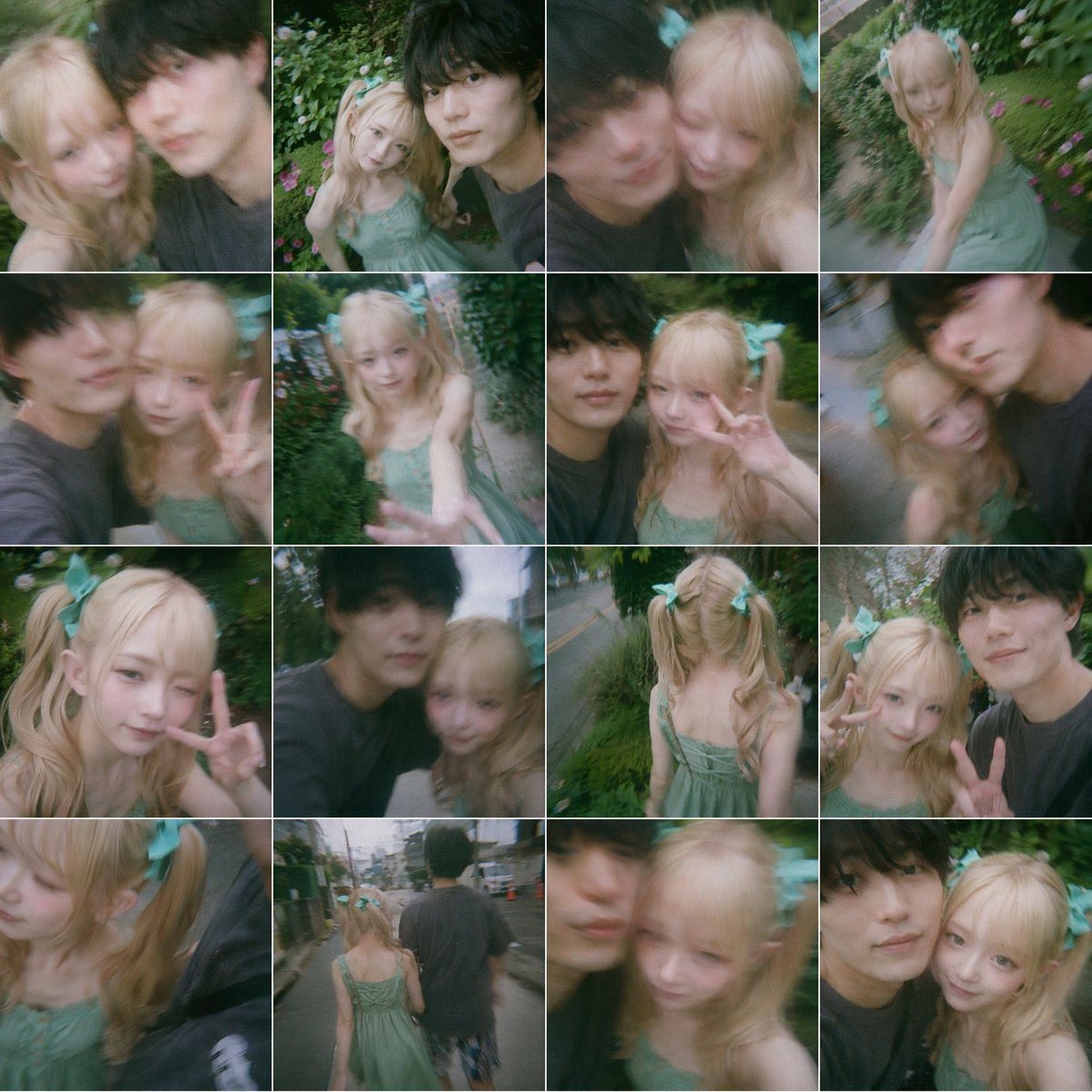
4x4 Collage Of 16 Candid Smartphone Snapshots Arranged In A Tight Square

A 4x4 collage of 16 candid smartphone snapshots arranged in a tight square grid with thin white dividers, styled like spontaneous couple selfies taken during an evening walk in a lush res...

A 4x4 collage of 16 candid smartphone snapshots arranged in a tight square grid with thin white dividers, styled like spontaneous couple selfies taken during an evening walk in a lush res...
Prompt

A 4x4 collage of 16 candid smartphone snapshots arranged in a tight square grid with thin white dividers, styled like spontaneous couple selfies taken during an evening walk in a lush residential neighborhood. The images have a soft dreamy look with slight motion blur, shallow focus, mild fisheye or wide-angle phone-lens distortion, and a nostalgic green-tinted film aesthetic. The recurring subjects are a cute young woman and a taller young man, but both faces are intentionally obscured by large soft-edged rectangular blur blocks centered over their faces in every frame. The woman has long wavy blonde hair in twin ponytails tied with oversized mint-green ribbon bows, fair skin, and wears a light sage-green spaghetti-strap sundress with a gathered bodice. The man has short dark hair and wears a loose dark charcoal T-shirt. The collage should feel playful, intimate, and accidental, as if captured while walking and joking around outdoors. Show exactly 16 different shots: 1) close selfie of the pair shoulder-to-shoulder, 2) slightly higher-angle selfie with greenery behind them, 3) very close blurry selfie with the man leaning in from the left, 4) the woman alone from a high angle near flowerbeds and hedges, 5) side selfie with the woman making a peace sign, 6) the woman reaching one hand toward the camera while standing on a narrow garden path, 7) selfie of both together with the woman flashing a peace sign, 8) tilted close-up of the pair with strong motion blur, 9) close-up portrait of the woman alone making a peace sign, 10) selfie of the couple while walking along a roadside, 11) rear view of the woman alone from behind, showing the back of her dress and twin ponytails, 12) selfie of both with the woman making a peace sign beside the man, 13) extreme close crop with the woman’s hair and bow prominent, 14) full-body rear shot of the couple walking away down a quiet street, 15) close blurry selfie dominated by the face-obscuring blocks, 16) another close selfie of both side-by-side. Background details across the collage should include dense green hedges, garden flowers, a narrow lane, roadside grass, utility poles, and a quiet suburban street. Use natural ambient outdoor light, muted highlights, soft contrast, and a candid social-media photo dump vibe.

Prompt structure
  • Modelgpt-image-2
  • Use casesocial-media-post
  • Stylephotorealistic, cinematic
  • Aspect ratioFlexible
Best used for
  • Use casesocial-media-post
  • Stylephotorealistic, cinematic
  • Recommended specs1:1, 4:5, 16:9, or 9:16
  • ModelGPT Image 2
How to customize

Use this 4x4 Collage Of 16 Candid Smartphone Snapshots Arranged In A Tight Square prompt as a base. Replace the subject, product details, environment, lighting, brand colors, and output ratio while keeping the social-media-post intent and photorealistic, cinematic direction stable.

Editable variables
  • SubjectReplace the product, person, scene, interface, or object being generated.
  • Use caseKeep or rewrite the destination as social media post, ad creative, cover image, poster, or ecommerce hero.
  • FrameChoose 1:1, 4:5, 16:9, or 9:16 based on the final placement.
  • Brand cuesAdd colors, materials, props, text-safe space, and the platform where the image will be used.
Recommended specs

Choose the frame for the destination first, then use 1K, 2K, or 4K based on output quality needs. Product images and posters usually benefit from higher resolution.

Pre-generation checklist
  • CheckSubject, lighting, composition, and frame are specific enough to review.
  • CheckText-safe space is included when the image will carry a headline or ad copy.
  • CheckResolution, credit cost, and final destination are checked before generation.
Why this prompt works

4x4 Collage Of 16 Candid Smartphone Snapshots Arranged In A Tight Square works because it starts from the image job, then controls subject, composition, lighting, style, and frame. It is best for social media post while keeping the photorealistic, cinematic direction stable.

Common questions
  • Can I use it directly?Yes. Replace the subject, brand cues, and frame, then generate in Image2Studio.
  • Which ratio should I use?Choose 1:1, 4:5, 16:9, or 9:16 based on the destination.




