
Image2Studio
Examples

gpt-image-2

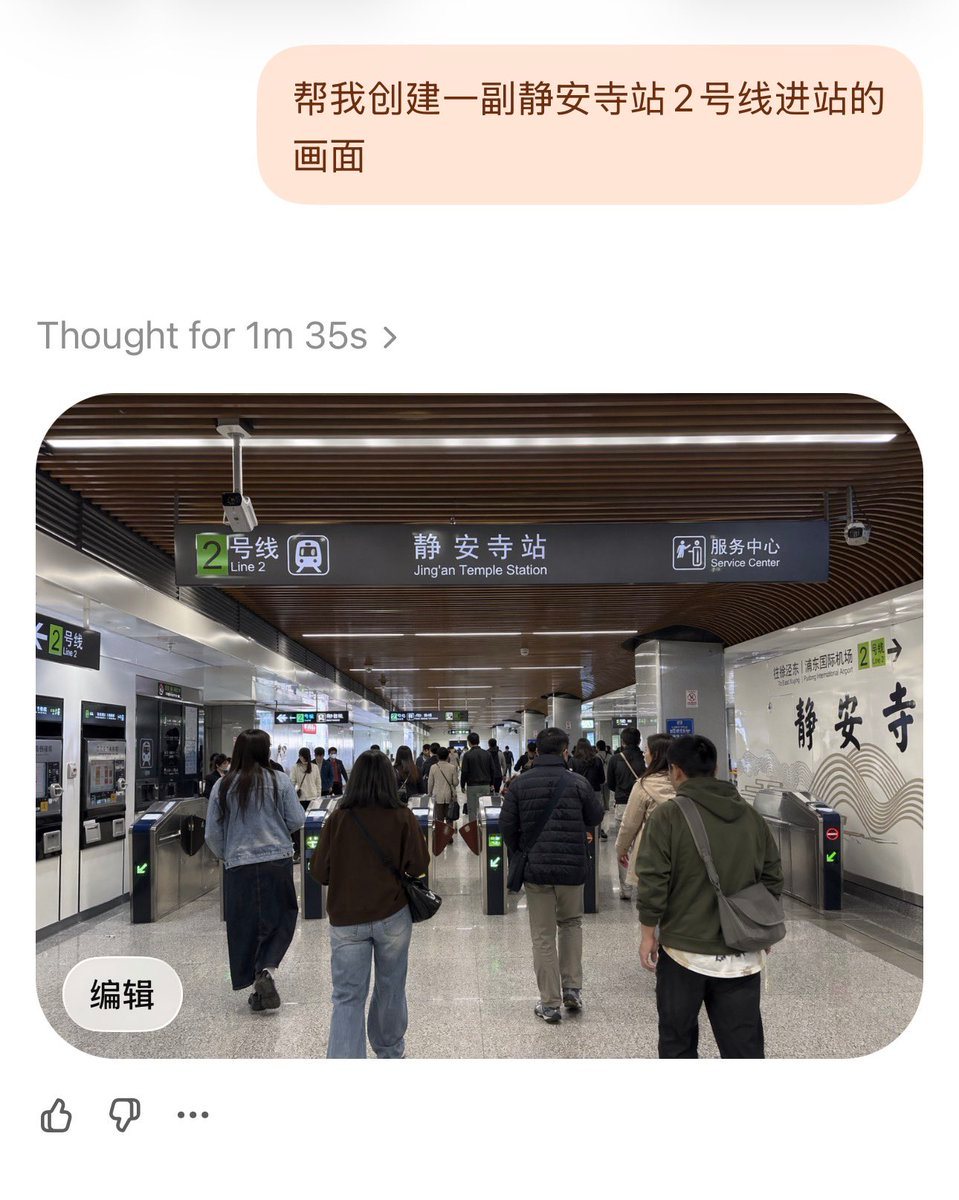
Realistic Documentary-style Photo Of The Entrance Area

A realistic documentary-style photo of the entrance area inside Jing'an Temple Station on Line 2 in Shanghai Metro, viewed from a passenger's eye level while walking toward the fare gates...

A realistic documentary-style photo of the entrance area inside Jing'an Temple Station on Line 2 in Shanghai Metro, viewed from a passenger's eye level while walking toward the fare gates...
Prompt

A realistic documentary-style photo of the entrance area inside {argument name="station name" default="Jing'an Temple Station"} on {argument name="subway line" default="Line 2"} in Shanghai Metro, viewed from a passenger's eye level while walking toward the fare gates. The scene is a wide indoor station concourse with a modern ceiling made of dark brown curved wooden slats and long linear white lights. In the center hangs a large dark overhead wayfinding sign with a green square route marker showing the number 2 and the text “2号线 / Line 2,” the main station name “静安寺站 / Jing'an Temple Station,” and a service center icon with the bilingual text “服务中心 / Service Center.” Below the sign are multiple stainless steel fare gates, with exactly 6 visible gate lanes in the foreground, some showing green arrow indicators and at least one showing a red no-entry symbol. Show a busy but orderly flow of commuters, around 10 to 15 adults in everyday autumn clothing, seen mostly from behind, walking into the station through the gates; include jackets, jeans, backpacks, shoulder bags, and neutral colors. On the left wall, include ticket or vending machines and another smaller green Line 2 sign. On the right wall, create a decorative white station wall with large black Chinese calligraphy reading “静安寺” and subtle wave-like graphic lines, plus a small green Line 2 marker nearby. Materials should feel authentic: polished gray speckled stone floor, metallic columns, tiled walls, and realistic transit fixtures. Lighting is bright, even, and fluorescent, with a clean public-transport atmosphere. Compose it as a slightly wide-angle smartphone photo, centered on the overhead sign and gate area, highly realistic, candid, detailed, and true to an actual Shanghai metro station interior.

Prompt structure
  • Modelgpt-image-2
  • Use casesocial-media-post
  • Stylephotorealistic, minimal
  • Aspect ratioFlexible
Best used for
  • Use casesocial-media-post
  • Stylephotorealistic, minimal
  • Recommended specs1:1, 4:5, 16:9, or 9:16
  • ModelGPT Image 2
How to customize

Use this Realistic Documentary-style Photo Of The Entrance Area prompt as a base. Replace the subject, product details, environment, lighting, brand colors, and output ratio while keeping the social-media-post intent and photorealistic, minimal direction stable.

Editable variables
  • SubjectReplace the product, person, scene, interface, or object being generated.
  • Use caseKeep or rewrite the destination as social media post, ad creative, cover image, poster, or ecommerce hero.
  • FrameChoose 1:1, 4:5, 16:9, or 9:16 based on the final placement.
  • Brand cuesAdd colors, materials, props, text-safe space, and the platform where the image will be used.
Recommended specs

Choose the frame for the destination first, then use 1K, 2K, or 4K based on output quality needs. Product images and posters usually benefit from higher resolution.

Pre-generation checklist
  • CheckSubject, lighting, composition, and frame are specific enough to review.
  • CheckText-safe space is included when the image will carry a headline or ad copy.
  • CheckResolution, credit cost, and final destination are checked before generation.
Why this prompt works

Realistic Documentary-style Photo Of The Entrance Area works because it starts from the image job, then controls subject, composition, lighting, style, and frame. It is best for social media post while keeping the photorealistic, minimal direction stable.

Common questions
  • Can I use it directly?Yes. Replace the subject, brand cues, and frame, then generate in Image2Studio.
  • Which ratio should I use?Choose 1:1, 4:5, 16:9, or 9:16 based on the destination.




