
Image2Studio
Examples

gpt-image-2

Candid Indoor Family Snapshot Styled Like An Early-2000s Home Photo From

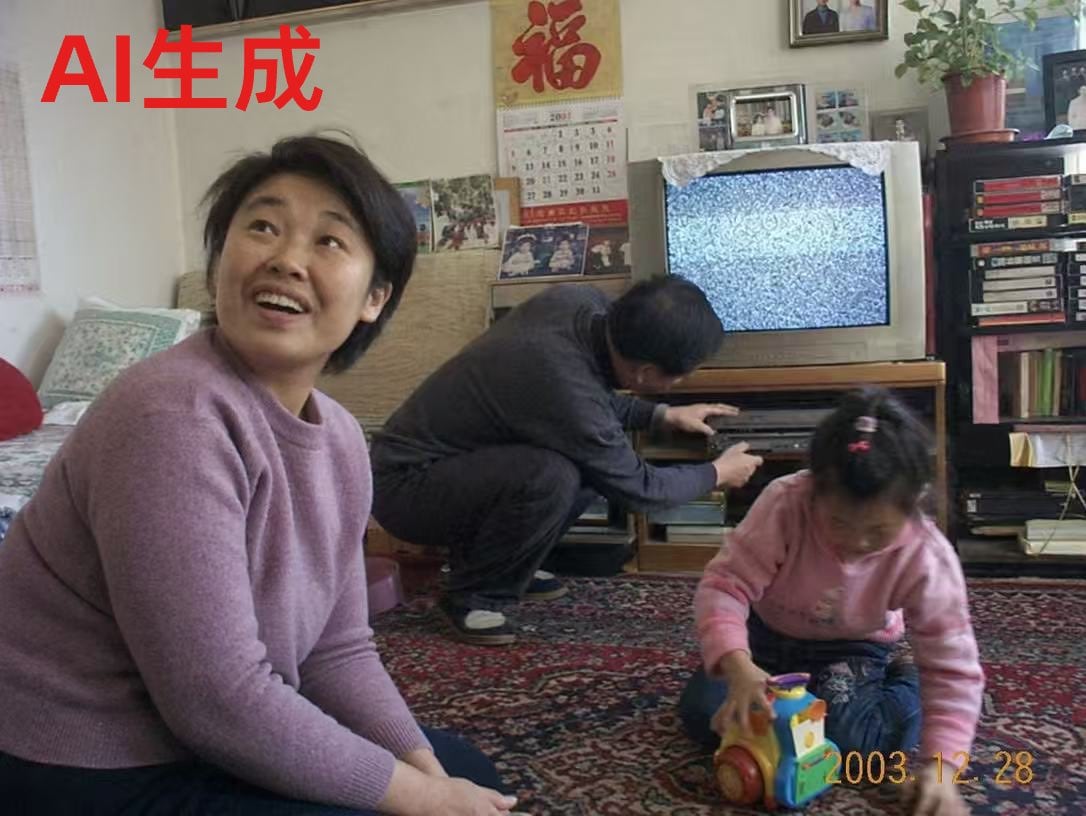
A candid indoor family snapshot styled like an early-2000s home photo from mainland China, shot on a consumer digital camera with slightly soft focus, muted colors, mild noise, and an on-...

A candid indoor family snapshot styled like an early-2000s home photo from mainland China, shot on a consumer digital camera with slightly soft focus, muted colors, mild noise, and an on-...
Prompt

A candid indoor family snapshot styled like an early-2000s home photo from mainland China, shot on a consumer digital camera with slightly soft focus, muted colors, mild noise, and an on-camera date stamp in the bottom right reading {argument name="date stamp" default="2003.12.28"}. The scene shows a modest living room with three people whose faces are intentionally blurred: in the left foreground, an adult woman in a lavender-pink knit sweater sits on the edge of a bed or sofa, turned slightly toward the camera; in the center background, an adult man in dark clothes crouches in front of a wooden TV stand, adjusting a silver DVD or VCD player; in the right foreground, a small girl wearing a light pink sweater and dark pants kneels on a richly patterned red carpet while holding a colorful toy vehicle. Behind them is a bulky silver CRT television displaying gray static noise, covered with a lace cloth on top. The wall behind the TV is filled with lived-in details: a large red Chinese character poster reading “福” above a hanging calendar, several framed family photos, and small pinned pictures. On the far right is a tall black shelving unit with neatly stacked VHS tapes or media cases, books, and a potted plant on top with trailing green leaves. On the far left edge, part of a bed or couch with pale bedding and a red cushion is visible. Add large bold red Chinese text in the top left corner reading {argument name="headline text" default="AI生成"}. Compose it as an unposed, believable family moment with authentic domestic clutter, nostalgic realism, natural room lighting, and the unmistakable look of an old personal photograph.

Prompt structure
  • Modelgpt-image-2
  • Use casesocial-media-post
  • Stylephotorealistic
  • Aspect ratioFlexible
Best used for
  • Use casesocial-media-post
  • Stylephotorealistic
  • Recommended specs1:1, 4:5, 16:9, or 9:16
  • ModelGPT Image 2
How to customize

Use this Candid Indoor Family Snapshot Styled Like An Early-2000s Home Photo From prompt as a base. Replace the subject, product details, environment, lighting, brand colors, and output ratio while keeping the social-media-post intent and photorealistic direction stable.

Editable variables
  • SubjectReplace the product, person, scene, interface, or object being generated.
  • Use caseKeep or rewrite the destination as social media post, ad creative, cover image, poster, or ecommerce hero.
  • FrameChoose 1:1, 4:5, 16:9, or 9:16 based on the final placement.
  • Brand cuesAdd colors, materials, props, text-safe space, and the platform where the image will be used.
Recommended specs

Choose the frame for the destination first, then use 1K, 2K, or 4K based on output quality needs. Product images and posters usually benefit from higher resolution.

Pre-generation checklist
  • CheckSubject, lighting, composition, and frame are specific enough to review.
  • CheckText-safe space is included when the image will carry a headline or ad copy.
  • CheckResolution, credit cost, and final destination are checked before generation.
Why this prompt works

Candid Indoor Family Snapshot Styled Like An Early-2000s Home Photo From works because it starts from the image job, then controls subject, composition, lighting, style, and frame. It is best for social media post while keeping the photorealistic direction stable.

Common questions
  • Can I use it directly?Yes. Replace the subject, brand cues, and frame, then generate in Image2Studio.
  • Which ratio should I use?Choose 1:1, 4:5, 16:9, or 9:16 based on the destination.




