
Image2Studio
Examples

gpt-image-2

Candid Family Snapshot Styled Like A Consumer Digital Camera Photo From

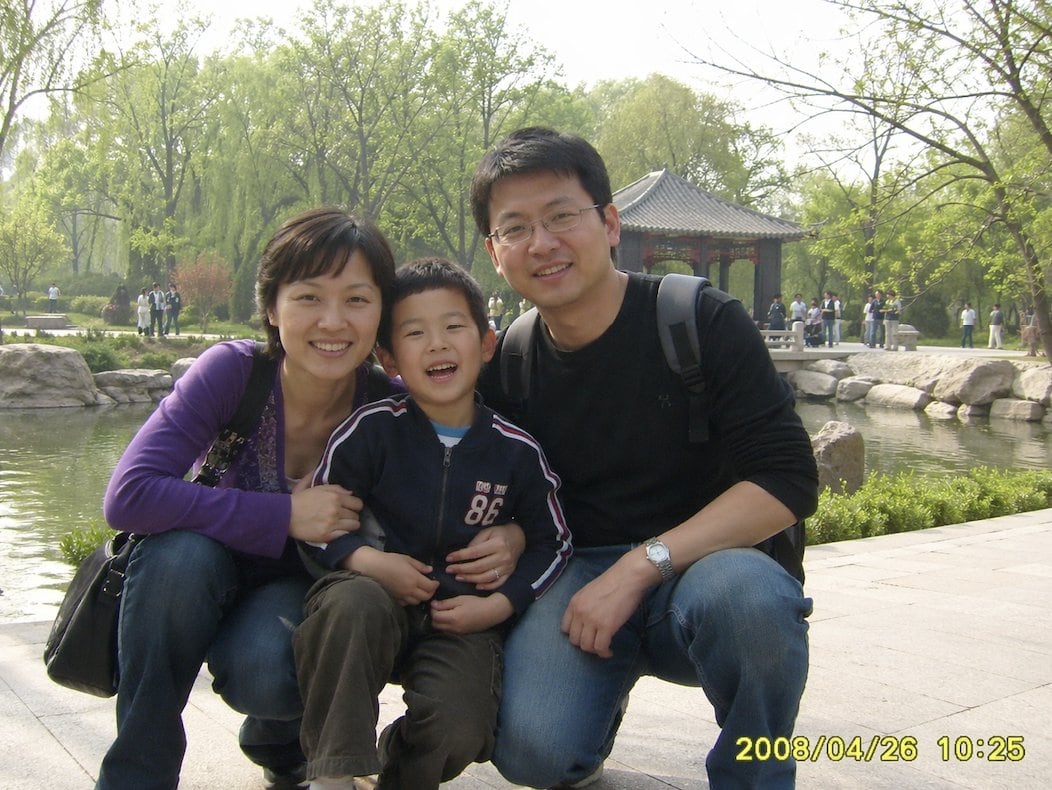
A candid family snapshot styled like a consumer digital camera photo from around 2008, showing a Chinese family of three posing closely together in a public park in springtime. The mother...

A candid family snapshot styled like a consumer digital camera photo from around 2008, showing a Chinese family of three posing closely together in a public park in springtime. The mother...
Prompt

A candid family snapshot styled like a consumer digital camera photo from around {argument name="year" default="2008"}, showing a Chinese family of three posing closely together in a public park in springtime. The mother is on the left, crouching and leaning in, wearing a purple cardigan over a dark patterned top, blue jeans, and carrying a black shoulder bag. The child is in the center, standing or half-squatting between the parents, wearing a navy zip-up jacket with white and red striped sleeves and a large "86" print on the chest, with olive or brown pants. The father is on the right, crouching close to the child, wearing a black long-sleeve shirt, blue jeans, a wristwatch, and a gray backpack with visible shoulder straps. All three are gathered tightly and looking toward the camera in a typical casual family-photo pose. Place them on a light stone walkway beside a calm pond edged with large ornamental rocks. In the background, show lush green trees with fresh leaves, a traditional Chinese pavilion with a gray tiled roof, and small groups of park visitors scattered along the path and bridge area. Lighting is soft bright daytime with slight haze, realistic early-spring colors, and the modest image quality of an older compact camera: slightly flat contrast, mild blur, natural noise, and an authentic point-and-shoot snapshot feel. Add a yellow digital camera timestamp in the bottom right corner reading {argument name="timestamp text" default="2008/04/26 10:25"}. Composition should feel like a real family travel photo taken informally in China in the late 2000s, horizontal framing, eye-level perspective, documentary realism, no stylization.

Prompt structure
  • Modelgpt-image-2
  • Use casesocial-media-post
  • Stylephotorealistic, editorial
  • Aspect ratioFlexible
Best used for
  • Use casesocial-media-post
  • Stylephotorealistic, editorial
  • Recommended specs1:1, 4:5, 16:9, or 9:16
  • ModelGPT Image 2
How to customize

Use this Candid Family Snapshot Styled Like A Consumer Digital Camera Photo From prompt as a base. Replace the subject, product details, environment, lighting, brand colors, and output ratio while keeping the social-media-post intent and photorealistic, editorial direction stable.

Editable variables
  • SubjectReplace the product, person, scene, interface, or object being generated.
  • Use caseKeep or rewrite the destination as social media post, ad creative, cover image, poster, or ecommerce hero.
  • FrameChoose 1:1, 4:5, 16:9, or 9:16 based on the final placement.
  • Brand cuesAdd colors, materials, props, text-safe space, and the platform where the image will be used.
Recommended specs

Choose the frame for the destination first, then use 1K, 2K, or 4K based on output quality needs. Product images and posters usually benefit from higher resolution.

Pre-generation checklist
  • CheckSubject, lighting, composition, and frame are specific enough to review.
  • CheckText-safe space is included when the image will carry a headline or ad copy.
  • CheckResolution, credit cost, and final destination are checked before generation.
Why this prompt works

Candid Family Snapshot Styled Like A Consumer Digital Camera Photo From works because it starts from the image job, then controls subject, composition, lighting, style, and frame. It is best for social media post while keeping the photorealistic, editorial direction stable.

Common questions
  • Can I use it directly?Yes. Replace the subject, brand cues, and frame, then generate in Image2Studio.
  • Which ratio should I use?Choose 1:1, 4:5, 16:9, or 9:16 based on the destination.




