
Image2Studio
Examples

gpt-image-2

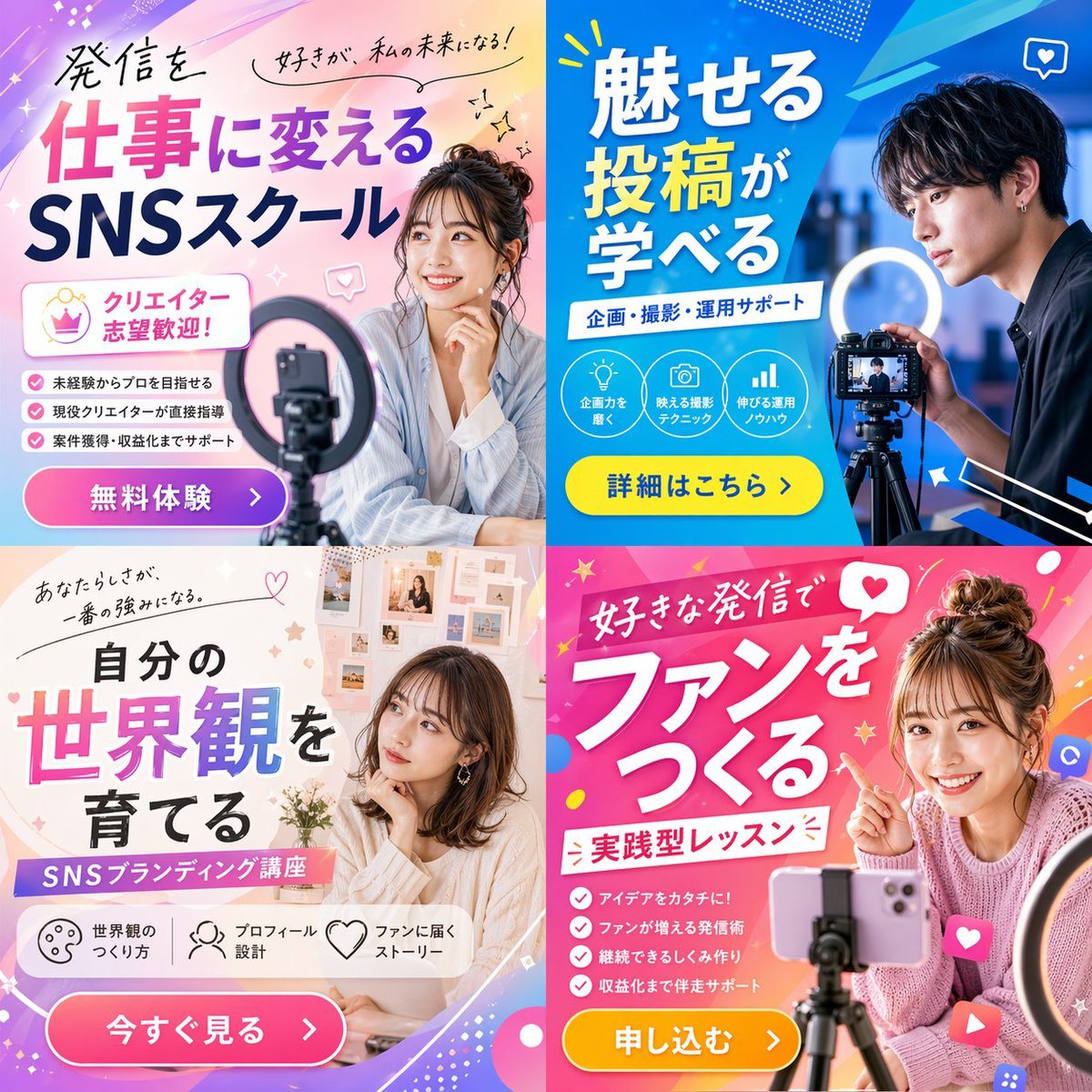
2x2 Social Media Course Banner Ads

Generates a 2x2 grid of promotional banner ads for a social media or content creation school, featuring diverse models, vibrant layouts, and customizable Japanese typography.

Generates a 2x2 grid of promotional banner ads for a social media or content creation school, featuring diverse models, vibrant layouts, and customizable Japanese typography.
Prompt

{"type": "2x2 grid of promotional banner ads", "theme": "{argument name=\"course theme\" default=\"Social Media Content Creation School\"}", "panels": [{"position": "top-left", "color_palette": "light blue and pink pastel gradient", "subject": "young woman smiling, resting chin on hand, smartphone and ring light in foreground", "typography": {"headline": "{argument name=\"top left headline\" default=\"発信を仕事に変える SNSスクール\"}", "subheadings": ["好きが、私の未来になる!", "クリエイター志望歓迎!"]}, "layout_elements": {"bullet_points_count": 3, "call_to_action_button": "pink button labeled '無料体験 >'"}}, {"position": "top-right", "color_palette": "deep blue and cyan geometric", "subject": "young man looking intently at a professional camera on a tripod with a ring light", "typography": {"headline": "{argument name=\"top right headline\" default=\"魅せる投稿が学べる\"}", "subheadings": ["企画・撮影・運用サポート"]}, "layout_elements": {"circular_icons_count": 3, "icon_types": ["lightbulb", "camera", "bar chart"], "call_to_action_button": "yellow button labeled '詳細はこちら >'"}}, {"position": "bottom-left", "color_palette": "soft beige and white aesthetic", "subject": "young woman looking thoughtfully to the side, mood board background", "typography": {"headline": "{argument name=\"bottom left headline\" default=\"自分の世界観を育てる\"}", "subheadings": ["あなたらしさが、一番の強みになる。", "SNSブランディング講座"]}, "layout_elements": {"horizontal_icons_count": 3, "icon_types": ["palette", "person", "heart"], "call_to_action_button": "pink button labeled '今すぐ見る >'"}}, {"position": "bottom-right", "color_palette": "vibrant pink and magenta pop design", "subject": "young woman smiling brightly, pointing at text, messy bun, smartphone on tripod", "typography": {"headline": "{argument name=\"bottom right headline\" default=\"好きな発信でファンをつくる\"}", "subheadings": ["実践型レッスン"]}, "layout_elements": {"bullet_points_count": 4, "call_to_action_button": "yellow button labeled '申し込む >'"}}]}

Prompt structure
  • Modelgpt-image-2
  • Use casesocial-media-post
  • Stylephotorealistic
  • Aspect ratioFlexible
Best used for
  • Use casesocial-media-post
  • Stylephotorealistic
  • Recommended specs1:1, 4:5, 16:9, or 9:16
  • ModelGPT Image 2
How to customize

Use this 2x2 Social Media Course Banner Ads prompt as a base. Replace the subject, product details, environment, lighting, brand colors, and output ratio while keeping the social-media-post intent and photorealistic direction stable.

Editable variables
  • SubjectReplace the product, person, scene, interface, or object being generated.
  • Use caseKeep or rewrite the destination as social media post, ad creative, cover image, poster, or ecommerce hero.
  • FrameChoose 1:1, 4:5, 16:9, or 9:16 based on the final placement.
  • Brand cuesAdd colors, materials, props, text-safe space, and the platform where the image will be used.
Recommended specs

Choose the frame for the destination first, then use 1K, 2K, or 4K based on output quality needs. Product images and posters usually benefit from higher resolution.

Pre-generation checklist
  • CheckSubject, lighting, composition, and frame are specific enough to review.
  • CheckText-safe space is included when the image will carry a headline or ad copy.
  • CheckResolution, credit cost, and final destination are checked before generation.
Why this prompt works

2x2 Social Media Course Banner Ads works because it starts from the image job, then controls subject, composition, lighting, style, and frame. It is best for social media post while keeping the photorealistic direction stable.

Common questions
  • Can I use it directly?Yes. Replace the subject, brand cues, and frame, then generate in Image2Studio.
  • Which ratio should I use?Choose 1:1, 4:5, 16:9, or 9:16 based on the destination.




