
Image2Studio
Examples

gpt-image-2

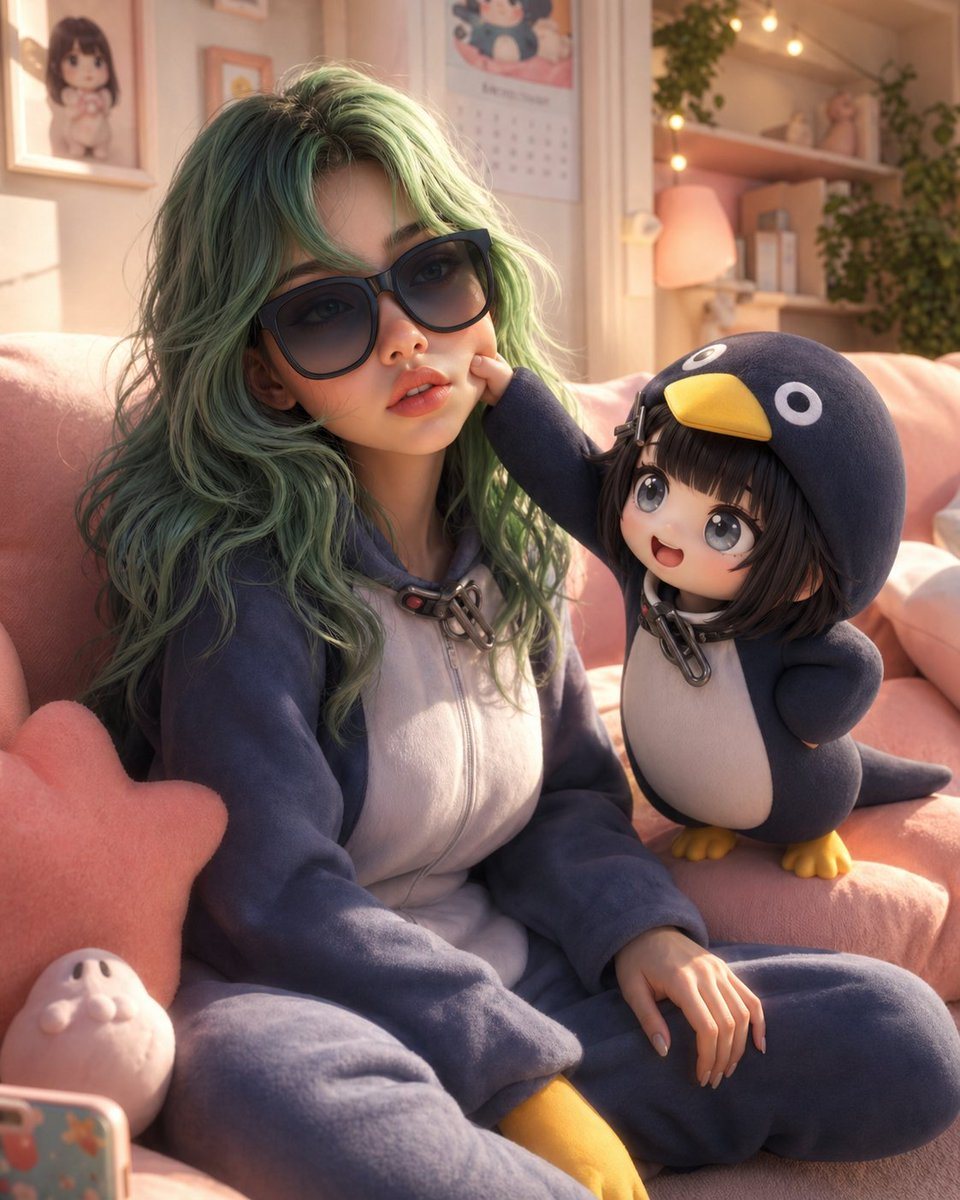
High-quality 3D Animated Scene

A high-quality 3D animated scene featuring a young woman (based on the provided reference image, accurate face and identity, realistic skin texture) wearing the exact same outfit/costume...

A high-quality 3D animated scene featuring a young woman (based on the provided reference image, accurate face and identity, realistic skin texture) wearing the exact same outfit/costume...
Prompt

A high-quality 3D animated scene featuring a {argument name="subject" default="young woman"} (based on the provided reference image, accurate face and identity, realistic skin texture) wearing the exact same outfit/costume as in the reference image, with all clothing details, colors, and textures preserved. She is sitting casually on a {argument name="furniture" default="soft pastel couch"} in a {argument name="room type" default="cozy, aesthetic room"}. Her posture is relaxed and expressive, with a playful, slightly amused facial expression. Next to her is the baby character “Goo Goo Gaga”, recreated exactly the same as in the provided reference image — identical appearance, outfit, proportions, facial expression, and style (no changes at all). Goo Goo Gaga is standing on the couch, playfully interacting with her (pulling her cheek or holding onto her arm), creating a cute and slightly chaotic moment. Environment: warm, cozy pastel-toned room filled with soft cushions, plush toys, and minimal aesthetic decor (colors: soft pink, peach, cream, mint). Lighting: soft cinematic lighting with warm glow, gentle shadows, depth of field, dreamy atmosphere. Style: high-end 3D cartoon (Pixar/Disney style), ultra-smooth rendering, subsurface scattering skin, fluffy fabric textures, highly detailed, clean composition. Mood: cute, playful, wholesome, expressive, slightly chaotic, viral social media aesthetic. Important: use the provided reference images for both characters — keep the woman’s face and outfit accurate, and keep Goo Goo Gaga exactly unchanged from its reference.“8K render, Unreal Engine, Octane render quality”

Prompt structure
  • Modelgpt-image-2
  • Use casesocial-media-post
  • Style3d-render, minimal, cinematic, photorealistic
  • Aspect ratioFlexible
Best used for
  • Use casesocial-media-post
  • Style3d-render, minimal, cinematic, photorealistic
  • Recommended specs1:1, 4:5, 16:9, or 9:16
  • ModelGPT Image 2
How to customize

Use this High-quality 3D Animated Scene prompt as a base. Replace the subject, product details, environment, lighting, brand colors, and output ratio while keeping the social-media-post intent and 3d-render, minimal, cinematic, photorealistic direction stable.

Editable variables
  • SubjectReplace the product, person, scene, interface, or object being generated.
  • Use caseKeep or rewrite the destination as social media post, ad creative, cover image, poster, or ecommerce hero.
  • FrameChoose 1:1, 4:5, 16:9, or 9:16 based on the final placement.
  • Brand cuesAdd colors, materials, props, text-safe space, and the platform where the image will be used.
Recommended specs

Choose the frame for the destination first, then use 1K, 2K, or 4K based on output quality needs. Product images and posters usually benefit from higher resolution.

Pre-generation checklist
  • CheckSubject, lighting, composition, and frame are specific enough to review.
  • CheckText-safe space is included when the image will carry a headline or ad copy.
  • CheckResolution, credit cost, and final destination are checked before generation.
Why this prompt works

High-quality 3D Animated Scene works because it starts from the image job, then controls subject, composition, lighting, style, and frame. It is best for social media post while keeping the 3d-render, minimal, cinematic, photorealistic direction stable.

Common questions
  • Can I use it directly?Yes. Replace the subject, brand cues, and frame, then generate in Image2Studio.
  • Which ratio should I use?Choose 1:1, 4:5, 16:9, or 9:16 based on the destination.




