
Image2Studio
Prompts

gpt-image-2

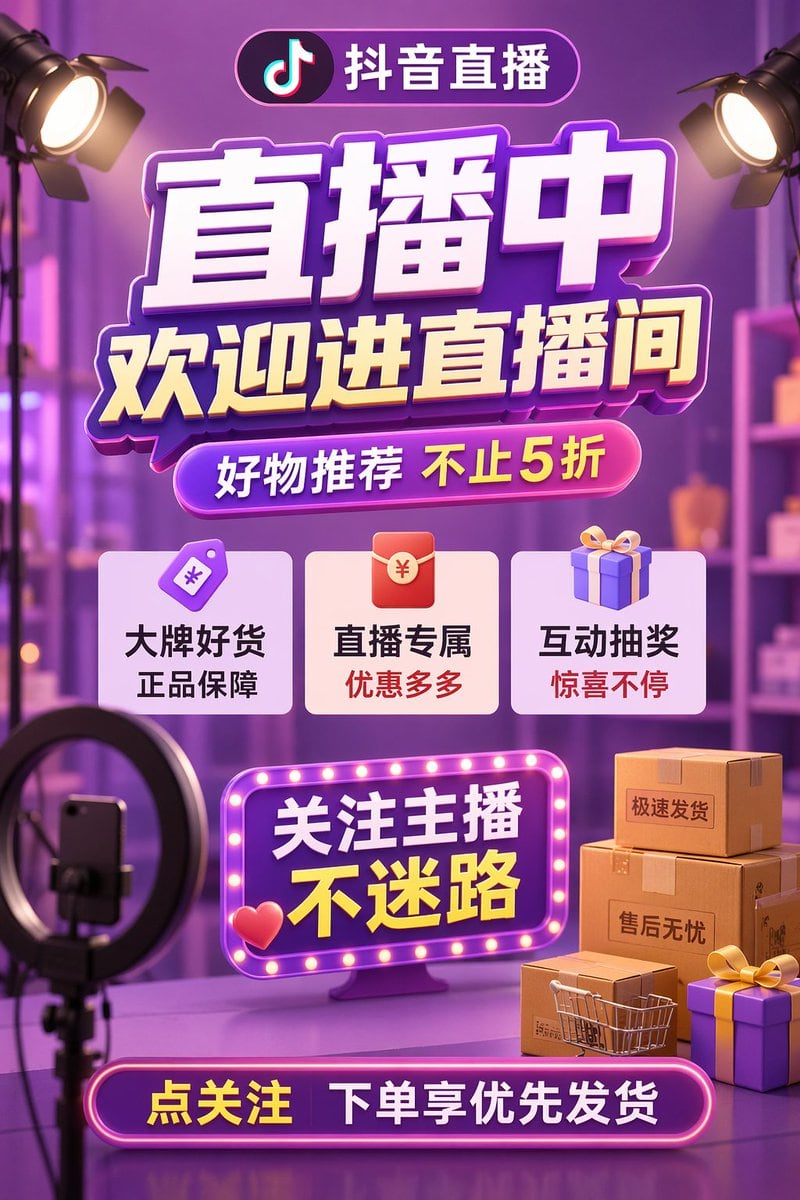
3D E-commerce Livestream Promotional Poster

Structured 3D e-commerce livestream promotional poster prompt for GPT Image 2.

Structured 3D e-commerce livestream promotional poster prompt for GPT Image 2.
Prompt

{ "type": "3D e-commerce livestream promotional poster", "style": "vibrant purple and gold color scheme, glossy UI elements, neon lights, soft blurred studio background", "typography": { "header_pill": "抖音直播", "main_title": "{argument name=\"main title\" default=\"直播中\"}", "subtitle": "{argument name=\"subtitle\" default=\"欢迎进直播间\"}", "promo_pill": "{argument name=\"promo text\" default=\"好物推荐 不止5折\"}" }, "layout": { "sections": [ { "title": "feature_cards", "position": "middle", "count": 3, "items": [ {"icon": "purple price tag", "text": "大牌好货 正品保障"}, {"icon": "red envelope", "text": "直播专属 优惠多多"}, {"icon": "purple gift box", "text": "互动抽奖 惊喜不停"} ] }, { "title": "marquee_sign", "position": "lower middle", "style": "neon border with glowing dots, 3D red heart icon", "text": "{argument name=\"marquee text\" default=\"关注主播 不迷路\"}" }, { "title": "footer_pill", "position": "bottom center", "style": "glowing neon border", "text": "{argument name=\"footer text\" default=\"点关注 下单享优先发货\"}" } ] }, "scene_elements": { "top_corners": "2 studio spotlights pointing inwards", "bottom_left": "1 ring light on a tripod holding a smartphone", "bottom_right": "3 stacked cardboard boxes with labels '极速发货' and '售后无忧', 1 miniature shopping cart, 2 purple gift boxes with yellow ribbons", "background": "blurred studio setup with shelves and purple ambient lighting" } }

Prompt structure
  • Modelgpt-image-2
  • Use casecampaign-poster
  • Style3d-render, cyberpunk, editorial, isometric
  • Aspect ratioFlexible
Best used for
  • Use casecampaign-poster
  • Style3d-render, cyberpunk, editorial, isometric
  • Recommended specs1:1, 4:5, 16:9, or 9:16
  • ModelGPT Image 2
How to customize

Use this 3D E-commerce Livestream Promotional Poster prompt as a base. Replace the subject, product details, environment, lighting, brand colors, and output ratio while keeping the campaign-poster intent and 3d-render, cyberpunk, editorial, isometric direction stable.

Editable variables
  • SubjectReplace the product, person, scene, interface, or object being generated.
  • Use caseKeep or rewrite the destination as campaign poster, ad creative, cover image, poster, or ecommerce hero.
  • FrameChoose 1:1, 4:5, 16:9, or 9:16 based on the final placement.
  • Brand cuesAdd colors, materials, props, text-safe space, and the platform where the image will be used.
Recommended specs

Choose the frame for the destination first, then use 1K, 2K, or 4K based on output quality needs. Product images and posters usually benefit from higher resolution.

Pre-generation checklist
  • CheckSubject, lighting, composition, and frame are specific enough to review.
  • CheckText-safe space is included when the image will carry a headline or ad copy.
  • CheckResolution, credit cost, and final destination are checked before generation.
Why this prompt works

3D E-commerce Livestream Promotional Poster works because it starts from the image job, then controls subject, composition, lighting, style, and frame. It is best for campaign poster while keeping the 3d-render, cyberpunk, editorial, isometric direction stable.

Common questions
  • Can I use it directly?Yes. Replace the subject, brand cues, and frame, then generate in Image2Studio.
  • Which ratio should I use?Choose 1:1, 4:5, 16:9, or 9:16 based on the destination.




