
Image2Studio
Prompts

gpt-image-2

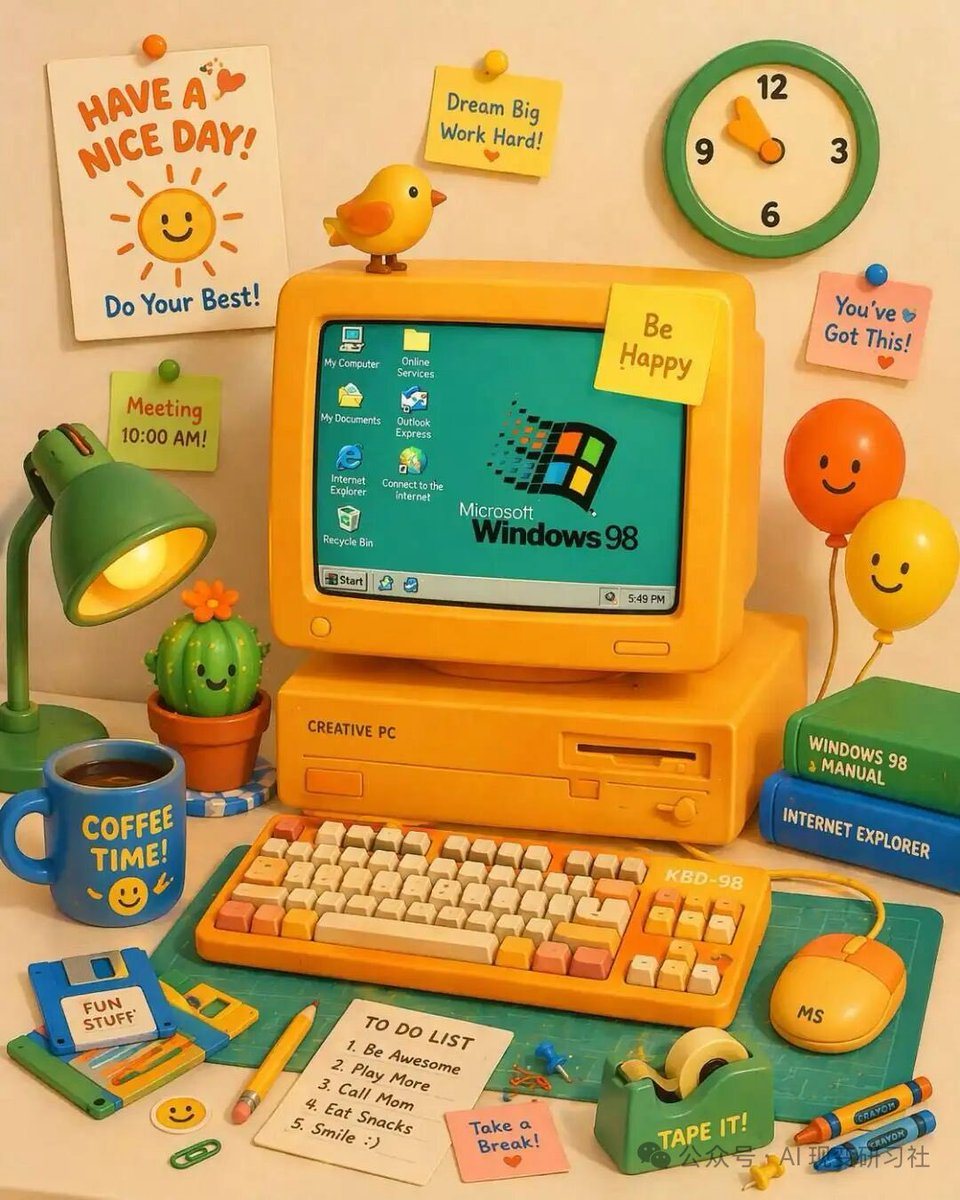
Vibrant Cute 3D Claymation-style Illustration Of A Retro Yellow Desktop

A vibrant, cute 3D claymation-style illustration of a retro yellow desktop computer setup on a desk. The central yellow CRT monitor displays a teal screen with the Microsoft Windows 98 lo...

A vibrant, cute 3D claymation-style illustration of a retro yellow desktop computer setup on a desk. The central yellow CRT monitor displays a teal screen with the Microsoft Windows 98 lo...
Prompt

A vibrant, cute 3D claymation-style illustration of a retro yellow desktop computer setup on a desk. The central yellow CRT monitor displays a teal screen with the {argument name="OS logo text" default="Microsoft Windows 98"} logo and 7 desktop icons labeled 'My Computer', 'Online Services', 'My Documents', 'Outlook Express', 'Internet Explorer', 'Connect to the Internet', and 'Recycle Bin', plus a bottom taskbar with a 'Start' button and a clock reading '5:49 PM'. The monitor has a yellow sticky note reading '{argument name="monitor sticky note" default="Be Happy"}' and a small yellow bird perched on top. The computer base is labeled 'CREATIVE PC'. In front is a yellow mechanical keyboard labeled 'KBD-98' with orange and cream keys, and a yellow mouse labeled 'MS'. To the left is a green desk lamp, a smiling potted cactus, a blue floppy disk labeled '{argument name="floppy disk label" default="FUN STUFF"}', and a blue mug reading '{argument name="mug text" default="COFFEE TIME!"}' with a smiley face. To the right are 2 stacked books (green 'WINDOWS 98 MANUAL', blue 'INTERNET EXPLORER') and 2 smiling balloons (orange and yellow). The foreground features a green cutting mat, a yellow pencil, a green tape dispenser labeled 'TAPE IT!', 2 crayons, a pink sticky note reading 'Take a Break!', and a white notepad with a 5-item 'TO DO LIST': '1. Be Awesome', '2. Play More', '3. Call Mom', '4. Eat Snacks', '5. Smile :)'. The background wall has a green and cream clock, a white poster reading '{argument name="poster text" default="HAVE A NICE DAY!"}' with a smiling sun and 'Do Your Best!', and 3 additional sticky notes: a yellow one reading 'Dream Big Work Hard!', a pink one reading 'You've Got This!', and a green one reading 'Meeting 10:00 AM!'.

Prompt structure
  • Modelgpt-image-2
  • Use casesocial-media-post
  • Style3d-render, watercolor
  • Aspect ratioFlexible
Best used for
  • Use casesocial-media-post
  • Style3d-render, watercolor
  • Recommended specs1:1, 4:5, 16:9, or 9:16
  • ModelGPT Image 2
How to customize

Use this Vibrant Cute 3D Claymation-style Illustration Of A Retro Yellow Desktop prompt as a base. Replace the subject, product details, environment, lighting, brand colors, and output ratio while keeping the social-media-post intent and 3d-render, watercolor direction stable.

Editable variables
  • SubjectReplace the product, person, scene, interface, or object being generated.
  • Use caseKeep or rewrite the destination as social media post, ad creative, cover image, poster, or ecommerce hero.
  • FrameChoose 1:1, 4:5, 16:9, or 9:16 based on the final placement.
  • Brand cuesAdd colors, materials, props, text-safe space, and the platform where the image will be used.
Recommended specs

Choose the frame for the destination first, then use 1K, 2K, or 4K based on output quality needs. Product images and posters usually benefit from higher resolution.

Pre-generation checklist
  • CheckSubject, lighting, composition, and frame are specific enough to review.
  • CheckText-safe space is included when the image will carry a headline or ad copy.
  • CheckResolution, credit cost, and final destination are checked before generation.
Why this prompt works

Vibrant Cute 3D Claymation-style Illustration Of A Retro Yellow Desktop works because it starts from the image job, then controls subject, composition, lighting, style, and frame. It is best for social media post while keeping the 3d-render, watercolor direction stable.

Common questions
  • Can I use it directly?Yes. Replace the subject, brand cues, and frame, then generate in Image2Studio.
  • Which ratio should I use?Choose 1:1, 4:5, 16:9, or 9:16 based on the destination.