
Image2Studio
Examples

gpt-image-2

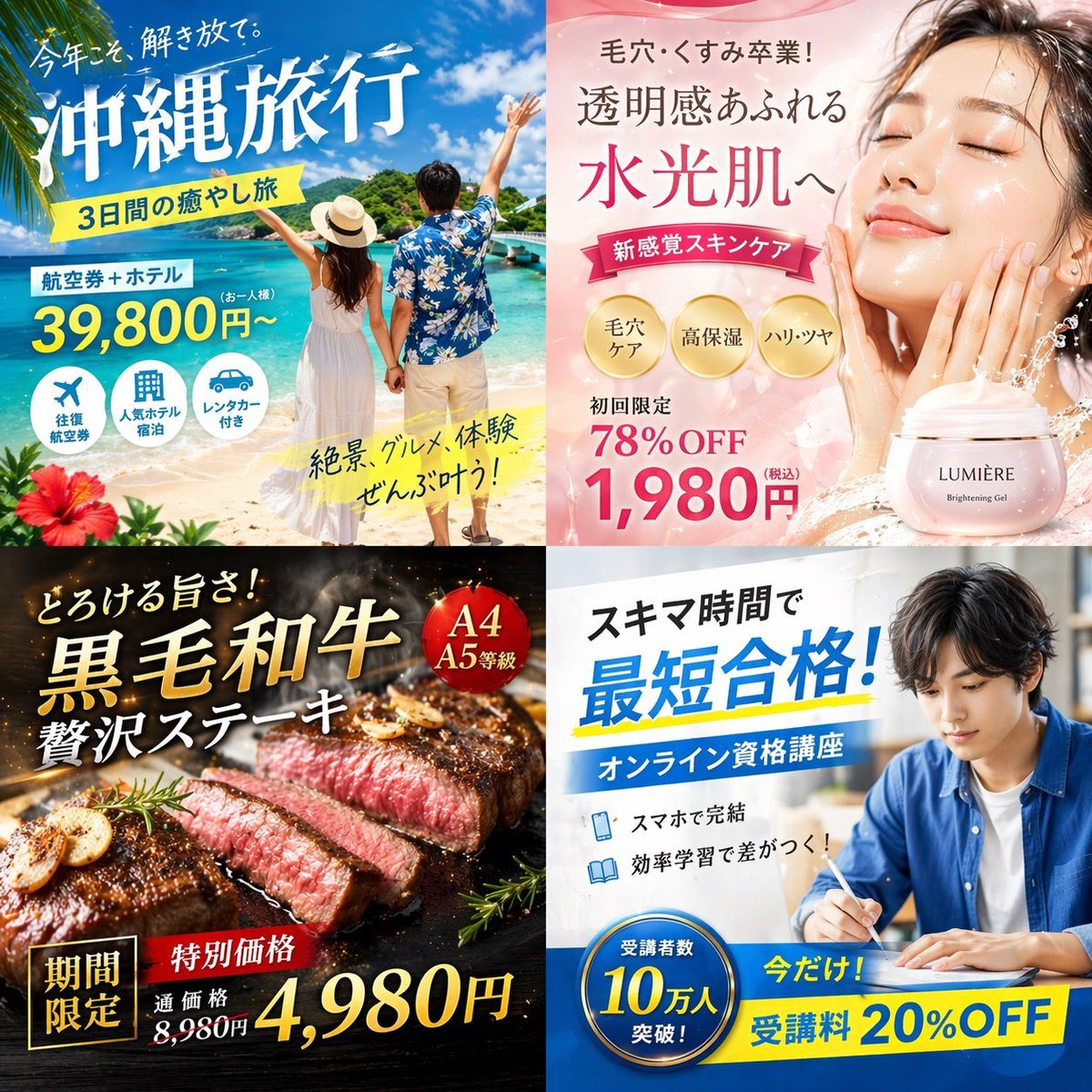
2x2 Grid Of Japanese Digital Advertisement Banners

Ready-to-edit 2x2 grid of Japanese digital advertisement banners image prompt.

Ready-to-edit 2x2 grid of Japanese digital advertisement banners image prompt.
Prompt

{ "type": "2x2 grid of Japanese digital advertisement banners", "layout": { "structure": "4 equal quadrants", "quadrants": [ { "position": "top-left", "theme": "Travel", "subject": "A couple holding hands on a white sand beach, looking out at turquoise ocean water under a bright blue sky.", "elements": ["red hibiscus flower in bottom left corner"], "text_labels": [ "今年こそ、解き放て。", "{argument name=\"travel destination\" default=\"沖縄旅行\"}", "3日間の癒やし旅", "航空券+ホテル", "39,800円〜", "絶景、グルメ、体験 ぜんぶ叶う!" ], "icons": { "count": 3, "descriptions": ["airplane", "hotel building", "car"] } }, { "position": "top-right", "theme": "Skincare", "subject": "Close-up portrait of a young woman with glowing, dewy skin, eyes closed, gently touching her cheeks.", "elements": [ "soft pink gradient background", "dynamic water splash effects", "pink cosmetic jar labeled '{argument name=\"skincare product name\" default=\"LUMIÈRE\"} Brightening Gel'" ], "text_labels": [ "毛穴・くすみ卒業!", "透明感あふれる", "水光肌へ", "新感覚スキンケア", "初回限定 78%OFF", "{argument name=\"discount price\" default=\"1,980円\"}" ], "badges": { "count": 3, "style": "gold circular", "labels": ["毛穴ケア", "高保湿", "ハリ・ツヤ"] } }, { "position": "bottom-left", "theme": "Gourmet Food", "subject": "Thick, sliced, medium-rare steak sizzling on a dark grill plate.", "elements": [ "garlic chips", "rosemary sprig", "dark background with smoke and glowing embers" ], "text_labels": [ "とろける旨さ!", "{argument name=\"food item\" default=\"黒毛和牛\"}", "贅沢ステーキ", "期間限定", "特別価格", "通常価格 8,980円", "4,980円" ], "badges": { "count": 1, "style": "red circular", "labels": ["A4 A5等級"] } }, { "position": "bottom-right", "theme": "Online Education", "subject": "Young man in a blue shirt studying at a desk, writing in a notebook next to an open laptop.", "elements": ["bright indoor lighting", "desk environment"], "text_labels": [ "スキマ時間で", "{argument name=\"education goal\" default=\"最短合格!\"}", "オンライン資格講座", "スマホで完結", "効率学習で差がつく!", "今だけ! 受講料 20%OFF" ], "badges": { "count": 1, "style": "blue circular", "labels": ["受講者数 10万人 突破!"] }, "icons": { "count": 2, "descriptions": ["smartphone", "open book"] } } ] } }

Prompt structure
  • Modelgpt-image-2
  • Use casesocial-media-post
  • Stylephotorealistic, editorial, luxury
  • Aspect ratioFlexible
Best used for
  • Use casesocial-media-post
  • Stylephotorealistic, editorial, luxury
  • Recommended specs1:1, 4:5, 16:9, or 9:16
  • ModelGPT Image 2
How to customize

Use this 2x2 Grid Of Japanese Digital Advertisement Banners prompt as a base. Replace the subject, product details, environment, lighting, brand colors, and output ratio while keeping the social-media-post intent and photorealistic, editorial, luxury direction stable.

Editable variables
  • SubjectReplace the product, person, scene, interface, or object being generated.
  • Use caseKeep or rewrite the destination as social media post, ad creative, cover image, poster, or ecommerce hero.
  • FrameChoose 1:1, 4:5, 16:9, or 9:16 based on the final placement.
  • Brand cuesAdd colors, materials, props, text-safe space, and the platform where the image will be used.
Recommended specs

Choose the frame for the destination first, then use 1K, 2K, or 4K based on output quality needs. Product images and posters usually benefit from higher resolution.

Pre-generation checklist
  • CheckSubject, lighting, composition, and frame are specific enough to review.
  • CheckText-safe space is included when the image will carry a headline or ad copy.
  • CheckResolution, credit cost, and final destination are checked before generation.
Why this prompt works

2x2 Grid Of Japanese Digital Advertisement Banners works because it starts from the image job, then controls subject, composition, lighting, style, and frame. It is best for social media post while keeping the photorealistic, editorial, luxury direction stable.

Common questions
  • Can I use it directly?Yes. Replace the subject, brand cues, and frame, then generate in Image2Studio.
  • Which ratio should I use?Choose 1:1, 4:5, 16:9, or 9:16 based on the destination.




