
Image2Studio
Examples

gpt-image-2

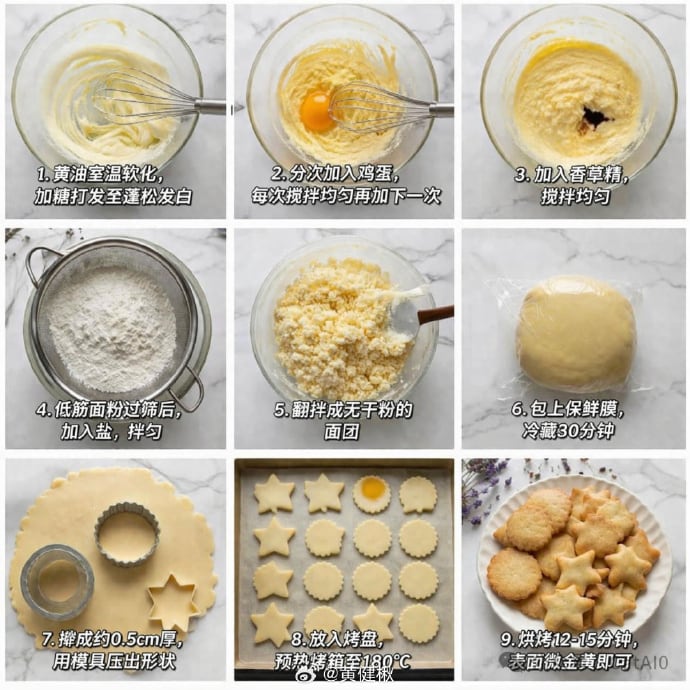
Step-by-step Recipe Tutorial Grid

Ready-to-edit step-by-step recipe tutorial grid image prompt.

Ready-to-edit step-by-step recipe tutorial grid image prompt.
Prompt

{ "type": "step-by-step recipe tutorial grid", "recipe": "{argument name=\"recipe name\" default=\"butter cookies\"}", "style": "top-down food photography, bright natural lighting, photorealistic", "background": "{argument name=\"background texture\" default=\"white marble countertop\"}", "layout": { "grid": "3x3", "total_panels": 9, "panels": [ { "step": 1, "visual": "whisking softened butter and sugar in a glass bowl with a metal whisk", "text_overlay": "{argument name=\"step 1 text\" default=\"1. 黄油室温软化,加糖打发至蓬松发白\"}" }, { "step": 2, "visual": "adding a raw egg yolk to the butter mixture, whisking", "text_overlay": "2. 分次加入鸡蛋,每次搅拌均匀再加下一次" }, { "step": 3, "visual": "adding dark vanilla extract to the mixture in the glass bowl", "text_overlay": "3. 加入香草精,搅拌均匀" }, { "step": 4, "visual": "sifting white flour through a round metal sieve into a glass bowl", "text_overlay": "4. 低筋面粉过筛后,加入盐,拌匀" }, { "step": 5, "visual": "mixing crumbly dough with a spatula in a glass bowl", "text_overlay": "5. 翻拌成无干粉的面团" }, { "step": 6, "visual": "a smooth ball of dough tightly wrapped in clear plastic wrap", "text_overlay": "6. 包上保鲜膜,冷藏30分钟" }, { "step": 7, "visual": "rolled out flat dough with round and star-shaped metal cookie cutters cutting out shapes", "text_overlay": "7. 擀成约0.5cm厚,用模具压出形状" }, { "step": 8, "visual": "raw star and round cookie dough shapes arranged neatly on a parchment-lined baking sheet", "text_overlay": "8. 放入烤盘,预热烤箱至180°C" }, { "step": 9, "visual": "{argument name=\"final product\" default=\"baked golden-brown star and round cookies piled on a white fluted plate\"}", "text_overlay": "{argument name=\"step 9 text\" default=\"9. 烘烤12-15分钟,表面微金黄即可\"}" } ] } }

Prompt structure
  • Modelgpt-image-2
  • Use casesocial-media-post
  • Stylephotorealistic, editorial, luxury
  • Aspect ratioFlexible
Best used for
  • Use casesocial-media-post
  • Stylephotorealistic, editorial, luxury
  • Recommended specs1:1, 4:5, 16:9, or 9:16
  • ModelGPT Image 2
How to customize

Use this Step-by-step Recipe Tutorial Grid prompt as a base. Replace the subject, product details, environment, lighting, brand colors, and output ratio while keeping the social-media-post intent and photorealistic, editorial, luxury direction stable.

Editable variables
  • SubjectReplace the product, person, scene, interface, or object being generated.
  • Use caseKeep or rewrite the destination as social media post, ad creative, cover image, poster, or ecommerce hero.
  • FrameChoose 1:1, 4:5, 16:9, or 9:16 based on the final placement.
  • Brand cuesAdd colors, materials, props, text-safe space, and the platform where the image will be used.
Recommended specs

Choose the frame for the destination first, then use 1K, 2K, or 4K based on output quality needs. Product images and posters usually benefit from higher resolution.

Pre-generation checklist
  • CheckSubject, lighting, composition, and frame are specific enough to review.
  • CheckText-safe space is included when the image will carry a headline or ad copy.
  • CheckResolution, credit cost, and final destination are checked before generation.
Why this prompt works

Step-by-step Recipe Tutorial Grid works because it starts from the image job, then controls subject, composition, lighting, style, and frame. It is best for social media post while keeping the photorealistic, editorial, luxury direction stable.

Common questions
  • Can I use it directly?Yes. Replace the subject, brand cues, and frame, then generate in Image2Studio.
  • Which ratio should I use?Choose 1:1, 4:5, 16:9, or 9:16 based on the destination.




