
Image2Studio
Examples

gpt-image-2

Comparison Graphic On A Black Background

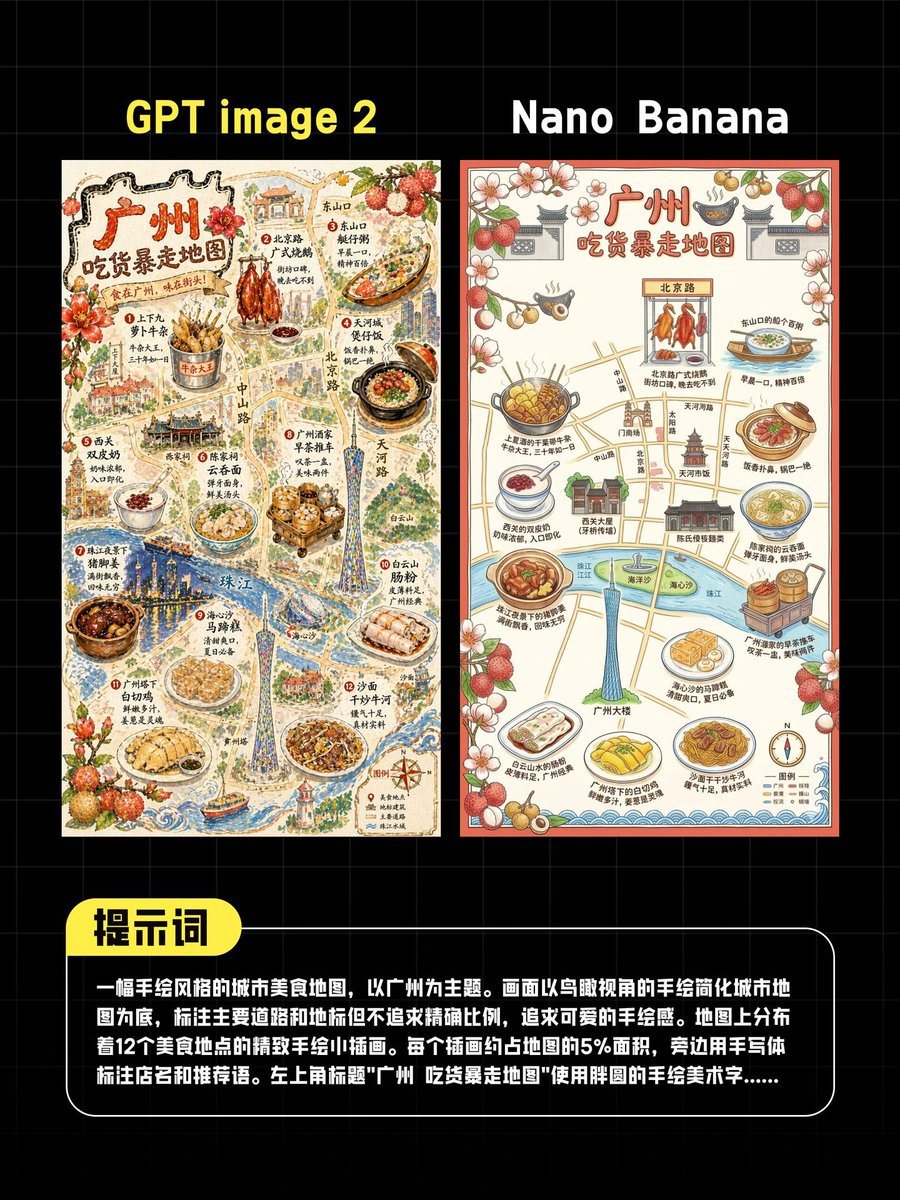
A comparison graphic on a black background with a faint gray square grid, designed like a social media test result poster. At the top are 2 large side-by-side titles in bold sans serif te...

A comparison graphic on a black background with a faint gray square grid, designed like a social media test result poster. At the top are 2 large side-by-side titles in bold sans serif te...
Prompt

A comparison graphic on a black background with a faint gray square grid, designed like a social media test result poster. At the top are 2 large side-by-side titles in bold sans serif text: “GPT image 2” above the left image and “Nano Banana” above the right image. Below them are 2 vertically oriented illustrated posters placed next to each other with a small gap. Both posters depict the same concept: a hand-drawn foodie walking map of Guangzhou in Chinese, but rendered in 2 different visual styles. The left poster is more detailed, textured, dense, and richly illustrated, while the right poster is cleaner, flatter, and simpler. The left poster has a warm cream paper background and an intricate vintage hand-painted travel-map style with fine linework, watercolor texture, decorative flowers and lychee fruits, miniature buildings, roads, river areas, and many food illustrations. The large Chinese title at the top of the left poster reads “广州 吃货暴走地图”. The map includes roughly 12 featured food spots distributed across the city, each shown as a small food illustration with Chinese labels and short handwritten-style annotations. Visible foods include skewers, roast poultry, noodle dishes, clay pot dishes, rice rolls, dumplings, soups, and dessert bowls, with landmarks such as the Canton Tower and riverfront scenery integrated into the map. The right poster also has the Chinese title “广州 吃货暴走地图” and shows the same general idea but in a cleaner infographic-like map style with simplified roads, icons, floral and lychee border decorations, food callouts, a river, the Canton Tower, and approximately 12 labeled food illustrations around the map. At the bottom of the overall comparison graphic is 1 rounded black text panel with a white outline. Attached to its upper left edge is 1 bright yellow rounded tab label reading “提示词” in bold black Chinese characters. Inside the black panel is a block of white Chinese text describing the image-generation prompt; it appears as a multi-line paragraph. The composition is centered, high contrast, and presented as a polished AI image comparison post for Chinese social media, with crisp typography, poster-like symmetry, and a clean test-benchmark aesthetic.

Prompt structure
  • Modelgpt-image-2
  • Use casesocial-media-post
  • Stylewatercolor, 3d-render, minimal, isometric
  • Aspect ratioFlexible
Best used for
  • Use casesocial-media-post
  • Stylewatercolor, 3d-render, minimal, isometric
  • Recommended specs1:1, 4:5, 16:9, or 9:16
  • ModelGPT Image 2
How to customize

Use this Comparison Graphic On A Black Background prompt as a base. Replace the subject, product details, environment, lighting, brand colors, and output ratio while keeping the social-media-post intent and watercolor, 3d-render, minimal, isometric direction stable.

Editable variables
  • SubjectReplace the product, person, scene, interface, or object being generated.
  • Use caseKeep or rewrite the destination as social media post, ad creative, cover image, poster, or ecommerce hero.
  • FrameChoose 1:1, 4:5, 16:9, or 9:16 based on the final placement.
  • Brand cuesAdd colors, materials, props, text-safe space, and the platform where the image will be used.
Recommended specs

Choose the frame for the destination first, then use 1K, 2K, or 4K based on output quality needs. Product images and posters usually benefit from higher resolution.

Pre-generation checklist
  • CheckSubject, lighting, composition, and frame are specific enough to review.
  • CheckText-safe space is included when the image will carry a headline or ad copy.
  • CheckResolution, credit cost, and final destination are checked before generation.
Why this prompt works

Comparison Graphic On A Black Background works because it starts from the image job, then controls subject, composition, lighting, style, and frame. It is best for social media post while keeping the watercolor, 3d-render, minimal, isometric direction stable.

Common questions
  • Can I use it directly?Yes. Replace the subject, brand cues, and frame, then generate in Image2Studio.
  • Which ratio should I use?Choose 1:1, 4:5, 16:9, or 9:16 based on the destination.




