
Image2Studio
Examples

gpt-image-2

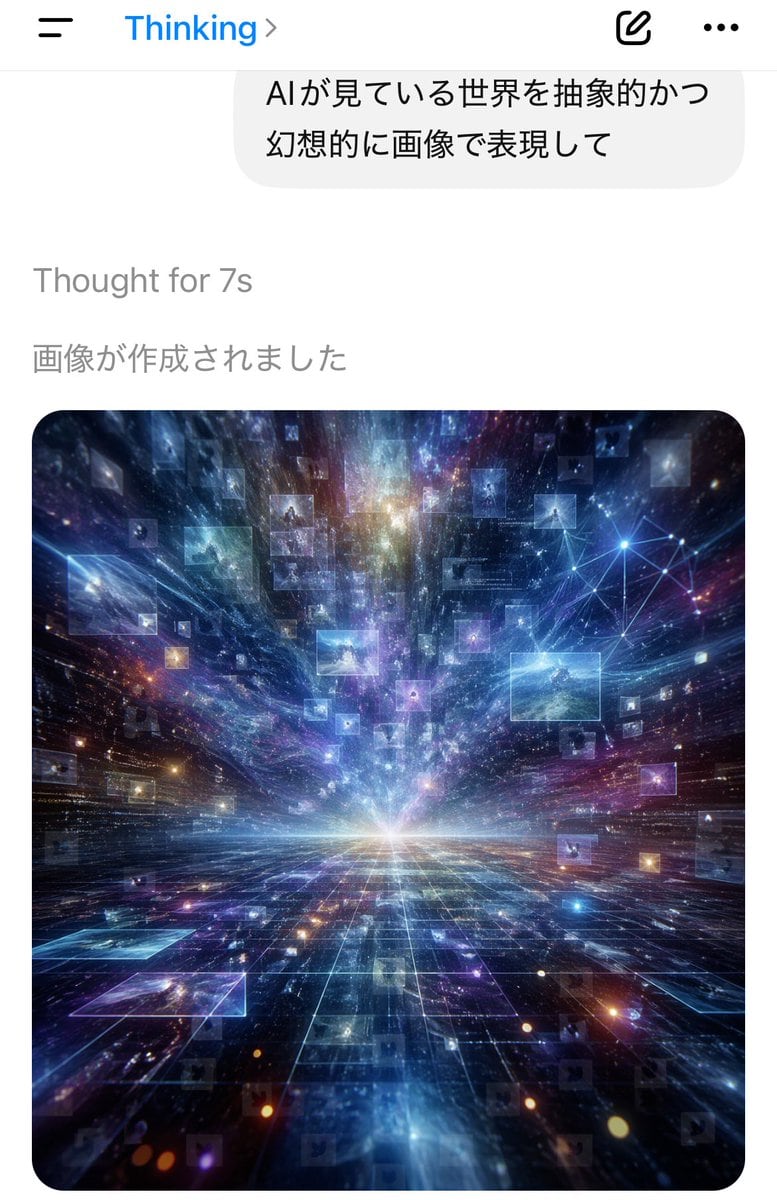
Smartphone Chat App Screenshot In Portrait Orientation

A smartphone chat app screenshot in portrait orientation, minimal iOS-style interface on a white background. At the top is a navigation bar with a hamburger menu icon on the left, the blu...

A smartphone chat app screenshot in portrait orientation, minimal iOS-style interface on a white background. At the top is a navigation bar with a hamburger menu icon on the left, the blu...
Prompt

A smartphone chat app screenshot in portrait orientation, minimal iOS-style interface on a white background. At the top is a navigation bar with a hamburger menu icon on the left, the blue title “Thinking” near the top center-left with a right chevron, and 2 icons on the right: a compose/edit square icon and a horizontal three-dots menu icon. Below it is a large rounded light-gray chat bubble containing 2 lines of Japanese text: “AIが見ている世界を抽象的かつ” and “幻想的に画像で表現して”. Under the bubble, left-aligned gray system text reads “Thought for 7s”, and below that another gray Japanese line reads “画像が作成されました”. The lower half of the screen shows a single generated image card with large rounded corners. The image is a surreal abstract cosmic data landscape: a glowing white horizon at the center, a dark reflective grid floor receding in deep perspective, and explosive streaks of light, nebula clouds, stars, and particles rushing outward from the vanishing point. Floating throughout the space are dozens of translucent rectangular image panels or data windows, some faint and some bright, suspended at different depths. In the upper right area of the artwork, include a luminous network node diagram made of connected points and lines. Dominant colors are electric blue, indigo, violet, cyan, and touches of magenta and gold. The mood is futuristic, vast, dreamlike, and intelligent, as if visualizing the world as seen by an AI. Clean mobile app screenshot composition, realistic UI, crisp typography, high-contrast luminous digital art in the embedded image.

Prompt structure
  • Modelgpt-image-2
  • Use caseapp-ui-mockup
  • Styleminimal, photorealistic, cyberpunk, luxury
  • Aspect ratioFlexible
Best used for
  • Use caseapp-ui-mockup
  • Styleminimal, photorealistic, cyberpunk, luxury
  • Recommended specs1:1, 4:5, 16:9, or 9:16
  • ModelGPT Image 2
How to customize

Use this Smartphone Chat App Screenshot In Portrait Orientation prompt as a base. Replace the subject, product details, environment, lighting, brand colors, and output ratio while keeping the app-ui-mockup intent and minimal, photorealistic, cyberpunk, luxury direction stable.

Editable variables
  • SubjectReplace the product, person, scene, interface, or object being generated.
  • Use caseKeep or rewrite the destination as app ui mockup, ad creative, cover image, poster, or ecommerce hero.
  • FrameChoose 1:1, 4:5, 16:9, or 9:16 based on the final placement.
  • Brand cuesAdd colors, materials, props, text-safe space, and the platform where the image will be used.
Recommended specs

Choose the frame for the destination first, then use 1K, 2K, or 4K based on output quality needs. Product images and posters usually benefit from higher resolution.

Pre-generation checklist
  • CheckSubject, lighting, composition, and frame are specific enough to review.
  • CheckText-safe space is included when the image will carry a headline or ad copy.
  • CheckResolution, credit cost, and final destination are checked before generation.
Why this prompt works

Smartphone Chat App Screenshot In Portrait Orientation works because it starts from the image job, then controls subject, composition, lighting, style, and frame. It is best for app ui mockup while keeping the minimal, photorealistic, cyberpunk, luxury direction stable.

Common questions
  • Can I use it directly?Yes. Replace the subject, brand cues, and frame, then generate in Image2Studio.
  • Which ratio should I use?Choose 1:1, 4:5, 16:9, or 9:16 based on the destination.




