
Image2Studio
Examples

gpt-image-2

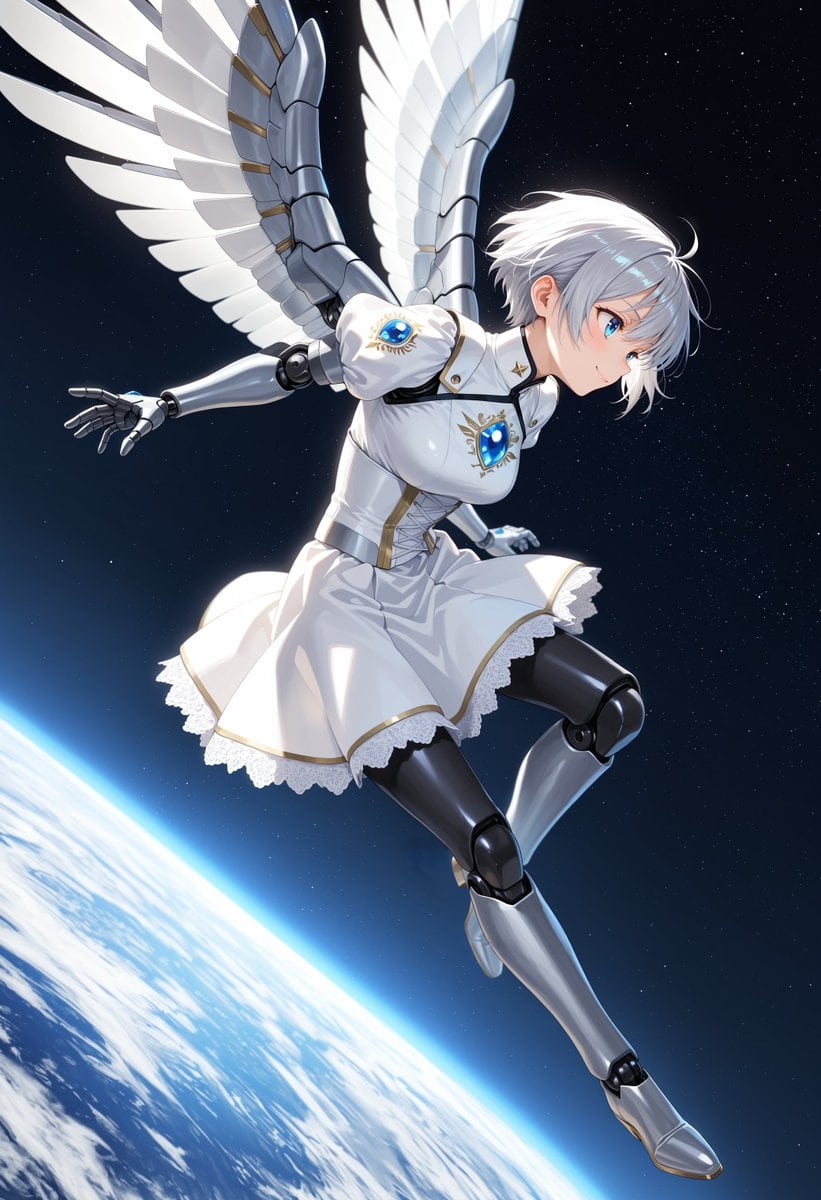
Angelic Android Girl Above Earth

This prompt generates a polished anime sci-fi fantasy illustration of a winged female android in a white dress floating above Earth, suitable for character art, key visuals, or cover-style space illustrations.

This prompt generates a polished anime sci-fi fantasy illustration of a winged female android in a white dress floating above Earth, suitable for character art, key visuals, or cover-style space illustrations.
Prompt

A dynamic anime-style full-body illustration of a futuristic angelic android girl floating in outer space above Earth, shown in a dramatic diagonal action pose as if gliding or diving forward. She has short tousled {argument name="hair color" default="silver-white"} hair with soft layered bangs, a slim feminine build, and a partially obscured face turned to the right. Her body is a mix of human and machine: 2 visible metallic robotic arms and 2 visible robotic legs with articulated black joints and polished silver armor plating. She wears a white ceremonial dress uniform with a fitted bodice, puffed short sleeves, gold trim, a flared skirt, and delicate white lace underskirt details. The chest and both sleeves each feature a luminous blue gem emblem with ornate gold eye-like decoration, for a total of 3 blue jewel insignias. Add a high collar with small gold star accents and a silver waist belt. She has 2 large mechanical feathered wings extending upward and outward from her back, each wing made of layered white feather-like panels attached to metallic segmented frames. Her left arm reaches back with open mechanical fingers while her legs are bent in mid-flight, one knee raised and the other leg extended downward. The background is deep black space filled with fine stars, with the curved horizon of Earth occupying the lower left and bottom edge, glowing with a bright blue atmospheric rim and visible white cloud patterns over the planet surface. Use cinematic rim lighting, glossy reflections on metal parts, crisp clean anime linework, highly detailed fabric folds, elegant sci-fi fantasy design, and a sense of weightless motion.

Prompt structure
  • Modelgpt-image-2
  • Use casesocial-media-post
  • Styleluxury, anime, cyberpunk, cinematic
  • Aspect ratioFlexible
Best used for
  • Use casesocial-media-post
  • Styleluxury, anime, cyberpunk, cinematic
  • Recommended specs1:1, 4:5, 16:9, or 9:16
  • ModelGPT Image 2
How to customize

Use this Angelic Android Girl Above Earth prompt as a base. Replace the subject, product details, environment, lighting, brand colors, and output ratio while keeping the social-media-post intent and luxury, anime, cyberpunk, cinematic direction stable.

Editable variables
  • SubjectReplace the product, person, scene, interface, or object being generated.
  • Use caseKeep or rewrite the destination as social media post, ad creative, cover image, poster, or ecommerce hero.
  • FrameChoose 1:1, 4:5, 16:9, or 9:16 based on the final placement.
  • Brand cuesAdd colors, materials, props, text-safe space, and the platform where the image will be used.
Recommended specs

Choose the frame for the destination first, then use 1K, 2K, or 4K based on output quality needs. Product images and posters usually benefit from higher resolution.

Pre-generation checklist
  • CheckSubject, lighting, composition, and frame are specific enough to review.
  • CheckText-safe space is included when the image will carry a headline or ad copy.
  • CheckResolution, credit cost, and final destination are checked before generation.
Why this prompt works

Angelic Android Girl Above Earth works because it starts from the image job, then controls subject, composition, lighting, style, and frame. It is best for social media post while keeping the luxury, anime, cyberpunk, cinematic direction stable.

Common questions
  • Can I use it directly?Yes. Replace the subject, brand cues, and frame, then generate in Image2Studio.
  • Which ratio should I use?Choose 1:1, 4:5, 16:9, or 9:16 based on the destination.




