
Image2Studio
Examples

gpt-image-2

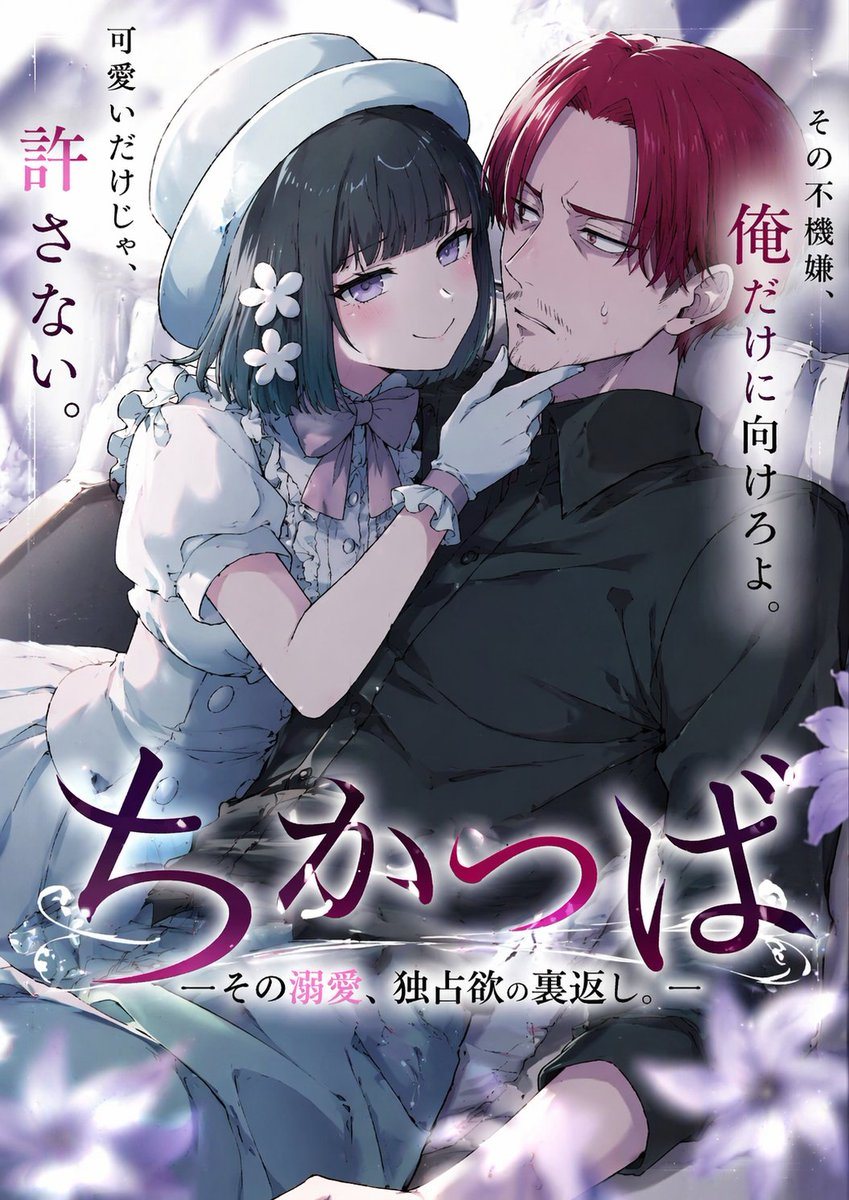
Anime Light Novel Cover Illustration

Generates an anime-style romance light novel cover featuring a teasing girl and a reluctant man, complete with customizable Japanese typography.

Generates an anime-style romance light novel cover featuring a teasing girl and a reluctant man, complete with customizable Japanese typography.
Prompt

An anime-style light novel cover illustration featuring two characters in an intimate pose. On the left, a young woman with short dark hair, purple eyes, wearing a white hat, a frilly white dress with a pink bow tie, white gloves, and two white flower hairpins. She has an affectionate, teasing smile and is gently touching the chin of the man next to her. On the right, an adult man with {argument name="man's hair color" default="red"} hair parted in the middle, purple eyes, and a light goatee. He is wearing a black button-down shirt and has a slightly annoyed, reluctant expression with a sweat drop on his cheek. The scene features soft, romantic lighting with out-of-focus purple flower petals in the foreground corners. The image includes several Japanese text elements: a large stylized main title at the bottom reading {argument name="main title" default="ちかつば"}, a subtitle below it reading {argument name="subtitle" default="ーその溺愛、独占欲の裏返し。ー"}, vertical text on the top left reading {argument name="left quote" default="可愛いだけじゃ、許さない。"}, and vertical text on the top right reading {argument name="right quote" default="その不機嫌、俺だけに向けろよ。"}.

Prompt structure
  • Modelgpt-image-2
  • Use casesocial-media-post
  • Styleanime, watercolor
  • Aspect ratioFlexible
Best used for
  • Use casesocial-media-post
  • Styleanime, watercolor
  • Recommended specs1:1, 4:5, 16:9, or 9:16
  • ModelGPT Image 2
How to customize

Use this Anime Light Novel Cover Illustration prompt as a base. Replace the subject, product details, environment, lighting, brand colors, and output ratio while keeping the social-media-post intent and anime, watercolor direction stable.

Editable variables
  • SubjectReplace the product, person, scene, interface, or object being generated.
  • Use caseKeep or rewrite the destination as social media post, ad creative, cover image, poster, or ecommerce hero.
  • FrameChoose 1:1, 4:5, 16:9, or 9:16 based on the final placement.
  • Brand cuesAdd colors, materials, props, text-safe space, and the platform where the image will be used.
Recommended specs

Choose the frame for the destination first, then use 1K, 2K, or 4K based on output quality needs. Product images and posters usually benefit from higher resolution.

Pre-generation checklist
  • CheckSubject, lighting, composition, and frame are specific enough to review.
  • CheckText-safe space is included when the image will carry a headline or ad copy.
  • CheckResolution, credit cost, and final destination are checked before generation.
Why this prompt works

Anime Light Novel Cover Illustration works because it starts from the image job, then controls subject, composition, lighting, style, and frame. It is best for social media post while keeping the anime, watercolor direction stable.

Common questions
  • Can I use it directly?Yes. Replace the subject, brand cues, and frame, then generate in Image2Studio.
  • Which ratio should I use?Choose 1:1, 4:5, 16:9, or 9:16 based on the destination.




