
Image2Studio
Examples

gpt-image-2

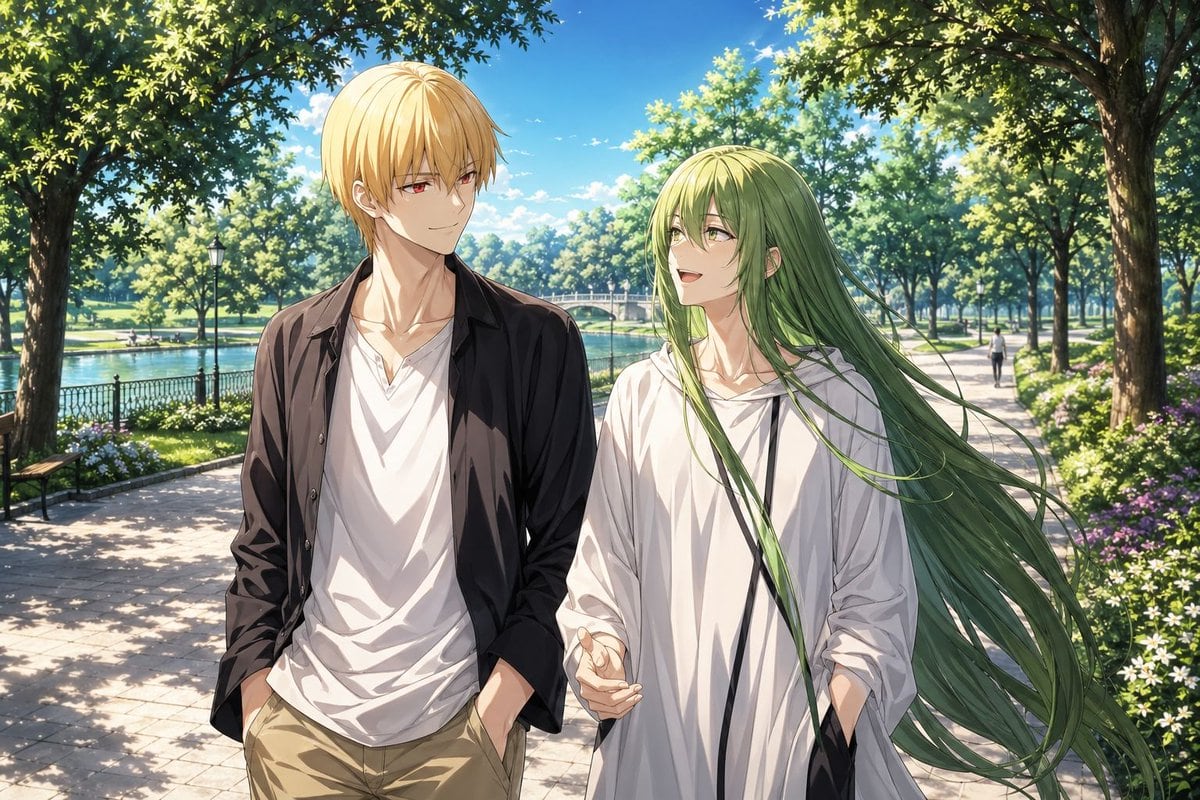
Anime Park Date Illustration

This prompt generates a serene anime-style illustration of two iconic characters walking together in a lush sunlit park, suitable for romantic slice-of-life fanart or character pairing artwork.

This prompt generates a serene anime-style illustration of two iconic characters walking together in a lush sunlit park, suitable for romantic slice-of-life fanart or character pairing artwork.
Prompt

A polished anime-style illustration of {argument name="character duo" default="Gilgamesh and Enkidu"} on a quiet park date, shown from the thighs up while walking side by side along a sunlit stone path beside a lake. The left character is a tall, slender young man with short straight {argument name="left character hair color" default="golden blond"} hair, wearing a black open overshirt, a loose white V-neck T-shirt, and beige khaki pants with both hands in his pockets. The right character is a slim and ethereal young person with very long flowing {argument name="right character hair color" default="soft green"} hair streaming to the right in the breeze, wearing an oversized white hoodie with black drawstrings and one hand gesturing naturally while walking. Their mood is gentle, intimate, and slightly romantic, like an ambiguous casual date. Place them centered in the foreground with the blond character on the left and the green-haired character on the right, both looking toward each other or slightly ahead. The background is a beautiful public park in bright late-morning or early-afternoon summer light: tall leafy trees arch overhead, creating dappled shadows on the path; a calm lake runs along the left side behind a black metal fence; a small arched bridge appears in the mid-distance; flowerbeds with white and purple blossoms line the walkway; 2 park benches are visible on the left side; 1 lamppost stands near the water; and 1 tiny distant pedestrian walks on the right side of the path. Use a vivid blue sky with small white clouds, lush greenery, high-detail foliage, soft cinematic sunlight, clean linework, and refined painterly shading. SFW, elegant, serene, visually rich anime key art, with a romantic slice-of-life atmosphere and a vertical composition.

Prompt structure
  • Modelgpt-image-2
  • Use casesocial-media-post
  • Stylecinematic, anime, watercolor, minimal
  • Aspect ratioFlexible
Best used for
  • Use casesocial-media-post
  • Stylecinematic, anime, watercolor, minimal
  • Recommended specs1:1, 4:5, 16:9, or 9:16
  • ModelGPT Image 2
How to customize

Use this Anime Park Date Illustration prompt as a base. Replace the subject, product details, environment, lighting, brand colors, and output ratio while keeping the social-media-post intent and cinematic, anime, watercolor, minimal direction stable.

Editable variables
  • SubjectReplace the product, person, scene, interface, or object being generated.
  • Use caseKeep or rewrite the destination as social media post, ad creative, cover image, poster, or ecommerce hero.
  • FrameChoose 1:1, 4:5, 16:9, or 9:16 based on the final placement.
  • Brand cuesAdd colors, materials, props, text-safe space, and the platform where the image will be used.
Recommended specs

Choose the frame for the destination first, then use 1K, 2K, or 4K based on output quality needs. Product images and posters usually benefit from higher resolution.

Pre-generation checklist
  • CheckSubject, lighting, composition, and frame are specific enough to review.
  • CheckText-safe space is included when the image will carry a headline or ad copy.
  • CheckResolution, credit cost, and final destination are checked before generation.
Why this prompt works

Anime Park Date Illustration works because it starts from the image job, then controls subject, composition, lighting, style, and frame. It is best for social media post while keeping the cinematic, anime, watercolor, minimal direction stable.

Common questions
  • Can I use it directly?Yes. Replace the subject, brand cues, and frame, then generate in Image2Studio.
  • Which ratio should I use?Choose 1:1, 4:5, 16:9, or 9:16 based on the destination.




