
Image2Studio
Prompts

gpt-image-2

短视频 App 界面模型

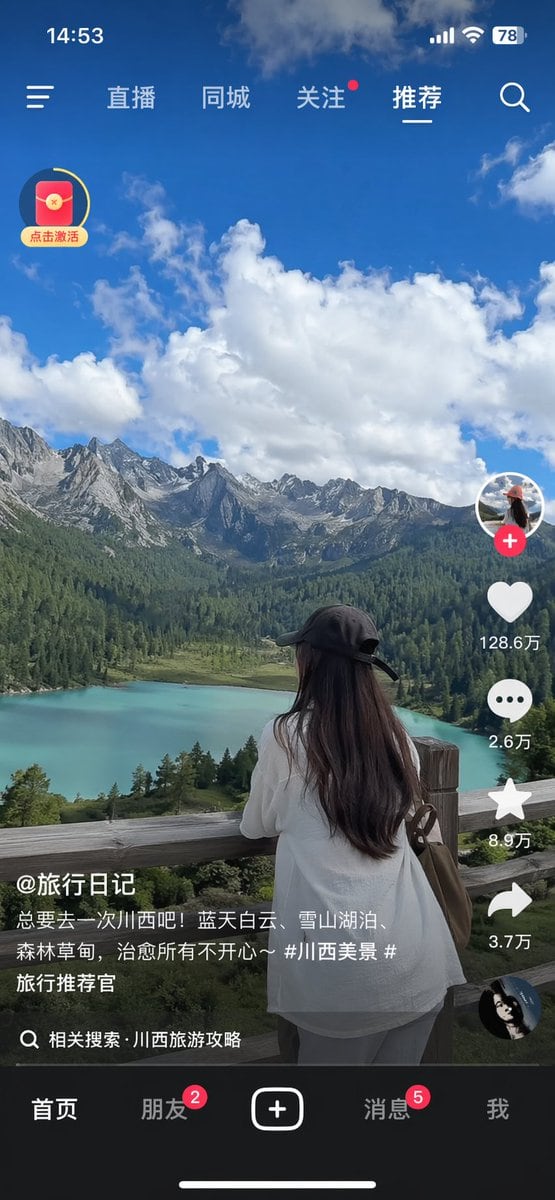
生成一张逼真的移动端短视频 App 截图,包含风景旅游视频以及标准的社交媒体 UI 覆盖层。

Copy this GPT Image 2 prompt for social media post and ui mockups with Photorealistic styling. Use it in Image2Studio to generate, edit, and save.
Prompt

{ "type": "mobile short-video app interface screenshot", "main_content": { "scene": "{argument name=\"scenic background\" default=\"turquoise alpine lake, green pine forests, jagged snow-capped mountains, blue sky with fluffy white clouds\"}", "subject": "{argument name=\"main subject\" default=\"woman with long dark hair wearing a black baseball cap backwards and a white shirt, leaning on a wooden fence looking at the view\"}" }, "ui_elements": { "status_bar": { "time": "14:53", "icons": ["signal bars", "wifi", "battery 78"] }, "top_navigation": { "left_icon": "hamburger menu", "tabs": ["直播", "同城", "关注", "推荐"], "active_tab": "推荐", "right_icon": "search magnifying glass" }, "floating_widget": { "position": "top left", "icon": "red envelope with yellow circular progress bar", "text": "点击激活" }, "right_action_bar": { "count": 6, "items": [ {"icon": "profile picture with red plus button"}, {"icon": "heart", "text": "{argument name=\"like count\" default=\"128.6万\"}"}, {"icon": "speech bubble", "text": "2.6万"}, {"icon": "star", "text": "8.9万"}, {"icon": "share arrow", "text": "3.7万"}, {"icon": "spinning record album"} ] }, "bottom_left_info": { "username": "{argument name=\"username\" default=\"@旅行日记\"}", "caption": "{argument name=\"video caption\" default=\"总要去一次川西吧!蓝天白云、雪山湖泊、森林草甸,治愈所有不开心~ #川西美景 #旅行推荐官\"}", "search_prompt": "相关搜索 · 川西旅游攻略" }, "bottom_navigation": { "count": 5, "tabs": [ {"label": "首页"}, {"label": "朋友", "badge": "2"}, {"label": "plus button in rounded rectangle"}, {"label": "消息", "badge": "5"}, {"label": "我"} ] }, "system_ui": "iOS home indicator line at the bottom" } }

Prompt structure
  • Modelgpt-image-2
  • Use casesocial-media-post
  • Stylephotorealistic
  • Aspect ratioFlexible
Best used for
  • Use casesocial-media-post
  • Stylephotorealistic
  • Recommended specs1:1, 4:5, 16:9, or 9:16
  • ModelGPT Image 2
How to customize

Use this 短视频 App 界面模型 prompt as a base. Replace the subject, product details, environment, lighting, brand colors, and output ratio while keeping the social-media-post intent and photorealistic direction stable.

Editable variables
  • SubjectReplace the product, person, scene, interface, or object being generated.
  • Use caseKeep or rewrite the destination as social media post, ad creative, cover image, poster, or ecommerce hero.
  • FrameChoose 1:1, 4:5, 16:9, or 9:16 based on the final placement.
  • Brand cuesAdd colors, materials, props, text-safe space, and the platform where the image will be used.
Recommended specs

Choose the frame for the destination first, then use 1K, 2K, or 4K based on output quality needs. Product images and posters usually benefit from higher resolution.

Pre-generation checklist
  • CheckSubject, lighting, composition, and frame are specific enough to review.
  • CheckText-safe space is included when the image will carry a headline or ad copy.
  • CheckResolution, credit cost, and final destination are checked before generation.
Why this prompt works

短视频 App 界面模型 works because it starts from the image job, then controls subject, composition, lighting, style, and frame. It is best for social media post while keeping the photorealistic direction stable.

Common questions
  • Can I use it directly?Yes. Replace the subject, brand cues, and frame, then generate in Image2Studio.
  • Which ratio should I use?Choose 1:1, 4:5, 16:9, or 9:16 based on the destination.




