
Image2Studio
Examples

gpt-image-2

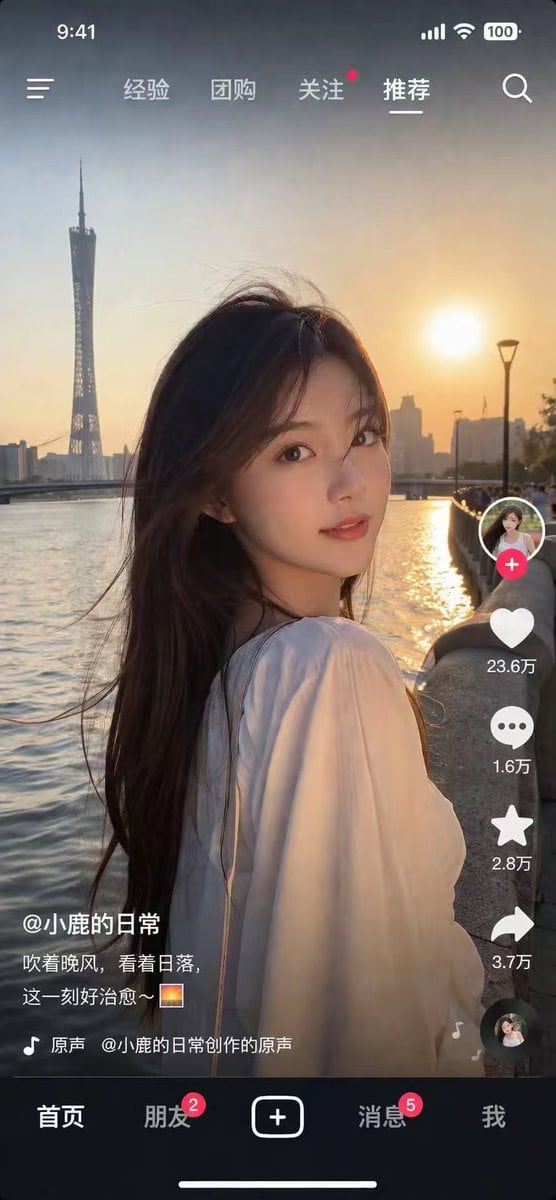
Mobile Short Video App Screenshot

Ready-to-edit mobile short video app screenshot image prompt.

Ready-to-edit mobile short video app screenshot image prompt.
Prompt

{ "type": "mobile short video app screenshot", "style": "photorealistic, highly detailed", "main_image": { "subject": "{argument name=\"subject description\" default=\"young Asian woman with long dark hair, wearing a white top, looking back over her shoulder\"}", "lighting": "golden hour, sunset backlight, warm glowing light", "background": "{argument name=\"background location\" default=\"riverfront at sunset with a tall twisted tower skyline\"}" }, "ui_overlay": { "top_bar": { "left": "time 9:41, menu icon", "center_tabs": ["经验", "团购", "关注", "推荐"], "right": "signal, wifi, battery 100, search icon" }, "right_sidebar": { "count": 6, "elements": [ "profile picture with red plus button", "heart icon with text '{argument name=\"like count\" default=\"23.6万\"}'", "comment bubble icon with text '1.6万'", "star icon with text '2.8万'", "share arrow icon with text '3.7万'", "spinning record album icon" ] }, "bottom_left_info": { "username": "{argument name=\"username\" default=\"@小鹿的日常\"}", "caption": "{argument name=\"caption\" default=\"吹着晚风,看着日落,这一刻好治愈~ 🌅\"}", "audio_track": "🎵 原声 @小鹿的日常创作的原声" }, "bottom_nav": { "count": 5, "tabs": [ "首页", "朋友 (with red badge 2)", "central square plus button", "消息 (with red badge 5)", "我" ], "footer": "white home indicator line" } } }

Prompt structure
  • Modelgpt-image-2
  • Use casesocial-media-post
  • Stylephotorealistic
  • Aspect ratioFlexible
Best used for
  • Use casesocial-media-post
  • Stylephotorealistic
  • Recommended specs1:1, 4:5, 16:9, or 9:16
  • ModelGPT Image 2
How to customize

Use this Mobile Short Video App Screenshot prompt as a base. Replace the subject, product details, environment, lighting, brand colors, and output ratio while keeping the social-media-post intent and photorealistic direction stable.

Editable variables
  • SubjectReplace the product, person, scene, interface, or object being generated.
  • Use caseKeep or rewrite the destination as social media post, ad creative, cover image, poster, or ecommerce hero.
  • FrameChoose 1:1, 4:5, 16:9, or 9:16 based on the final placement.
  • Brand cuesAdd colors, materials, props, text-safe space, and the platform where the image will be used.
Recommended specs

Choose the frame for the destination first, then use 1K, 2K, or 4K based on output quality needs. Product images and posters usually benefit from higher resolution.

Pre-generation checklist
  • CheckSubject, lighting, composition, and frame are specific enough to review.
  • CheckText-safe space is included when the image will carry a headline or ad copy.
  • CheckResolution, credit cost, and final destination are checked before generation.
Why this prompt works

Mobile Short Video App Screenshot works because it starts from the image job, then controls subject, composition, lighting, style, and frame. It is best for social media post while keeping the photorealistic direction stable.

Common questions
  • Can I use it directly?Yes. Replace the subject, brand cues, and frame, then generate in Image2Studio.
  • Which ratio should I use?Choose 1:1, 4:5, 16:9, or 9:16 based on the destination.




